
A software maintenance plan is a formal document that governs how a system gets patched, updated, monitored, and eventually retired, so reliability doesn’t depend on tribal knowledge or whoever’s on call that week. It should belong to one named owner,
usually an engineering manager or product owner, who signs off on changes and answers for uptime. If you don’t have one yet, the first move isn’t writing a policy doc. It’s running a maintenance audit.
That audit means walking your stack and writing down what actually exists: every dependency, every third-party library, every open incident from the last two quarters, and every piece of infrastructure nobody remembers provisioning. You can’t plan maintenance for a system you haven’t mapped.
Before you draft a single policy, capture this:
- A full inventory of services, dependencies, and third-party components, including versions and licenses
- A list of unresolved incidents and their root causes from the last six to twelve months
- A risk rating for each major component, flagging anything running on unsupported or end-of-life software
- The names of who currently handles fixes, even informally, so you can formalize ownership
Key Takeaways
A software maintenance plan works only when a named owner enforces it through automated release gating and a tested pilot cycle, not through documentation alone.
| Point | Details |
|---|---|
| Start with an audit | Map dependencies, licenses, and incident history before writing any policy language. |
| Separate the four maintenance types | Schedule preventive and perfective work; route corrective and adaptive work through incidents. |
| Build the full checklist | Include process workflow, risk assessment, testing, backups, licensing, and retirement criteria. |
| Pilot before rollout | Test the plan on one system for one full cycle before applying it company-wide. |
| Bring in Bowtie for the audit | Bowtie runs the dependency audit and code review that should precede any formal maintenance plan. |
Table of Contents
- The Four Types of Software Maintenance You’re Already Doing
- What Goes Into a Formal Maintenance Plan Document
- How Do You Actually Build a Maintenance Plan?
- Choosing Between In-House, Outsourced, and Hybrid Support
- What Drives Maintenance Costs, and How Do You Budget for It?
- Which Tools and Metrics Actually Show Maintenance Health?
- Planning Migration and Retirement Without Breaking Anything
- How Bowtie Approaches Maintenance Planning in Practice
- An Editor’s Take on Maintenance Plans
- Get a Maintenance Plan Built Around Your Actual Codebase
- Frequently Asked Questions
- Sources
The Four Types of Software Maintenance You’re Already Doing
Most teams perform all four kinds of maintenance without labeling them, which is exactly why maintenance work feels chaotic. Naming the type tells you whether the work is scheduled or reactive, and that distinction drives everything from staffing to budget.
- Corrective maintenance fixes defects after they surface in production. A checkout button that throws a 500 error under load is corrective work: something broke, and you’re restoring intended behavior. This is incident-driven by nature and should be tracked against a mean time to repair target, not a calendar.
- Preventive maintenance addresses problems before they cause failure. Rotating expiring TLS certificates, patching a vulnerable dependency flagged by a security scanner, or archiving a bloated database table before it slows queries all count. This work belongs on a schedule, not a ticket queue, because waiting for it to become urgent defeats the point.
- Adaptive maintenance keeps software working as its environment changes. When a payment processor deprecates an API version or a mobile OS update breaks a push-notification library, adaptive work follows. It’s externally triggered, so you plan around vendor deprecation calendars rather than internal sprint cycles.
- Perfective maintenance improves something that already works, like refactoring a slow reporting module or simplifying a tangled authentication flow. This is the type most likely to get cut under deadline pressure, and it’s also the type that prevents corrective maintenance from ballooning later.
Here’s the practical distinction that trips teams up: maintenance is what keeps the system healthy, while support is what happens when a user calls in with a problem. Maintenance is proactive and system-facing, while support is reactive and user-facing, and folding both into one agreement, rather than treating them as separate line items, tends to cut down on total incidents. Schedule preventive and perfective work on a recurring cadence. Let corrective and most adaptive work flow through an incident or ticket system instead, since forcing them onto a fixed calendar just creates a backlog of pretend deadlines.
What Goes Into a Formal Maintenance Plan Document
A maintenance plan isn’t a paragraph in your onboarding wiki. ISO/IEC/IEEE 14764:2022 treats maintenance as a full lifecycle process, and NASA’s SWE-105 guidance spells out the specific sections a serious plan needs. Borrow their structure even if you’re running a five-person startup, because the categories matter more than the formality.
Your table of contents should cover:
- Maintenance process implementation. Who submits a change request, who approves it, and what workflow it moves through from ticket to production.
- Problem and modification analysis. A defined method for triaging a reported issue, including severity classification and initial risk assessment before anyone touches code.
- Modification implementation. Coding standards, branch strategy, and required peer review before a fix merges.
- Testing and regression testing. What automated suites must pass, and which manual checks are mandatory for high-risk changes.
- Review and acceptance criteria. Who signs off before a release ships, and what evidence they need to see.
- Upgrade scheduling and rollback plans. A calendar for routine upgrades, plus a documented backout procedure for when a deployment goes wrong.
- Operational backups. Backup frequency, retention windows, and a tested restore procedure, not just a cron job nobody has verified in a year.
- Licensing and third-party component tracking. A living registry of every library, its license terms, and its renewal or expiration date.
- Documentation updates. A rule that says documentation changes ship with the code change, not “sometime later.”
- Resource needs. Named staff, hours budgeted per maintenance category, and a plan for coverage during absences.
- Migration and retirement criteria. The conditions under which a component gets replaced or shut down, and the steps for doing it safely.
If your system spans multiple major components (a mobile app, a backend API, and a data pipeline, say) NASA’s own guidance recommends splitting these into separate maintenance plan volumes rather than cramming everything into one document that nobody reads end to end. A single sprawling plan tends to get skimmed once and ignored forever.
Pro Tip: Assign an expiration date to your license and third-party component registry entries, not just a “last checked” date. A calendar reminder that a dependency’s support contract lapses in ninety days is worth more than a spreadsheet someone updates when they remember.
How Do You Actually Build a Maintenance Plan?
Turning the checklist above into a working document takes a defined sequence, not a two-hour meeting. Here’s the order that produces something teams will actually follow.
- Run the inventory and risk audit first. You already started this in the opening step: map dependencies, tag anything unsupported, and pull the last six to twelve months of incident history to spot patterns. Skipping this step is the single biggest reason maintenance plans gather dust. They get written for a system that doesn’t match reality.
- Define objectives, SLAs, and KPIs before touching process design. Decide what “healthy” means in numbers: uptime target, acceptable mean time to repair, and a maintenance window that doesn’t clash with your busiest usage hours. Vague goals like “keep things running smoothly” produce vague plans.
- Choose a support model and map escalation paths. Decide whether maintenance runs in-house, through an outside partner, or as a hybrid, and write down exactly who gets paged first when something breaks at 2 a.m.
- Set schedules and deployment rules. Define your CI/CD gating criteria (what tests must pass before merge), your regression testing scope, and a rollback procedure that’s been tested at least once, not just documented in theory.
- Pilot the plan on one system before rolling it out everywhere. Pick a moderate-risk application, run the plan for one full maintenance cycle, and gather feedback from whoever executed it. Adjust the SLAs and workflow before applying the plan company-wide.
- Get formal sign-off and set a review cadence. The plan’s owner presents it to stakeholders, gets approval, and schedules a review, typically every six to twelve months, to catch drift as the system and team change.
The pilot step gets skipped more than any other, usually because teams want the plan finished and filed. That’s a mistake. A plan that hasn’t survived one real maintenance cycle is a draft, not a policy.
Choosing Between In-House, Outsourced, and Hybrid Support
There’s no universal right answer here. The choice depends on what’s at stake if something breaks and how deep your in-house expertise runs. Internal enterprise tools that only employees touch can often tolerate a leaner support model than a customer-facing application where every outage costs revenue.

In-house teams know the codebase’s history and can move fast on tricky bugs, but they’re expensive to staff around the clock and prone to burnout if maintenance duty isn’t rotated. Outsourced maintenance, handled through a vetted partner, scales more predictably and often costs less per hour, but you’re trusting an outside team with institutional knowledge they’ll never fully absorb. A hybrid model, internal ownership with an outside partner handling overflow or after-hours coverage, tends to work best for teams that can’t justify a full round-the-clock internal rotation but still want a developer who knows the system reviewing anything serious.
Most mature support structures split work into tiers:
- L1 (first response): Triages incoming issues, handles known fixes from a runbook, and escalates anything unfamiliar. Target: acknowledge within 15 minutes, resolve simple issues within an hour.
- L2 (technical support): Diagnoses harder bugs, applies patches, and coordinates with engineering on anything that needs a code change. Target: resolution within four to eight business hours.
- L3 (engineering escalation): The developers who built the system, brought in for architecture-level problems or anything L2 can’t resolve. Target: response within 24 hours for non-critical issues, immediate for outages.
Pro Tip: Rotate your own developers through on-call duty instead of routing everything to a fully separate support team. A support desk disconnected from engineering creates a knowledge gap that turns every escalation into a slow game of context transfer.
What Drives Maintenance Costs, and How Do You Budget for It?
Staffing is almost always the largest line item, whether that’s salaried engineers on rotation or an outsourced retainer. After people, the next biggest drivers are third-party licensing fees, cloud and runtime costs that creep up as usage grows, monitoring and automation tooling, and technical debt remediation that gets deferred until it can’t be deferred anymore.
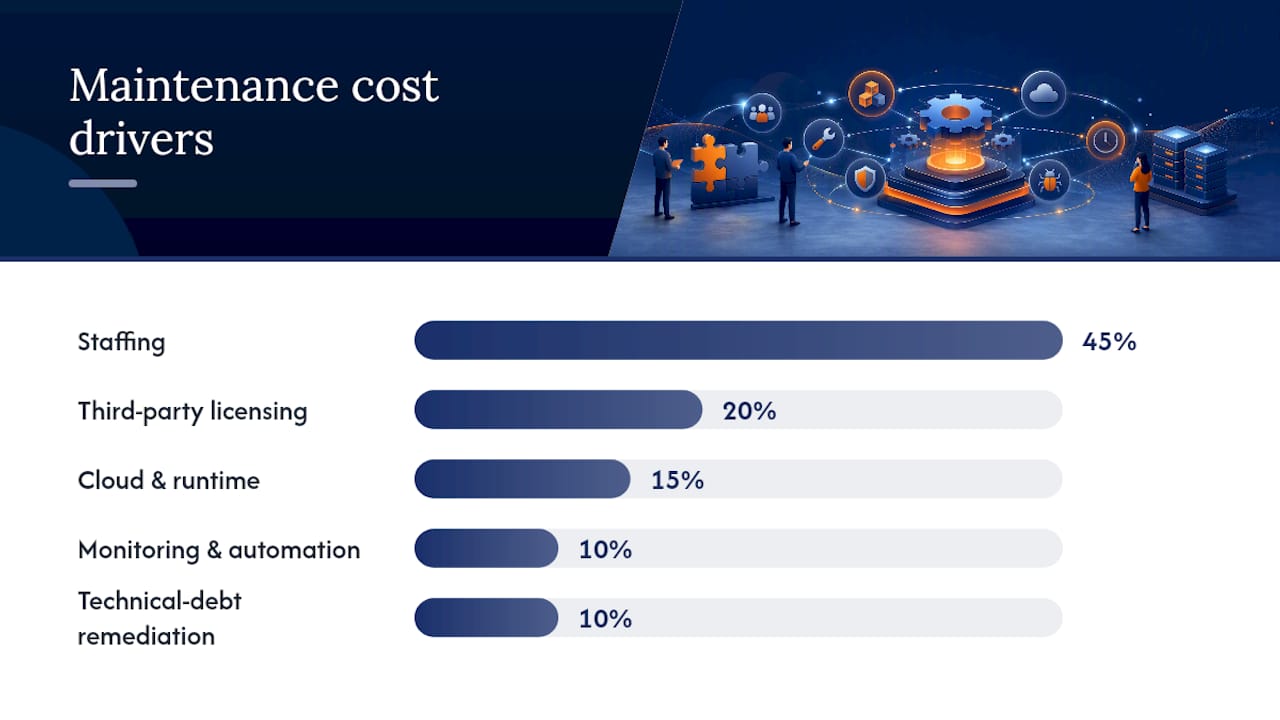
A useful budgeting habit: separate “urgent” from “scheduled” in your contract language before you sign anything. Vendor maintenance programs often bundle scheduled upgrades and standard technical support into one fixed annual fee, but urgent, off-hours incident response frequently costs extra unless you negotiate it into the base price upfront.
Common cost traps to watch for:
- Deferred technical debt compounds. A refactor that costs a week today can cost a month once three other systems depend on the broken pattern.
- Unlimited support promises are rarely unlimited. Read the fine print on response time tiers before assuming “24/7 support” means what you think it means.
- License sprawl inflates renewal costs. Unused or duplicate third-party tools quietly add up across a fiscal year.
- Skipping the pilot phase leads to expensive rework. A rushed rollout that skips testing usually costs more in incident cleanup than the time saved.
Which Tools and Metrics Actually Show Maintenance Health?
You need five tool categories, at minimum: monitoring and error tracking (something like Sentry or Datadog), a CI/CD pipeline that gates deployments on passing tests, an automated regression suite, backup and disaster-recovery verification that’s actually tested on a schedule, and a license management system that flags renewals before they lapse.
For metrics, five numbers tell most of the story:
- Mean time to repair (MTTR): how long it takes from detection to resolution
- Change-failure rate: what percentage of deployments cause an incident
- Deployment frequency: how often you ship changes safely
- Percentage of scheduled maintenance completed on time: whether preventive work is actually happening
- Backlog age: how long known issues sit unresolved
High-maturity teams that enforce CI/CD gating, automated regression suites, and staged rollouts with telemetry tend to see meaningfully lower change-failure rates and faster MTTR than teams shipping straight to production. Build a simple dashboard pulling these five numbers and share it with stakeholders monthly. It turns “maintenance” from an invisible cost center into a visible, improving trend line.
Planning Migration and Retirement Without Breaking Anything
Retirement isn’t a failure state. It’s a planned outcome, and it belongs in the maintenance plan from day one, not as a scramble when a vendor announces end-of-life. Watch for the signals: a platform losing vendor support, a maintenance cost that now exceeds the cost of rebuilding, or a dependency count that’s grown too risky to patch safely.
A safe migration or modernization effort follows a short, non-negotiable checklist:
- Run the old and new systems in parallel before cutting over completely
- Validate data conversion with real production data, not just test fixtures
- Communicate the timeline to every affected user group well before the cutover date
- Keep a documented fallback path in case the new system fails post-launch
- Archive historical data, close out unused licenses, and log the retirement decision for future audits
How Bowtie Approaches Maintenance Planning in Practice
We start every maintenance engagement the same way this article told you to: an audit, not a sales pitch. We map dependencies, flag unsupported components, and assign a clear owner before writing a single line of process documentation. From there, we lean heavily on automated release gating and monitoring instead of manual checklists, because a plan that depends on someone remembering to run a script is a plan waiting to fail.
We’ve applied this approach across clients ranging from large organizations like the NFL down to early-stage startups, and the pattern holds regardless of size: teams that treat maintenance as a scheduled discipline spend far less time firefighting.
A maintenance plan only works if someone owns it and something automated enforces it. Documentation alone is insufficient if not enforced.
If your team is sitting on AI-generated or Vibe-coded software that’s never had a formal audit, that’s usually the right moment to bring in a partner for a focused code review before writing your maintenance plan around it.
An Editor’s Take on Maintenance Plans
Most advice on this topic treats the maintenance plan as paperwork, something you write once to satisfy an audit and then file away. That’s backward. The research here, from ISO’s lifecycle framing to NASA’s granular checklist, points the same direction: a maintenance plan is a working document that only earns its keep if it changes how a team behaves week to week.
The conventional wisdom oversells process and undersells ownership. You can have a beautifully structured document with every section ISO recommends, and it will still fail if no single person is accountable for enforcing it. I’d prioritize the owner and the pilot cycle over the paperwork every time. Get one person’s name on the plan, run it against one real system for one real maintenance cycle, and only then worry about whether every checklist box is filled. A plan tested once against reality beats a perfect plan tested against nothing.
Get a Maintenance Plan Built Around Your Actual Codebase
Bowtie exists for exactly the gap this article just walked through: the space between a checklist and a working system that actually follows it. Where a generic template gives you section headings, we give you an audit of your real dependencies, a named owner structure, and automated release gating that enforces the plan instead of hoping someone remembers it.

That matters most for teams sitting on software nobody has formally reviewed, including AI-generated or Vibe-coded applications that shipped fast and never got a second look. We handle the code audit that should come before any maintenance plan gets written, so you’re not building process around code with hidden problems. From there, our enterprise modernization work covers everything from monitoring setup to migration planning, sized to your actual risk profile rather than a one-size-fits-all retainer.
If you’re ready to see what a maintenance plan built around your real stack looks like, start with an audit and we’ll show you exactly where the risk sits before we talk about anything else.
Frequently Asked Questions
What’s the difference between a software maintenance plan and a support agreement?
A maintenance plan covers proactive, system-facing work like patches, monitoring, and backups. A support agreement covers reactive, user-facing incident response. Many organizations combine both under one contract, but they’re distinct disciplines with different KPIs.
How often should a maintenance plan be reviewed?
Every six to twelve months, or immediately after any major incident that exposes a gap in the current process. Systems change faster than most plans get updated, so a fixed review cadence keeps the document from going stale.
Who should own a software maintenance plan?
One named person, typically an engineering manager, product owner, or operations lead, should hold final approval over changes and answer for the system’s reliability. Shared ownership with no single accountable name is the most common reason plans fail in practice.
Can maintenance and support be handled by an outside partner?
Yes. Outsourced maintenance models work well for teams that lack round-the-clock internal coverage, though a hybrid approach, internal ownership with outside overflow support, usually preserves institutional knowledge better than fully outsourcing everything.
What KPIs matter most for tracking maintenance effectiveness?
Mean time to repair, change-failure rate, deployment frequency, percentage of scheduled maintenance completed on time, and backlog age together give a clear picture of whether a maintenance program is actually working.
Sources
- ISO/IEC/IEEE 14764:2022 - Software engineering — Software life cycle processes — Maintenance
- SWE-105 - Software Maintenance Plan (NASA guidance / NPR 7150.2)
- Agilent — Software maintenance plans (vendor example)
- Maintenance vs. Support - The Down & Dirty - CMHWorks






