
A realistic software development timeline varies with project complexity, generally shorter for minimum viable products and longer for enterprise systems with multiple integrations. Every one of those ranges assumes a risk-adjusted buffer, not a best-case guess. Scope, integrations, and unresolved
unknowns move the numbers, and security and testing have to run through every phase, not get bolted on at the end.
TL;DR:
- Integrations such as payment processors or AI features significantly increase development time due to testing and edge cases.
- Phased rollouts help reduce scope-related delays by delivering a smaller, polished product first and expanding gradually.
- Using story points and schedule risk analysis with confidence ranges improves estimation accuracy and stakeholder communication.
- Addressing security from the start, through documentation and automated testing, prevents costly last-minute fixes and project delays.
- Building buffers based on specific unknowns, like additional sprints per unfamiliar system, creates more reliable schedules than arbitrary percentages.
Table of Contents
- Software Development Timeline: A Phase-by-Phase Breakdown
- How Long Should Your Project Take Based On Its Type?
- How Do You Estimate a Software Timeline With Confidence?
- Why Do Software Timelines Slip, and How Do You Prevent It?
- Where Does Security Fit Into the Schedule?
- Which Practices Actually Shorten a Timeline Without Adding Risk?
- Three Sample Timelines You Can Adapt
- How Do You Turn a Timeline Into a Contract?
- What We’ve Learned Building on Tight Timelines
- Get a Timeline You Can Actually Defend
- Sources
- FAQ
Software Development Timeline: A Phase-by-Phase Breakdown
Every software development timeline is really six smaller timelines stacked together. Skip the up-front work in any one of them, and you pay for it twice over in the next.
Planning and discovery typically takes a few weeks for smaller projects, with longer durations for projects involving legacy systems or multiple departments. This phase produces requirements documents, user stories, and a rough architecture sketch. Teams that rush this step almost always pay for it during development, when a “small” feature turns out to depend on three systems nobody mapped out.
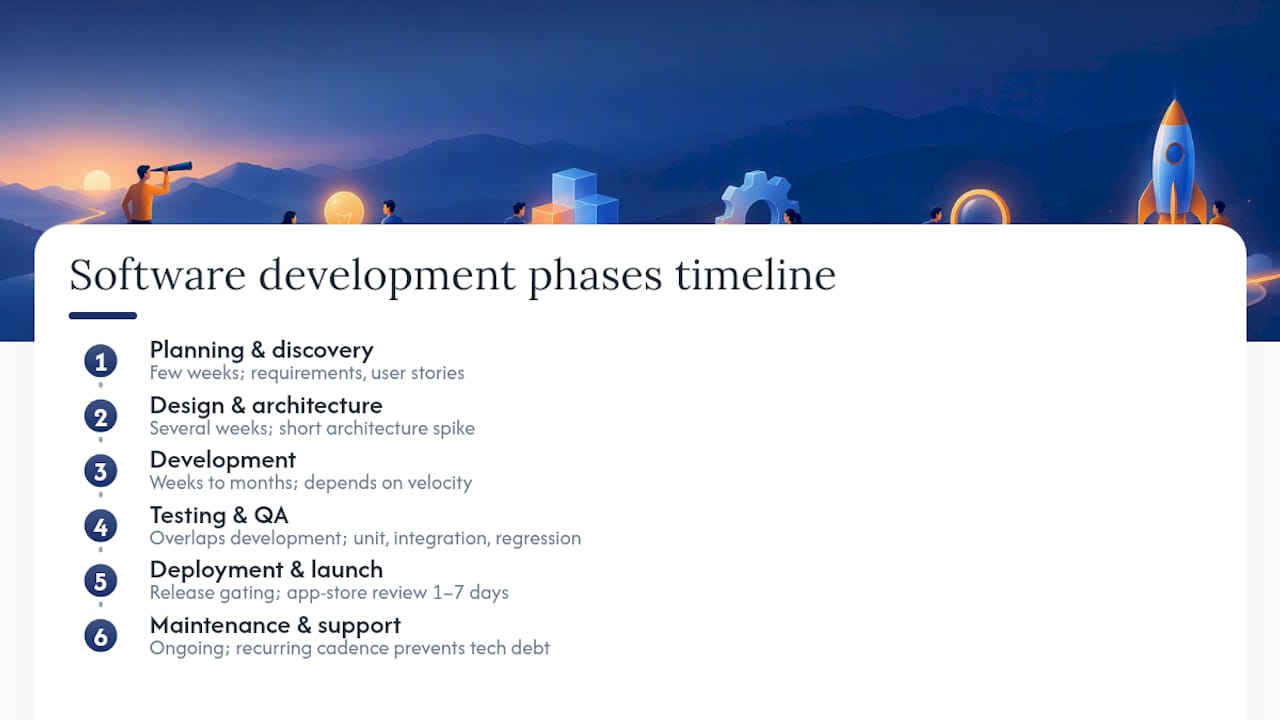
Design and architecture deserves dedicated time, particularly with unfamiliar technology; running a short architecture spike before choosing a tech stack can save time later, often taking several weeks depending on complexity.
Development phase duration varies widely based on team velocity rather than just headcount, ranging from a few weeks for lean MVPs to several months for full product builds.
Testing and QA ideally overlap development; while unit testing is continuous, integration, UX, and regression testing require dedicated time typically constituting a significant fraction of overall development effort.
Deployment and launch includes release gating, app-store review windows (often 1 to 7 days for mobile), and the first week of post-launch firefighting.
Maintenance and support is an ongoing activity; skipping regular maintenance often leads to accumulating technical debt that causes longer rebuild cycles. Bowtie’s own software maintenance planning guidance covers what a sane recurring cadence looks like.
How Long Should Your Project Take Based On Its Type?
Not every project deserves the same schedule. Matching your project type to a realistic range up front prevents the most common negotiation fight later: the client who wants enterprise features on an MVP calendar.
- MVP: typically developed by a small team with limited integrations and a narrow feature set to test hypotheses.
- Medium product: incorporates multiple features and third-party integrations with adequate QA cycles.
- Enterprise system: involves complex integrations, compliance needs, legacy data migrations, and multiple stakeholder review iterations, extending calendar timelines.
Integrations often represent significant hidden costs; for example, payment processors or EHR integrations add notable time due to sandbox testing and edge cases. AI features also add complexity through model evaluation and testing that may exceed standard sprint durations.
Phased rollouts help here. Instead of committing to the full enterprise scope on day one, ship a minimum lovable product, something smaller than a full MVP but polished enough to generate real feedback, then expand. It shortens time-to-value without pretending that the eventual scope is smaller than it is.
How Do You Estimate a Software Timeline With Confidence?
Story points measure relative effort, not hours. Once a team has a few sprints of completed points behind it, that velocity converts story points into an actual calendar projection. PMI’s guidance on team-based estimation treats estimation as a conversation among the people doing the work, which surfaces disagreements and hidden assumptions before they become missed deadlines.
Three-point estimates, sometimes called PERT estimates, ask for optimistic, pessimistic, and most-likely durations for each task, then blend them into a weighted figure. This single habit does more to prevent overpromising than any project management tool.
For anything with real budget or reputation on the line, run a schedule risk analysis. PMI outlines three steps: build a critical path method schedule, estimate duration uncertainty for each activity, then simulate thousands of scenarios (a Monte Carlo simulation) to produce a probability distribution for your finish date.
To present this to stakeholders:
- State every milestone as a range, not a date.
- Attach a confidence level (“70 percent likely by March 15, 90 percent likely by March 29”).
- Update the range after each sprint instead of defending the original guess.
Pro Tip: A date with 90 percent confidence attached is more useful to a stakeholder than a date with none. It tells them exactly how much risk they’re accepting.
Why Do Software Timelines Slip, and How Do You Prevent It?
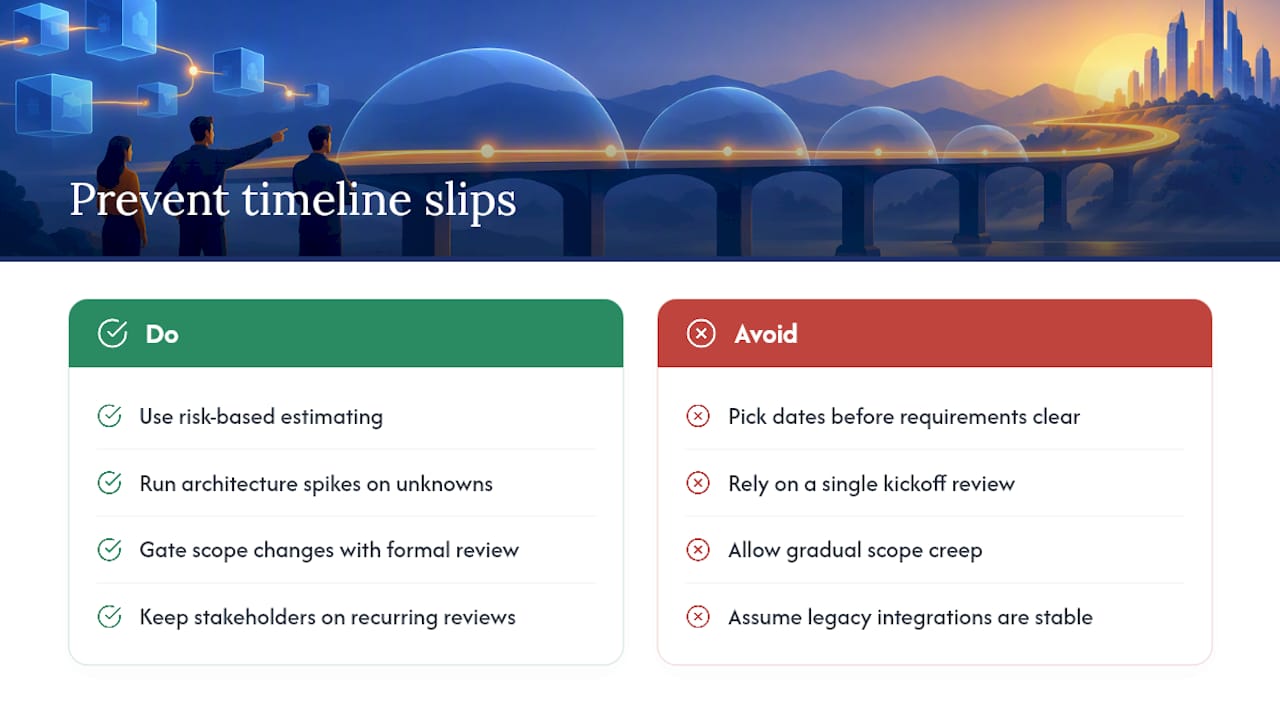
Most schedule failures trace back to one habit: date-driven estimating, picking a delivery date before requirements are clear, then reverse-engineering a schedule to fit it. PMI’s own guidance on estimating before requirements calls this one of the leading causes of project failure. Risk-based estimating, where the date follows the scope instead of the other way around, produces numbers you can actually defend.
The usual culprits beyond that:
Common causes of timeline slips include ambiguous requirements clarified late causing rework, stakeholder unavailability during critical reviews, gradual scope creep, and legacy systems that do not behave as documented.
Mitigation works best when it’s structural, not just cultural. Gate scope changes through a formal review instead of a Slack message. Run architecture spikes on the riskiest unknowns before committing a date. Keep stakeholders in a recurring review cadence rather than a single kickoff call. Disciplined Agile’s risk-value lifecycle approach, prioritizing the riskiest requirements first and proving architecture early, exists specifically to catch these problems before they eat a quarter.
Pro Tip: If a legacy integration is assumed to be stable, it is prudent to allocate time for a confirming spike to prevent potential launch delays.
Where Does Security Fit Into the Schedule?
Addressing security only at the end of a project leads to last-minute challenges that consume contingency buffers meant for other risks.
NIST’s Secure Software Development Framework organizes this into four groups: prepare the organization, protect the software, produce well-secured software, and respond to vulnerabilities. Applied across a timeline, that means documenting security requirements during planning, running software composition analysis (SCA) on dependencies during development, tracking provenance for anything AI-generated, and gating CI/CD pipelines so insecure code can’t ship by accident.
Integrating security earlier in the SDLC reduces the cost and effort of remediation compared with fixing vulnerabilities after release, according to NIST SP 800-218.
Implementing security early in the development cycle reduces unplanned rework later and does not necessarily increase project duration.
Which Practices Actually Shorten a Timeline Without Adding Risk?
Parallelism helps when workstreams are genuinely independent, like frontend and backend development against a stable API contract. It backfires when teams share the same database schema or the same unresolved architecture decision, because coordination overhead eats the time you thought you saved.
Automation is the safer lever. A working CI/CD pipeline, automated test suites, linting, and dependency scanning catch problems in minutes instead of during a manual QA pass three weeks later.
- Automate builds and deploys so releases stop depending on a person’s calendar.
- Run automated tests on every pull request, not just before launch.
- Scan dependencies continuously instead of once at the end.
Small, frequent releases with clear acceptance criteria shorten feedback loops, which is the whole point of the Agile Manifesto’s emphasis on working software over exhaustive planning. A team that measures velocity across short releases catches drift early instead of discovering it at the finish line.
Pro Tip: Write acceptance criteria before development starts, not during code review. Ambiguous “done” is where most late-stage rework hides.
Three Sample Timelines You Can Adapt
- MVP: A four-person cross-functional team with one integration ships in roughly 12 to 16 weeks: 2 weeks planning, 2 weeks architecture, 8 weeks development, running QA in parallel, 1 to 2 weeks deployment. Buffer sits at the end, roughly 1 week per month of development.
- Medium product: A phased release model spanning 6 to 9 months, with two or three integration points staged across separate releases rather than bundled into one big launch. Buffer scales with each integration, typically 1 to 3 sprints per unfamiliar system.
- Enterprise module: A 12 to 18 month timeline built around a data migration, compliance review, and monthly stakeholder checkpoints. Buffer here isn’t a single block at the end. It’s distributed against each migration and compliance milestone, since that’s where enterprise timelines actually break.
How Do You Turn a Timeline Into a Contract?
An estimate without governance is just a hope. Turning it into something enforceable means tying dollars and deliverables to specific milestones, not a single end date.
- Use milestone-based agreements with written acceptance criteria for each phase, so “done” isn’t a debate.
- Build in a change-control process before scope creep happens, not after.
- Run viability reviews at each major checkpoint to confirm the investment still makes sense.
- Choose a contract shape that fits the risk: time and materials with a cap for uncertain scope, phased fixed-price for well-defined work, or a retainer with defined outcomes for ongoing product evolution.
The right contract shape mirrors the estimate itself. If you’ve stated your timeline as a range with confidence levels, the contract should reflect that same honesty instead of pretending the first fixed date was ever real.
What We’ve Learned Building on Tight Timelines
Most timeline overruns seen in the industry trace back to one thing: a team committed to a date before anyone ran a real architecture spike. We push clients to spend a week proving the riskiest technical assumption before a single sprint gets scheduled, then gate every release behind automated CI checks instead of a person’s judgment call on a Friday afternoon.
That combination, spike first, automate the gate, doesn’t eliminate risk. It just moves the expensive discoveries earlier, where they’re cheap to fix instead of catastrophic.
— Chad
Get a Timeline You Can Actually Defend
Most teams don’t need a bigger calendar. They need a plan that survives contact with reality. Risk-adjusted timelines benefit from architecture spikes before commitments, CI/CD gates instead of manual sign-off, and continuous support after launch instead of a handoff and a goodbye.

If your team is staring down a schedule that already feels optimistic, a Senior Developer Review starting at $449 can catch the risks a rushed estimate missed, before they cost you a quarter. For teams building something new from scratch, AI Assisted Engineering starting at $9,950 pairs production-ready code with the kind of continuous support that keeps a launch date from sliding twice. And if the codebase in question came out of a Vibe-coding session or an AI pair-programming tool, a Vibe Check for $449 tells you exactly how much rework is hiding in it before you build a timeline on top of a shaky foundation. Full service details live on the Bowtie services page, and every price is listed on the pricing page. Book a review, and get a schedule you can actually put in front of a stakeholder.
Sources
FAQ
What Are the 7 Stages of Software Development?
The seven stages are typically planning, requirements analysis, design, development, testing, deployment, and maintenance. Some frameworks combine design and architecture into one stage or split testing into separate QA and UAT phases, but the sequence stays roughly consistent across most software development timelines.
What Are the 5 Steps of Software Development?
A condensed five-step version usually merges planning with requirements and folds deployment into a broader release stage: planning, design, development, testing, and deployment/maintenance. It’s the same seven-stage process, just grouped for simpler reporting.
What Is L1, L2, L3, and L4 in Software Development?
These levels typically describe support and escalation tiers rather than development phases: L1 handles basic user issues and ticket triage, L2 covers technical troubleshooting, and L3 involves engineers fixing code-level problems. Vendor or specialized third-party support is often categorized beyond these tiers. They matter for planning your maintenance phase, since each tier adds response-time expectations to your post-launch support model.
How Long Does It Take to Build an App From Scratch?
A simple MVP mobile app typically takes about 12 to 16 weeks with a small team. More complex consumer apps with multiple integrations often span several months, while enterprise applications with compliance requirements or legacy migrations can extend from 12 to 18 months.
How Do You Build Buffer Into a Software Timeline Without Guessing?
Tie buffer size to specific unknowns instead of applying a flat percentage across the whole project. A practical PMI-aligned approach suggests adding roughly 1 to 3 sprints, or 15 to 30 percent of phase effort, for each major integration or unfamiliar technical area, scaled to how novel that risk actually is.






