
If you process more than roughly 2 million tokens a day, need strict data control, or need sub-150ms responses, a self-hosted or hybrid setup earns its keep. If you’re under that volume with no compliance mandate, a managed API is
still cheaper and faster to ship. Most teams land in between: run a local baseline for sensitive or high-volume work, and route bursts or frontier-model requests to the cloud.
TL;DR:
- Self-hosting is most beneficial for workloads exceeding 2 million tokens per day, requiring strict data control, or needing sub-150ms response times.
- Medium to heavy usage (over a few million tokens monthly) can justify the upfront hardware costs within 12 to 18 months, especially with ongoing volume stability.
- Typical hardware needs depend heavily on model size, with a 7B or 13B model running comfortably on a single high-end GPU like an RTX 4090.
- Implementing a hybrid architecture allows routing sensitive or routine requests locally, while complex tasks or overflow load go to cloud models, optimizing costs and latency.
- Operational costs and long-term maintenance, including driver management and system monitoring, often outweigh hardware expenses in self-hosted setups.
Table of Contents
- What Is a Self-Hosted LLM (and When Does It Make Sense)?
- What Does It Cost to Self-Host an LLM Over Time?
- How Much GPU and VRAM Do You Actually Need?
- Which Tools Should You Use to Serve a Local Model?
- How Do You Deploy a Self-Hosted LLM Step by Step?
- What Does a Hybrid Local-Cloud Architecture Look Like?
- What Compliance and Privacy Checks Does Self-Hosting Require?
- How Do You Keep a Self-Hosted LLM Reliable Long-Term?
- Where Agency Support Actually Speeds Things Up
- Sources
- FAQ
- Bowtie’s Take on the Self-Hosting Rush
What Is a Self-Hosted LLM (and When Does It Make Sense)?
A self-hosted LLM runs on infrastructure you control, whether that’s a GPU box under your desk, a colocated rack, or a private cloud instance, instead of calling out to a vendor’s API. You own the weights, the inference server, and the uptime. That control is the entire point: no third party sees your prompts, no per-token invoice arrives at month’s end, and no rate limit throttles you during a launch.
The decision rarely comes down to one factor. A practical 5-factor scoring framework weighs privacy, context length, latency, output quality, and cost, and it’s a useful mental model even if you never build the spreadsheet.
Here’s how to score your own situation:
- Privacy and compliance: Does the workload touch regulated data (health records, financial details, legal documents)? If yes, weight this criterion heavily.
- Volume: Are you sending fewer than 500,000 tokens a day, or north of 10 million tokens a month? The economics flip hard past that second number.
- Context length: Do requests need 100K+ token context windows? Frontier cloud models still lead here; most local models top out lower before quality degrades.
- Latency: Does the product need sub-150ms time-to-first-token for a real-time feel, or is a two-second wait acceptable?
- Ops capacity: Do you have someone who can own GPU drivers, model updates, and 2 a.m. pages, even part time?
Three quick scenarios show how this plays out:
-
A customer support bot handling 200,000 tokens a day with no PII: cloud API. The volume doesn’t justify hardware, and there’s nothing sensitive to protect.
-
A legal document review tool processing contracts for a regulated client: self-hosted or hybrid, driven by data residency requirements more than cost.
-
A SaaS platform running 15 million tokens a month across chat and summarization features: hybrid, with local models handling routine requests and cloud APIs picking up complex edge cases.
What Does It Cost to Self-Host an LLM Over Time?
Comparing a cloud API’s per-token price to a GPU’s hourly rental rate is the single most common mistake teams make when running this math. It ignores electricity, hardware depreciation, and the engineer who has to babysit the thing when a driver update breaks inference at 11 p.m. on a Friday.
A proper TCO model runs 12 and 36 months out, not a single spot-price snapshot, because GPU costs amortize over years and ops labor compounds the longer the system runs.
Break-even points vary by usage tier, but the pattern holds across most analyses: light usage (a few hundred thousand tokens a day) rarely justifies the upfront hardware spend, and cloud APIs stay cheaper through the full 36-month window. Medium usage, somewhere in the low millions of tokens daily, is where the crossover starts to appear, typically somewhere in year one if you already have GPU capacity for other workloads. Heavy, sustained usage, tens of millions of tokens a month and up, tends to break even well inside 12 months, and by month 36 the TCO gap between local and cloud widens substantially in favor of self-hosting.
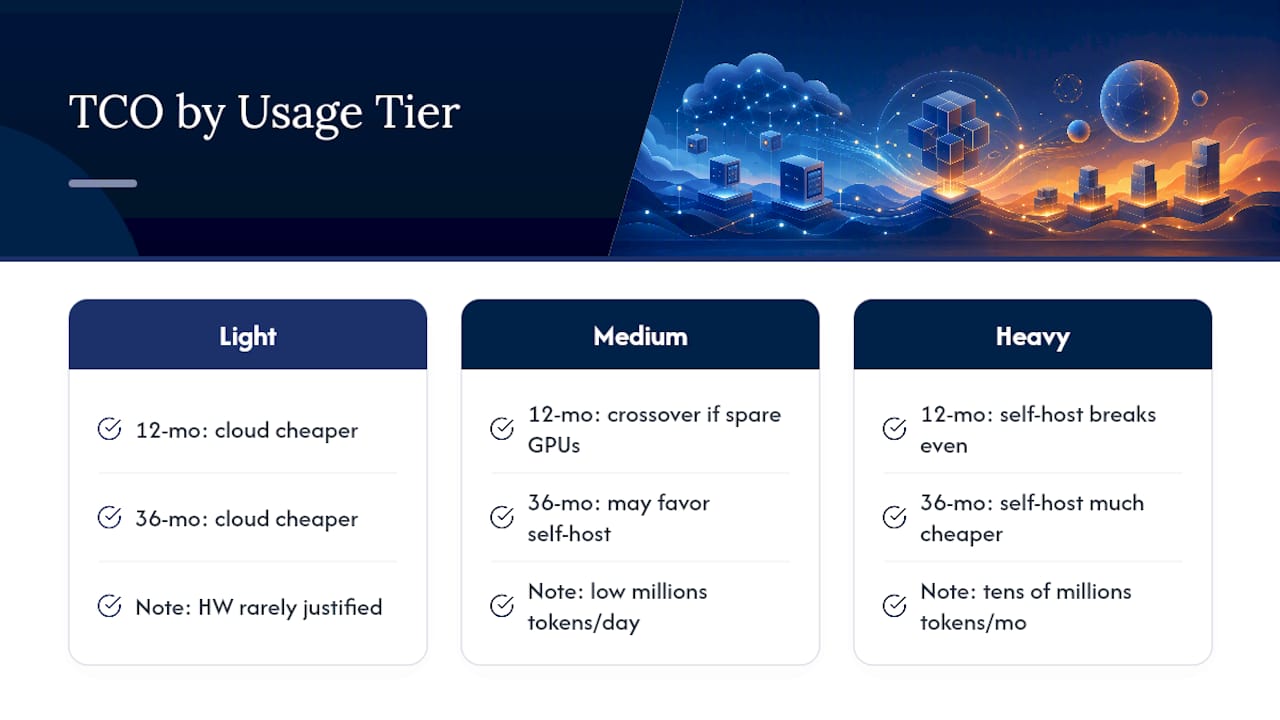
The honest recommendation: don’t guess. Run a real TCO calculation using your actual token volume, your region’s electricity rates, and a realistic ops labor estimate (not zero) before committing to hardware. If the model spits out a breakeven inside 18 months and you’re confident that volume will hold, self-hosting is worth the operational lift. If it’s closer to 30 months, a hybrid approach that delays the capital outlay is usually the safer bet.
How Much GPU and VRAM Do You Actually Need?
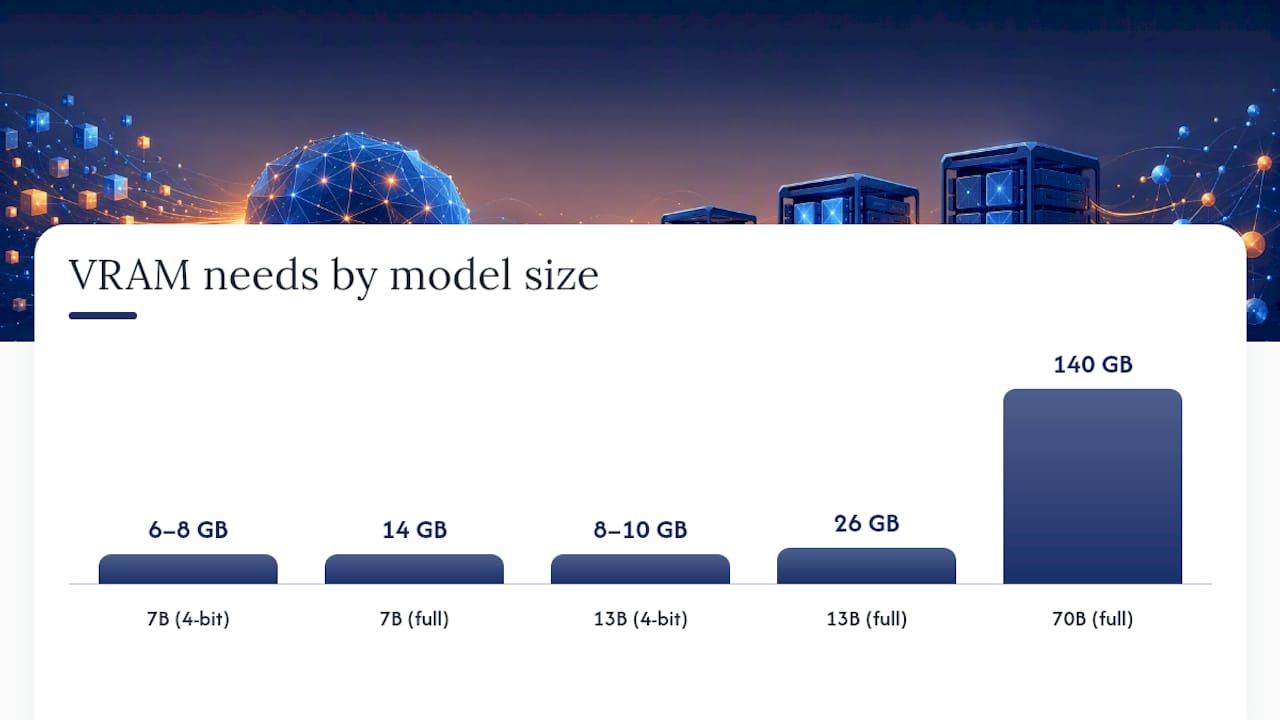
Model size and quantization level decide your hardware budget more than anything else. A 7B parameter model at full precision needs roughly 14GB of VRAM; the same model quantized to 4 bits fits comfortably in 6 to 8GB. A 13B model runs full precision at around 26GB but drops to roughly 8 to 10GB quantized. Scale up to 70B and the numbers get serious: full precision demands around 140GB of VRAM, spread across multiple high-end cards, but 4-bit quantization shrinks that to roughly 35GB, which fits on a single high-VRAM consumer or prosumer card.
That quantization math changes what “self-hosting” actually requires for most teams:
- 7B to 13B models: a single RTX 4090 (24GB VRAM) handles these comfortably, quantized or not, and remains the practical sweet spot for most small-to-midsize teams.
- 30B to 40B models: still workable on a 4090 with 4-bit quantization, though you’ll want to test output quality against your specific use case.
- 70B and larger: needs either multiple consumer GPUs pooled together or a jump to data-center hardware like an A100 or H100, especially if you need full precision or long context windows.
Quantization isn’t a free lunch. You trade some precision for memory savings, and on tasks requiring nuanced reasoning or long-context recall, that tradeoff shows up as occasional quality dips. For most production use cases, though, teams report the difference is small enough to be worth the VRAM savings, and the option to run larger models on consumer hardware has genuinely shifted where the practical sweet spot sits.
The colocation-versus-cloud-instance question comes down to how predictable your load is. If usage is steady and high, buying or colocating hardware wins on the TCO math above. If it spikes unpredictably, a rented cloud GPU instance keeps you flexible without a capital commitment you might regret in six months.
Which Tools Should You Use to Serve a Local Model?
The tool you pick depends entirely on what stage you’re at: kicking the tires, or running production traffic at scale.
- Ollama: the fastest path from zero to a working local model. One command pulls and runs a model with an OpenAI-compatible endpoint already wired up. Built for developer speed, not raw throughput.
- vLLM: the production choice when concurrent requests matter. Its continuous batching and memory management deliver dramatically higher throughput than Ollama under load, with some benchmarks showing gaps as wide as 19x depending on the workload. The cost is setup complexity; it’s not a one-command install.
- llama.cpp: the right pick for CPU-only or edge deployments where a GPU isn’t available or practical. It’s the engine that quietly powers a lot of the ecosystem above it, including Ollama itself.
- LocalAI and orchestration stacks like llmaker: handle the parts nobody enjoys building twice, including service discovery, vector database wiring, and an OpenAI-compatible facade that lets your application code stay identical whether it’s talking to a local model or a cloud API.
For retrieval-augmented generation, plug in a vector database (Qdrant, Weaviate, or pgvector are the common choices) and keep your embeddings pipeline separate from your inference server so you can swap either component without a rebuild. If your RAG pipeline pulls from structured content, tools like can help verify your source data is actually structured well enough for a model to retrieve from cleanly.
The tradeoff across all of these is consistent: faster setup means less throughput and fewer production guardrails. Pick based on where you are today, but build with an abstraction layer so you’re not locked into today’s choice.
How Do You Deploy a Self-Hosted LLM Step by Step?
Getting from “we should try this” to a hardened production endpoint doesn’t require a six-month roadmap. Five steps cover it.
- Pick a model sized to your hardware and use case. Start smaller than you think you need; a well-tuned 7B or 13B model often outperforms an oversized model running degraded due to memory pressure.
- Run it locally with Ollama or llama.cpp. Get a working endpoint on your machine before you think about servers, load balancers, or anything production-shaped.
- Wrap it in an OpenAI-compatible API. This is the single highest-leverage step in the whole process: it means your application code calls a
base_urland nothing else changes if you later switch between local and cloud. - Connect a vector database if you need retrieval. Wire up embeddings and RAG once the base model is stable, not before.
- Harden for production. Add monitoring, automated backups of model artifacts, a rollback plan for bad model updates, and a hybrid overflow route to cloud APIs for traffic spikes your hardware can’t absorb.
Before calling it done, benchmark against your actual traffic pattern, not a synthetic test. Measure time-to-first-token, tokens-per-second under concurrent load, and output quality against a held-out set of real prompts.
Pro Tip: Build the OpenAI-compatible facade in step 3 before you’ve picked your final model. It turns a model swap into a config change instead of a code rewrite, and it’s the difference between a two-hour migration and a two-week one.
What Does a Hybrid Local-Cloud Architecture Look Like?
Hybrid isn’t a compromise; it’s the dominant pattern for 2026 because most workloads aren’t uniformly sensitive or uniformly heavy. A support chatbot might handle 95% of requests with a local 13B model and route the remaining 5% (complex reasoning, long context, edge cases) to a frontier cloud model.
A workable routing rule set looks like this:
- Route any request containing regulated data (health, financial, legal identifiers) to the local model only, never to an external API.
- Route requests exceeding your local model’s reliable context window to cloud.
- Route latency-tolerant, complex reasoning tasks to cloud; keep latency-sensitive, routine tasks local.
- Route overflow traffic during demand spikes to cloud rather than over-provisioning local hardware for peak load you rarely hit.
Build this routing behind a single gateway layer so application code never hardcodes which backend it’s calling. That’s the same OpenAI-compatible abstraction pattern from the deployment steps above, and it’s what makes failover graceful instead of a fire drill: if local infrastructure goes down, the gateway reroutes to cloud without a code deploy.
What Compliance and Privacy Checks Does Self-Hosting Require?
Regulations like HIPAA, PCI DSS, and GDPR don’t always mandate self-hosting outright, but they make it the far simpler compliance path when protected health information, payment data, or EU personal data is in scope. Sending regulated data to a third-party API means that vendor’s compliance posture becomes your liability too.
Run through this checklist before calling a deployment compliant:
- Encryption at rest and in transit for model inputs, outputs, and any stored logs.
- Identity and access management scoped tightly to who can query the model and who can access raw logs.
- Audit logging for every inference request touching regulated data.
- Backup and disaster recovery for model artifacts and configuration, not just data.
- Network boundaries that actually isolate the inference server, not just a firewall rule someone wrote once and forgot.
Reviewing data residency versus data sovereignty requirements early saves a painful retrofit later, especially for teams operating across multiple jurisdictions.
Pro Tip: “Local” isn’t always as local as it looks. Some orchestration tools and monitoring agents phone home by default for telemetry or update checks. Audit outbound network traffic on your inference server, not just the inference path itself.
How Do You Keep a Self-Hosted LLM Reliable Long-Term?
Four metrics matter more than the rest: GPU utilization, request queue length, time-to-first-token, and error rate. If queue length creeps up steadily rather than oscillating, you’re under-provisioned for sustained load, not just bursts.
The most common failure modes are mundane, not exotic:
- Out-of-memory crashes from context windows or batch sizes creeping past what your VRAM allows; fix by capping request size or adding quantization headroom.
- Driver updates breaking inference after a routine OS patch; fix by pinning driver versions and testing updates in staging first.
- Model load failures on restart due to corrupted or partially downloaded artifacts; fix with checksummed model storage and automated integrity checks.
Staffing this doesn’t require a dedicated MLOps team from day one. A fractional or part-time MLOps contractor can usually keep a single-model deployment healthy; dedicated staffing becomes worth it once you’re running multiple models across environments or serving customer-facing traffic with strict SLAs. Investing early in AI observability practices pays for itself the first time a silent degradation would otherwise have gone unnoticed for a week.
Where Agency Support Actually Speeds Things Up
Most of what breaks self-hosted LLM projects isn’t the model choice. It’s the last mile: the hardening, the monitoring, the hybrid routing logic nobody budgeted time for. Our agency focuses on exactly that gap, using AI-driven development practices to get software from a working prototype to something production-ready faster than a traditional build cycle allows.
We typically start with an audit of what’s already running, whether that’s a self-hosted pilot someone spun up over a weekend or an AI-generated codebase that needs a second look before it touches real traffic. From there, most engagements move through a pilot phase to validate the architecture, then a full rollout with the monitoring, backup, and hybrid failover logic this article walks through. Clients ranging from large organizations to early-stage startups have used that same audit-to-rollout path.
If your team is weighing a local model deployment against another quarter of API bills, our AI integration services are built for exactly that decision point. Reach out for an audit or pilot scope before you commit hardware budget you can’t easily walk back.
Sources
- Local LLMs vs Cloud APIs: 2026 Total Cost of Ownership Analysis | SitePoint
- Stop Sending Everything to GPT-4: A 5-Factor Framework for Local vs Cloud LLMs - HybridLLM.dev
- Self-Hosted LLM Guide: Setup, Tools & Cost Comparison (2026)
FAQ
Is It Worth Self-Hosting an LLM?
It’s worth it if you process high sustained token volumes, handle regulated data, or need consistently low latency; below that, managed cloud APIs remain cheaper and simpler to run.
Can You Self-Host LLMs Like GPT Locally?
You can’t run proprietary models like GPT locally, but open-weight alternatives (Llama, Mistral, and similar families) run on your own hardware using tools like Ollama, vLLM, or llama.cpp with a comparable API interface.
What Is the Best Self-Hosted LLM Model?
There’s no single best model; it depends on your VRAM budget and task. Quantized 7B to 13B models fit comfortably on a single RTX 4090 for most use cases, while 70B-class models need multi-GPU setups or data-center hardware for full precision.
How Much Does It Cost to Host a Self-Hosted LLM?
Costs range from a few thousand dollars in consumer GPU hardware for light workloads to tens of thousands for multi-GPU production setups, with breakeven against cloud APIs typically appearing within 12 to 18 months at sustained high volumes.
Bowtie’s Take on the Self-Hosting Rush
Every framework in this article treats self-hosting as a math problem, and it mostly is. But the teams that get burned aren’t the ones who ran the TCO calculation wrong. They’re the ones who skipped it entirely because a blog post told them local models are “free” once you own the GPU.
Here’s the uncomfortable part nobody likes to say out loud: the hardware is the easy 20% of a self-hosted LLM project. The other 80% is the boring operational work, patching drivers, catching silent model degradation, building the hybrid failover path before you need it in a panic, that determines whether the thing survives contact with real production traffic. We’ve seen plenty of AI-generated prototypes that work beautifully in a demo and fall apart the moment concurrent users show up, not because the model was wrong, but because nobody built the guardrails.
The teams doing this well in 2026 aren’t the ones with the biggest GPU cluster. They’re the ones who scoped an abstraction layer on day one, so the local-versus-cloud decision stays reversible instead of permanent. That’s the real advantage self-hosting offers, not just savings on a per-token invoice, but the option to change your mind without rewriting your application.
— Chad






