
Prompt caching reuses previously computed model state, prefix tensors or full cached responses, so repeated prompts skip recomputation. That cuts input-token cost and latency whenever your traffic has stable prefixes or repetitive semantic intent behind it. It doesn’t help everything:
a chatbot answering wildly different one-off questions gets little benefit, while a RAG pipeline reusing the same system prompt and retrieved context across thousands of requests can see dramatic savings.
The catch is that “prompt caching” actually means three different techniques depending on who’s talking. Providers like OpenAI and Anthropic mean prefix caching, reusing the KV tensors from a matched prompt prefix. Infrastructure teams often mean semantic caching, matching new prompts to old ones by embedding similarity. And some teams mean simple exact-match response caching, a lookup table for identical requests. Confusing these three is the single most common mistake we see when auditing caching implementations.
Here’s what determines whether it’s worth building:
- You get latency and cost wins when prompts share long, stable prefixes, when queries repeat with high semantic similarity, or when your traffic volume justifies the infrastructure.
- You hit walls when prefixes fall below a model’s minimum token threshold, when cache TTLs expire faster than your request cadence, or when your traffic is mostly unique, single-shot queries.
Pro Tip: Before writing a single line of caching code, pull your last week of production logs and check your provider’s cached_tokens or cacheReadInputTokens metric. If it’s already near zero on your current prefix structure, that tells you exactly where to focus your prompt restructuring.
Key Takeaways
Prompt caching cuts LLM cost and latency reliably only when prefix structure, TTL settings, and a conservative cacheability classifier are all designed together, not bolted on separately.
| Point | Details |
|---|---|
| Three distinct techniques | Prefix caching, semantic caching, and exact-match response caching solve different problems and need separate monitoring. |
| Structure prompts deliberately | Stable content (system prompts, instructions) goes first; volatile fields (user input, timestamps) go last. |
| Tune thresholds with sampling | Start semantic similarity near 0.90 to 0.95 and adjust using A/B testing, not intuition. |
| Classify before caching | Default to “don’t cache” on any uncertainty about personalized content to prevent leaks. |
| Get architecture review from Bowtie | Bowtie audits prompt structure, designs layered caching, and builds the monitoring runbooks that keep rollouts safe. |
Table of Contents
- What Is Prompt Caching, Semantic Caching, and Response Caching?
- How Do You Structure Prompts to Maximize Cache Hits?
- Should You Adopt Semantic Caching for Your Workload?
- What Architecture Should You Use to Implement Caching?
- Why Do Classic Eviction Policies Fail for Semantic Caches?
- How Do You Keep a Cache Safe, Correct, and Fresh?
- How Do You Measure and Tune Your Cache Over Time?
- How Do You Deploy Prompt Caching Across a Scaled Fleet?
- What Should Engineering Teams Check Before Rollout?
- What Production Rollouts Actually Teach You
- Get Bowtie’s Help Designing Your Caching Layer
- Sources
What Is Prompt Caching, Semantic Caching, and Response Caching?
These three terms get used interchangeably in blog posts, and that sloppiness costs teams real engineering time. Each one caches a different layer of the stack, uses different storage, and fails in different ways.
Prefix caching (what most providers mean by “prompt caching”) stores the computed KV tensors, the internal attention state, for a prompt’s beginning. When a new request shares that exact prefix, the model skips recomputing attention for those tokens and starts fresh only where the prompt diverges. OpenAI’s documentation describes this as automatic for eligible requests on recent model families like GPT-4o and newer, with no code changes required beyond structuring your prompt correctly. Anthropic takes a more explicit approach: its Claude Platform docs let you mark cache_control breakpoints directly in the request, with retention windows of either 5 minutes or 1 hour depending on which TTL you select.
Semantic caching works at a completely different layer. Instead of matching exact token sequences, it embeds the incoming prompt into a vector, searches a nearest-neighbor index for a similar past prompt, and serves the cached response if similarity clears a threshold. Nothing about token order matters here, “What’s the capital of France?” and “Tell me France’s capital city” can both hit the same cache entry.
Response caching is the blunt instrument: exact string match on the full request, return the exact same output. It’s simple, fast, and only useful for genuinely repeated queries, think FAQ bots or configuration lookups.
Here’s what to monitor for each layer:
cached_tokens(OpenAI): the count of input tokens served from cache on a given request.cacheReadInputTokens/cacheWriteInputTokens(Anthropic, AWS Bedrock): separate counters for tokens read from an existing cache versus tokens written to create a new cache entry.- Semantic hit rate: the percentage of requests served by an embedding match, tracked independently from provider-side prefix hits.
Model constraints matter more than most teams realize going in. AWS Bedrock’s documentation specifies minimum token counts per cache checkpoint that vary by model, sometimes 1,024 tokens, sometimes 4,096, along with limits on how many checkpoints a single request can declare. If your system prompt is 400 tokens, you may not qualify for caching at all on certain models, no matter how perfectly you structure the rest of the request. Check your specific model card before assuming caching will engage.
The practical takeaway: prefix caching is provider-managed and nearly free to adopt if your prompts are already stable. Semantic caching requires you to build and maintain infrastructure, but it catches paraphrase traffic that prefix caching will never see. Most production systems that take caching seriously eventually run both, layered.
How Do You Structure Prompts to Maximize Cache Hits?
Prefix caching only works when a new request’s beginning matches a previous request byte-for-byte, up to the cache boundary. That means prompt structure isn’t a style choice anymore, it’s a performance lever.
- Put stable content first. System prompts, tool definitions, instructions, and few-shot examples should always open the request, in the same order, every time.
- Keep retrieved context in the middle, grouped consistently. If you’re injecting RAG results, keep the formatting and ordering identical across requests even as the content changes, so only the content block itself breaks the cache, not the wrapper around it.
- Push volatile fields to the very end. User messages, timestamps, session IDs, and any per-request metadata belong last, after everything cacheable.
- Use cache-key hints where your provider supports them. A
prompt_cache_keyor equivalent groups related requests onto backends that already hold the matching prefix in memory, which matters more than it sounds like it should on multi-region, autoscaled deployments. - Match your TTL choice to your traffic pattern. Anthropic’s 5-minute default suits bursty, conversational traffic; the 1-hour option fits batch or lower-frequency workloads where requests trickle in slower than the short window would tolerate.
The most common mistake we see in production audits is a timestamp or request ID injected into the system prompt “for logging purposes.” That single field, sitting before the actual instructions, invalidates the cache on every single request. Move it to the end, or better, log it out-of-band entirely.
Pro Tip: Run a quick diff on your last 100 request payloads. If the first 500 tokens aren’t byte-identical across requests that should be cacheable, you’ve found your leak before you’ve written a single line of caching infrastructure.
Bursty traffic deserves a specific mention. If your request volume spikes and drops sharply, a short TTL means the cache cools off between bursts and you pay full price on the first request of each new spike. Longer retention windows trade a small storage cost for consistently higher hit rates when your traffic isn’t smooth.
Should You Adopt Semantic Caching for Your Workload?
Semantic caching earns its complexity when your traffic has high paraphrase variance, users asking the same underlying question in dozens of different phrasings, something prefix caching can’t touch since it depends on exact token matches.

The workflow is straightforward in concept: embed the incoming prompt (usually after some canonicalization, like lowercasing and stripping filler words), search a vector index for the nearest neighbors, and if similarity clears your threshold, return the stored response instead of calling the model. What gets stored is the canonicalized embedding paired with the response, not the raw prompt text, since you’re matching on meaning, not wording.
Threshold selection is where most implementations go wrong. Redis’s engineering guidance recommends starting in the 0.90 to 0.95 cosine similarity range, then tuning downward carefully using sample-based A/B testing rather than intuition. Set it too low and you’ll serve confidently wrong answers to genuinely different questions. Set it too high and you’ll barely cache anything, defeating the purpose.
Index choice depends on scale:
- Flat/exact search works fine under roughly 10,000 to 50,000 cached entries, guarantees the true nearest neighbor, and needs zero tuning.
- HNSW or other ANN indices become necessary past that point, trading a small accuracy loss for the query speed you need at scale.
The pitfall nobody warns you about: semantic caching breaks down badly on agentic and multi-turn traffic. In a tool-calling loop, consecutive turns often look nearly identical in embedding space even though they represent completely different states in a conversation, “confirm the booking” after step 3 embeds close to “confirm the booking” after step 7, but the correct response is different both times. The practical fix, per liteLLM’s caching documentation, is to exclude agentic and tool-calling traffic from semantic caches entirely and rely on exact-match or prefix caching for those flows instead.
Pro Tip: Tag every cached response with the conversation turn number or agent state at write time. If you ever see hit rates spike suspiciously on multi-turn traffic, that tag is how you’ll catch stale replays before users do.
What Architecture Should You Use to Implement Caching?
There’s no single correct caching stack, the right architecture depends on your request volume, latency budget, and how much operational complexity your team can absorb. Most mature systems converge on a layered approach rather than picking just one technique.
A typical layered stack looks like this, checked in order on every request:
- Provider prefix cache — free, automatic on supporting models, checked first since it costs nothing to attempt.
- Exact-match response cache — a simple key-value lookup (Redis, SQLite, or in-process memory) for identical requests.
- Semantic response cache — the vector-search layer for paraphrase matching, checked only if the first two miss.
- Retrieval cache — caching the retrieval step itself in RAG pipelines, separate from caching the final generated response.
Storage backend choice tracks your scale directly. Small services or internal tools can run comfortably on in-process memory or SQLite, no external dependency, trivial to deploy, fine up to modest request volumes. Once you need caching shared across multiple instances or processes, Redis with vector search (VSS) becomes the default choice for teams that already run Redis for other purposes, since it collapses your exact-match and semantic layers into one system. Teams running higher embedding volumes or needing more sophisticated index management often reach for dedicated vector databases like Qdrant or FAISS instead. Open-source proxy projects such as llm-cacher document configurable combinations of these backends alongside pluggable embedder and index-type options, worth reviewing before you build your own from scratch.
Embedding pipeline choice matters more than teams initially assume. You’ve got two real options:
- Provider embedding APIs (OpenAI’s embedding models, for instance) give you strong semantic quality with minimal setup, but add a network round-trip to every cache lookup.
- Local, smaller embedding models cut that latency to single-digit milliseconds but require you to host and maintain another model in your infrastructure.
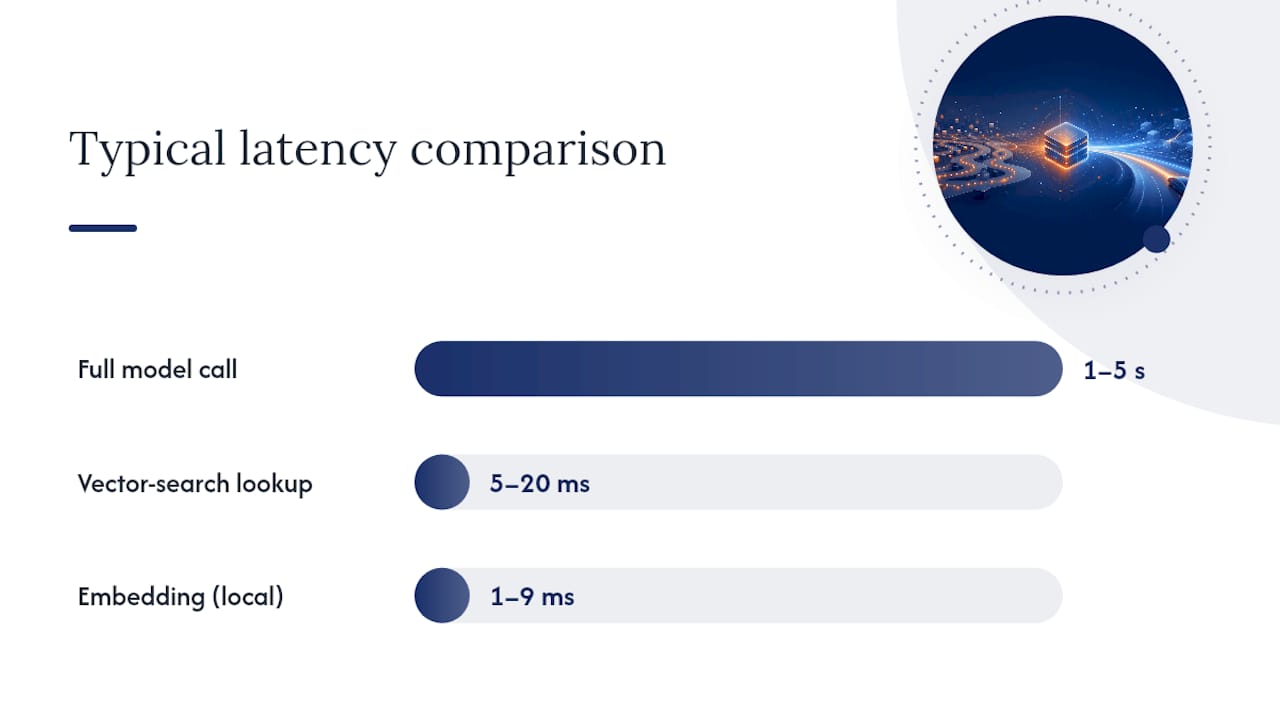
Engineering sources report that vector-search latency typically adds 5 to 20 milliseconds per lookup, a rounding error against the 1 to 5 seconds a full model call often takes. The net effect is almost always a speedup, but only if your embedding step itself doesn’t become a bottleneck under load, set a hard timeout on embedding calls and fail open to the model rather than blocking the request indefinitely.
Write patterns close the loop. On a cache miss, write the response back to the cache (write-through) so the next similar request hits instead of missing again. For predictable high-traffic queries, preload the cache proactively at deploy time rather than waiting for organic misses to populate it. At real scale, shard your cache by tenant, region, or query category, both to bound memory footprint per shard and to prevent one noisy tenant’s traffic pattern from evicting another tenant’s hot entries.
Why Do Classic Eviction Policies Fail for Semantic Caches?
LRU and LFU were designed for discrete, exact keys, a URL, a database row, a file path. Semantic caches don’t have discrete keys. They have points scattered across a continuous embedding space, where “closeness” is fuzzy and a single incoming query might be near-neighbors with a dozen cached entries simultaneously. Evicting the “least recently used” entry makes little sense when the next query might be equally similar to three different cached vectors at once.
Academic research addressing this problem found that computing the truly optimal offline eviction policy for a semantic cache is NP-hard, meaning there’s no efficient algorithm that guarantees the best possible eviction choice at scale. That’s not a discouraging result so much as a useful one: it tells you not to waste engineering time chasing a perfect policy and to focus instead on strong approximations.
The same research introduces practical heuristics worth knowing:
- FGRVB and RGRVB are greedy approximation algorithms that estimate an entry’s marginal value to future hit rate rather than trying to solve the full optimization problem.
- SphereLFU extends frequency-based eviction into embedding space by tracking hit density within a similarity radius rather than exact-match frequency, and the paper’s authors found it performs as the strongest practical online approximation across many of the workloads tested.
You don’t need to implement these from a paper to benefit from the thinking behind them. Three operational moves get you most of the way there:
- Track hit-count metadata per cluster, not just per individual cached entry, so you can evict low-value clusters rather than individually cold entries that still sit in a high-value neighborhood.
- Score entries by marginal contribution, roughly, how many additional queries this specific entry has captured that no other cached entry would have caught.
- Prefer cluster-aware eviction over point-wise LRU, removing whole low-density regions of your embedding space rather than one entry at a time.
Pro Tip: Measure “semantic hit coverage”, the percentage of distinct query intents your cache successfully serves, rather than just raw hit rate. A cache can post an impressive hit rate while quietly failing on your highest-value, most diverse queries if you’re not measuring coverage separately.
How Do You Keep a Cache Safe, Correct, and Fresh?
The single riskiest failure mode in prompt caching isn’t a cache miss, it’s a confidently wrong cache hit. Serving a stale or mismatched response with full model confidence is worse than no caching at all, because the user has no signal that anything went wrong.
Start with a cacheability classifier that runs before anything gets written to cache:
- Classify each request as generic or personalized before caching it. A request containing account details, names, or session-specific context should never enter a shared cache.
- Default to personalized on any uncertainty. A classifier that isn’t confident should skip caching rather than risk a leak, the cost of a missed cache hit is far lower than the cost of one user seeing another user’s cached data.
- Set invalidation triggers beyond simple TTL expiry. Event-driven eviction, wiping cache entries the moment underlying source content changes, catches staleness that a fixed timer misses.
- Use tag-based sweeping for bulk invalidation, tagging cached entries by source document or knowledge-base version so a single content update can clear every dependent cache entry at once.
- Preserve hit-score metadata across invalidation cycles so you’re not starting your popularity tracking from zero every time you sweep, which would otherwise make your eviction policy blind for a period after every cache clear.
Cache poisoning and collision risks deserve direct defenses, not just hope. Emerging research on this problem recommends lookahead validation: checking the first few tokens of what the model would generate, or running a lightweight secondary check, before committing to serve a cached completion in safety-critical systems. Response fingerprinting, hashing key semantic markers of a cached response, gives you a cheap sanity check against a request that matched on embedding similarity but shouldn’t have matched at all. Keep cross-session sharing limited by default rather than opt-out, especially in any system handling regulated or sensitive data.
Pro Tip: Run a standing A/B sample: route a small, fixed percentage of cache hits to the full model pipeline anyway, purely for comparison. Divergence between the cached answer and the fresh answer is your real-time false-positive signal, and it catches drift long before a user complaint does.
How Do You Measure and Tune Your Cache Over Time?
A caching system without observability is a caching system you’re guessing about. Track these metrics from day one, broken out by layer rather than blended into one number:
- Hit rate per layer — prefix, exact-match, and semantic hit rates tracked separately, since they respond to completely different tuning levers.
cached_tokensratio — the proportion of total input tokens served from cache versus recomputed, your clearest cost-savings signal.- False-positive rate — the percentage of semantic hits that, on sampled re-verification, turn out to be wrong or insufficiently similar matches.
- Staleness distribution — how old, on average, your cache hits are at serve time, a leading indicator of TTL misconfiguration.
- Latency savings on hits — the actual time difference between served-from-cache and served-fresh, which validates whether your embedding overhead is paying for itself.
The tuning cycle runs the same way every time: choose a similarity threshold, run it as an A/B test against a control group served without semantic caching, monitor the false-positive rate that surfaces, then adjust TTL and classifier sensitivity based on what you find. Repeat quarterly at minimum, more often if your underlying content or user base shifts quickly.
For cost accounting, the math is simpler than it looks. Providers report cached_tokens (OpenAI) or the split between cacheReadInputTokens and cacheWriteInputTokens (Anthropic, Bedrock) directly on each response. Cached tokens bill at a reduced rate relative to standard input tokens, so multiplying your cached-token volume by the discount your provider offers gives you a defensible savings estimate you can report up the chain, rather than an anecdotal “it feels faster.”
Sampling matters as much as the metrics themselves. Run your full, uncached pipeline on a periodic random sample of cache hits, even after your system is stable in production. That sample is what catches slow, compounding divergence between your cache and your model’s actual current behavior before it becomes visible to users.
How Do You Deploy Prompt Caching Across a Scaled Fleet?
Caching gets meaningfully harder once you’re running multiple instances behind a load balancer, since a cache that lives in one process’s memory is invisible to every other process serving traffic.
A prompt_cache_key or equivalent routing hint lets you co-locate related requests onto the same backend instance that already holds the matching prefix, raising hit rates without needing a fully shared cache for every layer. Use it deliberately, though: over-partitioning traffic by an overly specific key just fragments your cache into small islands.
Warm-up strategy matters more than most teams plan for before their first traffic spike. Preload your most common system prompts and frequent queries at deploy time rather than letting a fresh instance start cold. Synthetic warm requests, essentially a scripted burst of your top queries fired right after deployment, get a new instance’s cache populated before real user traffic arrives and pays the cold-start penalty.
For cross-instance sharing, you’re choosing between two real trade-offs:
- Shared Redis or vector DB gives every instance the same view of the cache, at the cost of a network hop on every lookup and a single point that needs its own scaling plan.
- Per-process in-memory caches are faster per lookup but mean each instance builds its own hit rate independently, and a rolling deploy effectively resets your cache warmth fleet-wide.
Whatever you choose, build graceful degradation in from the start. When a cache entry gets evicted under memory pressure, or the shared cache becomes temporarily unreachable, the system should fall through cleanly to the model rather than erroring out. Monitor cache pressure (eviction rate, memory utilization) as its own alert, separate from your hit-rate dashboard, since a caching layer under pressure degrades quietly long before it fails loudly.
What Should Engineering Teams Check Before Rollout?
Before shipping prompt caching to production, run through this checklist:
- Confirm your prompt structure puts stable content first and volatile fields last, verified against real request logs, not assumptions.
- Check your model card’s minimum token threshold per cache checkpoint and confirm your prefixes actually clear it.
- Build a cacheability classifier that defaults to “don’t cache” on any personalization uncertainty.
- Set TTL and invalidation rules together, never TTL alone, so content changes trigger eviction independent of the timer.
- Choose your index type (flat versus HNSW) based on actual entry-count projections, not guesswork.
- Instrument
cached_tokens, hit rate by layer, and false-positive sampling before you call the rollout done.
Pro Tip: Run your cacheability classifier and your semantic threshold as two separate, independently tunable knobs. Teams that bundle them into one setting inevitably end up tuning for cost savings at the expense of correctness, without realizing that’s the trade they made.
This is exactly the kind of implementation where a second set of experienced eyes pays for itself. Bowtie’s engineers work with teams on architecture design for exactly this stack, layered caching, classifier logic, embedding pipeline integration, and the production runbooks that keep a caching layer safe once real traffic hits it. Whether you’re starting from scratch or auditing an existing AI-generated implementation that’s already misbehaving in production, that’s the kind of review worth having before scale exposes the gaps.
What Production Rollouts Actually Teach You
The lesson that shows up again and again in production rollouts isn’t about thresholds or index types. It’s that the classifier deciding what’s safe to cache matters more than the caching technology itself. We’ve seen teams tune a beautiful semantic threshold and then watch it quietly leak personalized context because nobody built a conservative fallback for uncertain cases.
Monitoring catches what code review can’t. A standing sample comparing cached responses against fresh model runs is the cheapest insurance you’ll buy in this entire stack.
If you’re weighing where to invest next, put it into the classifier and the sampling pipeline before you chase a fancier eviction policy. And if you want a second opinion on your architecture before it hits production traffic, that’s a conversation worth having early, not after an incident.
— Chad
Get Bowtie’s Help Designing Your Caching Layer
Building this stack correctly the first time costs a fraction of what it costs to fix a caching layer that’s already leaking personalized data or serving stale answers in production. Bowtie is the alternative to guessing your way through provider docs and open-source proxy configs alone: our engineers design the layered cache architecture, audit your existing prompt structure against your model’s token thresholds, and build the classifier and monitoring runbooks that keep it safe once real traffic hits it.

The engagement flow we recommend is simple: an architecture audit of your current prompt handling and cache metrics, a scoped pilot on one high-traffic flow to validate hit rates and false-positive risk, then a full production rollout with monitoring in place from day one. This mirrors how we approach AI code audits more broadly, catching the black-box risks before they become incidents.
If your team is running an AI-generated or Vibe-coded application that needs a caching layer built right, or an existing one reviewed for the gaps outlined above, reach out to Bowtie and start with an architecture audit.
Sources
- Prompt caching | OpenAI API
- Prompt caching - Claude Platform Docs
- Prompt caching for faster model inference - Amazon Bedrock
- Semantic caching paper (FGRVB / SphereLFU) - arXiv
- What is semantic caching? - Redis Labs blog






