
Legacy system modernization is the process of replacing, restructuring, or extending outdated software systems to meet current business, security, and performance demands. If you’re running critical monoliths or aging mainframes, the most useful thing you can do right now is
run a portfolio inventory, score each application by business value and technical health, and pick one system for a small pilot. That single pilot teaches you more than six months of planning ever will.
The stakes are real. McKinsey warns that unmanaged legacy estates function as a strategic drag on innovation, consuming engineering capacity that should be building new capabilities. Most organizations already feel this: release cycles measured in months, deployment nights that require a war room, and on-call engineers who are the only people who understand a system built before they were hired.
This guide gives you the decision framework, the runbook, and the mitigation tactics to move from knowing you have a problem to actually solving it.
Key Takeaways
A successful legacy system modernization program requires portfolio-level prioritization, a pilot-first delivery cadence, and explicit governance before a single line of code moves.
| Point | Details |
|---|---|
| Score before you strategize | Apply weighted criteria (business value, technical health, regulatory risk) to every application before choosing a modernization approach. |
| Sequence strategies across the portfolio | Rehost deadline-driven systems first, then refactor or rearchitect high-value systems with the time you’ve bought. |
| Pilot before broad waves | A scoped pilot on one medium-complexity system calibrates your timeline, cost, and risk assumptions for the entire program. |
| Measure in business terms | Track DORA metrics and TCO alongside feature lead time so executives see business-case progress, not just technical milestones. |
| Bowtie as your modernization partner | Bowtie delivers discovery, AI-assisted refactoring, code audits, and wave-based delivery for CTOs and engineering teams ready to move fast. |
30/90/180-day checklist
30 days:
- Complete a portfolio inventory: every application, its runtime, its owner, and its maintenance cost
- Score each application against the six decision criteria and produce a prioritized list
- Identify one pilot candidate and get executive sponsor sign-off on the business case
90 days:
- Complete the pilot end-to-end, including cutover and a 30-day production stabilization period
- Document lessons learned and update timeline and cost estimates for subsequent waves
- Stand up the platform team and CI/CD landing zone for Wave 1
180 days:
- Complete Wave 1 (three to six systems) with documented exit criteria met for each
- Decommission the first retired legacy system
- Publish the first executive ROI update showing actual vs. projected TCO and feature lead time
Run the pilot before you commit to a broad wave plan. The pilot is not a delay; it’s the fastest way to build the organizational confidence and calibration data that the rest of the program depends on.
Table of Contents
- What counts as a legacy system?
- Why modernize now? Business drivers and the cost of waiting
- Modernization strategies: what each option means and when to use it
- How to choose the right approach for each system
- Practical modernization roadmap: a step-by-step runbook
- Technical risks and how to mitigate them
- People, process, and governance
- Measuring success: KPIs and how to report progress
- Emerging tech and AI-assisted modernization
- Short patterns and real-world illustrations
- An honest take on what modernization programs actually require
- Bowtie helps you move from assessment to production
- Sources
What counts as a legacy system?
Not every old system is a legacy system, and not every legacy system is old. The working definition that matters for modernization decisions has two dimensions: technology obsolescence (the runtime, language, or architecture is no longer supported or maintainable) and business obsolescence (the system can no longer support the speed, scale, or compliance requirements the business needs). A system can fail on either axis independently.
Common legacy types
- Mainframes running COBOL or PL/I: Core banking, insurance, and government transaction systems. Often processing millions of transactions daily with no viable replacement in sight, but carrying enormous knowledge-concentration risk.
- Monolithic web applications: A single deployable unit where the billing module, the user interface, and the data layer are all tangled together. Changing one feature risks breaking three others.
- Client-server applications: Desktop clients talking to a central database over a proprietary protocol. Common in manufacturing, healthcare, and legal software built in the 1990s and early 2000s.
- Aging ERPs and CRMs: Heavily customized SAP R/3, Oracle E-Business Suite, or Siebel instances where the customization layer has become more complex than the base product.
- Custom-built data-silo databases: Departmental Access databases, bespoke SQL Server schemas, or flat-file systems that have become the de facto system of record for a business unit.
- Older runtime applications: Java EE 5 apps on JBoss 4, .NET Framework 2.0 apps on Windows Server 2008, or PHP 5 codebases. The runtime itself is end-of-life, which means no security patches.
Symptoms that confirm a system is legacy
- Release cadence slower than once per quarter, with manual deployment steps
- Deployment failures that require rollback more than a significant portion of the time
- Maintenance costs consuming a large majority of the application’s annual IT budget
- Fewer than two engineers who understand the codebase well enough to make safe changes
- Open security vulnerabilities that cannot be patched without a major rewrite
- Integration with middleware or APIs that the vendor has already end-of-lifed
Pro Tip: Before any modernization conversation, pull your application portfolio into a spreadsheet and tag each system against these six symptoms. Systems with three or more flags are your highest-priority candidates. Systems with one or two flags may only need targeted maintenance, not a full modernization program.
Why modernize now? Business drivers and the cost of waiting
The honest answer is that most organizations wait too long. They wait until a vendor announces end-of-life, until a security breach forces the conversation, or until a competitor ships a feature in two weeks that would take your team eight months. By then, the options are narrower and the costs are higher.
Direct business benefits
- Lower total cost of ownership: Legacy systems typically carry disproportionate maintenance costs. Migrating to cloud-native or modern runtimes often shifts spend from keeping-the-lights-on to building new value.
- Faster time-to-market: Modern architectures with CI/CD pipelines and automated testing let teams ship features in days rather than months. Gartner’s modernization framework explicitly ties strategy selection to the speed-to-value the business needs.
- Improved security and compliance posture: End-of-life runtimes receive no security patches. Running PCI-DSS, HIPAA, or SOC 2 workloads on unsupported infrastructure is a compliance liability that auditors are increasingly flagging.
- Scalability: A monolith that requires a full redeployment to handle a traffic spike cannot compete with a service-oriented or event-driven architecture that scales individual components independently.
Business drivers that create urgency
- A cloud contract expiration or data-center exit deadline forcing a migration date
- A merger or acquisition requiring system consolidation within a defined window
- A regulatory change (new data-residency rules, updated accessibility standards, revised financial reporting requirements) that the current system cannot accommodate
- A digital initiative (mobile app, API partner program, AI feature layer) that the legacy system cannot support without major surgery
The red flags that justify acting now: vendor end-of-life announcements for your middleware or runtime; a security audit that surfaces unpatched CVEs in production; a key engineer who knows the system announcing they’re leaving; or a competitor shipping capabilities your system structurally cannot match.
McKinsey’s analysis of legacy estates found that technical debt and aging infrastructure slow innovation across the entire organization, not just the teams directly maintaining the old systems. The drag is systemic.
Modernization strategies: what each option means and when to use it
A comprehensive SET survey of modernization techniques(https://insights.sei.cmu.edu/documents/1958/2000_004_001_13673.pdf) catalogs approaches ranging from screen scraping and gateway adapters to full migration patterns, and its central finding holds up decades later: the technique must match the system’s constraints, not the team’s preferences. Here are the seven primary strategies, in roughly ascending order of effort and risk.
-
Encapsulation (Façade/Adapter): Wrap the legacy system behind a clean API or service interface without changing its internals. The system keeps running; new consumers talk to the wrapper. Best for systems that work correctly but need to participate in a modern integration layer. Effort: low. Risk: low. Long-term maintainability: limited, because the core system is unchanged.
-
Rehosting (Lift-and-Shift): Move the application to a new infrastructure environment (typically cloud IaaS) without changing the code. Best for meeting a data-center exit deadline quickly. Effort: low to medium. Risk: low to medium. Long-term maintainability: limited, because you’ve moved the problem, not solved it.
-
Replatforming: Move to a new runtime or managed service with minor code changes (e.g., moving a Java app from a self-managed Tomcat server to a managed container service, or migrating a database to a cloud-managed equivalent). Effort: medium. Risk: medium. Long-term maintainability: moderate improvement.
-
Refactoring: Restructure the existing code without changing its external behavior. Break apart a monolith into modules, improve testability, remove dead code, and reduce coupling. Effort: medium to high. Risk: medium. Long-term maintainability: significant improvement.
-
Rearchitecting: Fundamentally change the system’s architecture, often decomposing a monolith into microservices or an event-driven design. The business logic is preserved but the structure is rebuilt. Effort: high. Risk: high. Long-term maintainability: high.
-
Rebuild/Replace: Rewrite the system from scratch or replace it with a commercial off-the-shelf product. Justified when the existing codebase is so degraded that refactoring costs more than rebuilding. Effort: very high. Risk: very high. Long-term maintainability: high, if the new system is well-designed.
-
Strangler Fig Pattern: Incrementally replace the legacy system by routing specific functions to new services while the old system continues to run. Over time, the legacy system “strangles” as new services absorb its responsibilities. Effort: medium to high over time. Risk: lower than a big-bang replacement. Long-term maintainability: high.
When-to-choose comparison
| Strategy | Speed to value | Relative cost | Risk level | Long-term maintainability |
|---|---|---|---|---|
| Encapsulation | Fast (weeks) | Low | Low | Limited |
| Rehosting | Fast (weeks) | Low–Medium | Low–Medium | Limited |
| Replatforming | Medium (1–3 months) | Medium | Medium | Moderate |
| Refactoring | Medium (2–6 months) | Medium–High | Medium | High |
| Rearchitecting | Slow (6–18 months) | High | High | High |
| Rebuild/Replace | Slow (12–24+ months) | Very High | Very High | High |
| Strangler Fig | Incremental | Medium–High | Low–Medium | High |
Pro Tip: Sequence strategies across your portfolio rather than applying one approach to everything. Rehost the systems facing a data-center deadline first to buy time. Then use that breathing room to refactor or rearchitect the high-value systems that actually drive revenue. Trying to rearchitect everything at once is how programs stall.
How to choose the right approach for each system
The strategy table above gives you options. This section gives you the decision process for choosing between them for any specific application. Gartner’s prescriptive guidance recommends evaluating business value, technical health, and organizational capacity before locking a strategy, and that three-axis view is the right starting point.
Decision criteria to score each application
- Business value: How much revenue, compliance, or operational capability does this system directly support? A customer-facing checkout system scores higher than an internal reporting tool.
- Technical health: How degraded is the codebase? Score on test coverage, deployment frequency, known defects, and runtime support status.
- Regulatory requirements: Does the system handle PCI, HIPAA, SOX, or GDPR data? Regulatory constraints often force a specific strategy or timeline regardless of cost.
- Integration surface: How many upstream and downstream systems depend on this one? A system with 40 integrations carries far more migration risk than one with two.
- Team capability: Does your team have the skills to execute the chosen strategy, or will you need to hire or partner? A rearchitecting program without engineers who’ve decomposed a monolith before is a high-risk bet.
- Time-to-value: How quickly does the business need the outcome? A six-month refactor is the wrong answer when a vendor EOL deadline is eight weeks away.
Applying the criteria in practice
Weight each criterion based on your organization’s current priorities. A startup racing a competitor might flip those weights entirely. The key is that the weights are set by a business sponsor, not by the engineering team alone, which prevents the program from drifting toward technically interesting work that doesn’t move the business.
Two applications can look nearly identical on paper and still warrant different strategies. Consider a customer-facing API gateway and an internal HR reporting tool, both running on end-of-life Java EE. The API gateway has 30 downstream consumers, processes real-time transactions, and sits in a PCI scope. The HR tool runs batch reports for 50 users. The gateway needs a strangler-pattern rearchitecting with careful contract testing at every step. The HR tool is a replatform candidate, or possibly a replacement with a SaaS product. Same symptom, very different prescriptions.
Governance matters here. The scoring weights and the resulting prioritization list need sign-off from an executive sponsor before the program starts. Without that, individual teams will relitigate priorities at every wave boundary, and the program will lose momentum.
Practical modernization roadmap: a step-by-step runbook
Practitioner guidance consistently identifies wrong sequencing and underestimated dependencies as the primary causes of program failure. The antidote is a structured runbook with explicit entry and exit criteria at each phase, not a single-phase big-bang plan.
The seven-step runbook
-
Inventory and portfolio assessment: Catalog every application in scope. Capture runtime, age, team ownership, integration dependencies, business criticality, and current maintenance cost. This step typically takes two to four weeks for a mid-sized portfolio.
-
Score and prioritize: Apply the weighted scoring criteria from the previous section. Sort applications into three buckets: stay (no change needed), modernize (one of the seven strategies applies), and replace (retire or swap for a SaaS alternative). This three-bucket sort, recommended by practitioner playbooks, prevents the program from trying to modernize systems that should simply be turned off.
-
Build the business case: Quantify the cost of the current state (maintenance spend, incident cost, opportunity cost of slow delivery) against the projected cost and benefit of modernization. Executive sponsors need a number, not a technical argument.
-
Run a pilot: Pick one system from the modernize bucket, ideally a medium-complexity application that isn’t mission-critical enough to sink the company if the pilot hits problems. Execute the chosen strategy end-to-end. Measure everything. The pilot’s real output is the calibration data for the rest of the program.
-
Iterative wave delivery: Group remaining applications into waves of three to six systems with similar profiles and strategies. Each wave has defined entry criteria (pilot lessons applied, team trained, tooling ready) and exit criteria (performance benchmarks met, integration tests passing, runbook documented).
-
Migration and cutover: Execute the production cutover for each system using a blue-green or canary deployment pattern. Never do a hard cutover without a tested rollback plan. The rollback plan should be rehearsed, not written the night before go-live.
-
Decommission: Once the new system has run stably in production for a defined period (typically 30–90 days), retire the legacy system. Decommissioning is often skipped or delayed, which means organizations end up running two systems indefinitely. Build the decommission date into the business case from day one.
Timeline bands by strategy
- Rehosting: 4–12 weeks per application
- Replatforming: 6–16 weeks per application
- Refactoring: 3–9 months per application, depending on codebase size
- Rearchitecting: 9–18 months for a significant monolith
- Rebuild/Replace: 12–24+ months
Rollback plan template (compact)
- Define the rollback trigger: which metrics or failure conditions activate it
- Identify the rollback owner: one named person with authority to call it
- Document the rollback steps: tested, not theoretical
- Set the rollback window: how long after cutover the rollback option remains open
Pro Tip: LeanIX’s application modernization roadmap stresses that monitoring criteria should be defined before migration, not after. Know what “success” looks like in production before you cut over, or you’ll spend the first two weeks arguing about whether the system is healthy.
Technical risks and how to mitigate them
Every modernization program carries technical risk. The programs that fail aren’t the ones that encountered risk; they’re the ones that didn’t see it coming. Here’s the inventory of what typically goes wrong and what to do about it.
| Risk | Mitigation | Responsible role |
|---|---|---|
| Data loss during migration | Dual-write pattern, checksums, reconciliation scripts run before cutover | Data engineer, DBA |
| Integration breakage | Contract testing (Pact or equivalent), consumer-driven contracts, staged rollout | Platform team, API owner |
| Performance regression | Load testing in a production-like environment before cutover; define SLA thresholds as exit criteria | SRE, QA lead |
| Configuration drift | Infrastructure-as-code (Terraform, Pulumi) for all environments; no manual config changes | Platform team |
| Hidden dependencies | Automated dependency scanning (tools like Mend, Snyk, or CAST Highlight) before migration begins | Architect, security team |
| Security vulnerabilities introduced | Static analysis (SonarQube, Semgrep) and dependency scanning in CI pipeline; professional code audit before go-live | Security engineer |
Testing checklist and gating strategy
- Unit tests: Minimum coverage threshold defined before migration starts (typically 70–80% for business-critical paths). No wave exits without meeting it.
- Integration tests: All known integration points covered by automated tests. Run on every pull request.
- Contract tests: For systems with multiple consumers, consumer-driven contract tests prevent breaking changes from reaching production silently.
- Chaos and soak testing: For high-availability systems, run failure injection (Chaos Monkey or equivalent) and sustained load tests before cutover. A system that passes functional tests but falls over under sustained load is not ready.
The hidden dependency problem is the most common surprise in modernization programs. A system that looks like it has five integrations often has fifteen once you run a network traffic analysis or a static dependency scan. Budget discovery time for this before you commit to a migration timeline.
A comprehensive survey of modernization techniques from the SEI found that matching technique to system constraints, including integration surface and data complexity, is the single most important factor in avoiding mid-program failures. Discovery is not optional.
People, process, and governance
Technical strategy without organizational alignment fails. The programs that stall aren’t usually blocked by a hard technical problem; they’re blocked because no one has authority to make a decision, or because the team running the migration doesn’t have the skills the strategy requires.
Roles that every modernization program needs
- Executive sponsor: Owns the business case, sets the weighted scoring criteria, and has authority to resolve cross-team conflicts. Without this role filled by someone with real authority, the program will be deprioritized the moment a quarterly target is at risk.
- Product owner (modernization): Translates business requirements into migration acceptance criteria. Keeps the program connected to business outcomes rather than technical milestones.
- Platform team: Owns the target infrastructure, CI/CD pipelines, and observability stack. The migration teams depend on this team having the landing zone ready before each wave starts.
- Migration team(s): Application-specific teams executing the chosen strategy for each system. Ideally includes at least one engineer who knows the legacy system and one who knows the target architecture.
- Site Reliability Engineer (SRE): Defines SLOs for the modernized systems and owns the production cutover runbook.
- Security engineer: Reviews the modernized system before go-live and owns the security gating criteria.
Vendor and outsourcing decisions
Bring in an external partner when your internal team lacks a specific skill (cloud-native architecture, COBOL migration, automated test generation), when the timeline is too aggressive for internal capacity, or when you need an independent assessment of technical risk. Running a vendor pilot before signing a long-term contract is non-negotiable. A four-to-six-week paid pilot on a real system tells you more about a vendor’s actual capability than any proposal document.
When evaluating partners, look for:
- Evidence of completed programs at similar scale, not just slide decks
- A defined methodology with wave-based delivery and explicit exit criteria
- Willingness to be measured against DORA metrics and TCO targets
- Transparency about what they’ll hand back to your team at the end
Keeping stakeholders informed
- Weekly status updates during active waves: deployment metrics, open risks, next-week plan
- Monthly executive updates: business-case progress, spend vs. budget, milestone status
- Escalation path defined in writing before the program starts: who decides when a wave is blocked, and how fast
Change management is often treated as a soft concern. It isn’t. Engineers who built the legacy system need a path forward, whether that’s retraining on the new stack, a role in the migration team, or an honest conversation about what the program means for their position. Losing a key legacy-system expert mid-program because they felt sidelined is an avoidable and expensive failure mode.
Measuring success: KPIs and how to report progress
Modernization programs that can’t show progress in business terms lose executive support. The metrics you track need to speak two languages: engineering reality and business outcomes.
Core KPIs
- Deployment frequency (DORA): How often does the team deploy to production? A modernized system should deploy at least weekly; a high-performing team deploys multiple times per day.
- Lead time for changes (DORA): Time from code commit to production. A reduction from weeks to days is a concrete, measurable win.
- Change failure rate (DORA): Percentage of deployments that cause a production incident. Should decrease as test coverage and CI/CD maturity improve.
- Mean time to recovery (MTTR, DORA): How long does it take to restore service after an incident? Modern observability tooling (Datadog, Grafana, Honeycomb) should drive this down significantly.
- Cost per transaction / TCO: The financial proof that modernization is delivering value. Track run costs before and after migration, including licensing, infrastructure, and support labor.
- Feature lead time: How long from a business request to a feature in production? This is the metric executives care about most.
Gartner’s prescriptive guidance recommends that program-level evaluation include business value realization, not just technical health scores. Tie every KPI to a line in the original business case.
Reporting rhythm
During active pilot and wave delivery, weekly dashboards are the right cadence. They should show deployment frequency, open incidents, and spend vs. budget in a single view. Monthly executive updates should focus on business-case progress: are the projected cost savings materializing? Is feature lead time improving? Are the decommission milestones on track?
Short-term wins matter for program survival. Celebrate the first successful wave cutover, the first week of zero legacy-system incidents, and the first decommissioned server. These signals keep stakeholders engaged through the longer rearchitecting phases that don’t show visible results for months.
Emerging tech and AI-assisted modernization
Automation and AI tooling have materially changed what’s possible in modernization programs over the last two years. The honest framing: they accelerate specific, well-defined tasks. They don’t replace architectural judgment or eliminate the need for human review.
Where automation and AI actually help
- Automated code transformation: Tools like GitHub Copilot in agent mode can handle framework upgrade transforms (e.g., migrating a .NET Framework app to .NET 8) at a speed that would take a human team week. The key is pairing the automated transform with a comprehensive automated test suite that catches regressions the tool introduces.
- Dependency mapping agents: Static analysis tools (CAST Highlight, Mend, Snyk) can map an application’s full dependency graph in hours, surfacing hidden integrations that manual discovery would miss.
- Test generation: AI-assisted test generation tools can produce a baseline unit test suite for a legacy codebase that has no tests. The generated tests aren’t perfect, but they’re a starting point that dramatically reduces the manual effort of reaching a minimum coverage threshold.
- Migration plan generation: Some platforms can analyze a codebase and generate a structured migration plan with effort estimates. Treat these as a first draft that an experienced architect reviews, not a final plan.
- Observability instrumentation: Modern observability platforms (Datadog, Honeycomb, Grafana) can auto-instrument applications and surface performance baselines before migration, giving you a clear before-and-after comparison.
MongoDB’s Application Modernization Platform reports vendor case studies showing 2–3x acceleration on overall modernization programs, with some specific code migration tasks running up to 50–60x faster when automation handles the mechanical transforms. Those numbers come from vendor-reported cases and should be treated as upper-bound illustrations rather than guaranteed outcomes, but the directional signal is consistent with what practitioners report.
Pro Tip: Never ship AI-generated code or AI-generated tests to production without a human code review and a full automated test run. AI tools introduce subtle bugs, particularly around edge cases and security boundaries. The governance rule is simple: AI writes the first draft, humans and automated gates approve the final version.

Short patterns and real-world illustrations
These five patterns represent the most common modernization scenarios. They’re drawn from practitioner research and industry case data, not invented examples.
-
Small utility app, rehost in weeks: An internal reporting tool running on an end-of-life Windows Server instance. Lift-and-shift to a cloud VM, update the OS, validate outputs match. Timeline: 4–6 weeks. Risk: low. The main failure mode is discovering the app has undocumented dependencies on local file paths or registry settings.
-
Customer-facing monolith, strangler + rearchitect over 9–18 months: A monolithic e-commerce platform where the checkout, catalog, and account management functions are all in one deployable. Start by extracting the highest-traffic, most-changed service (usually checkout) behind a new API. Run old and new in parallel. Migrate traffic incrementally. Practitioner playbooks consistently recommend this wave-based approach over a big-bang rewrite for systems with active users.
-
COBOL mainframe, encapsulation + gradual migration: Wrap the mainframe behind a REST API gateway. New digital channels talk to the API; the mainframe keeps processing. Over time, migrate individual transaction types to a modern platform as business need justifies the cost. This pattern can run for years and is appropriate when the mainframe is stable and the cost of full replacement is prohibitive.
-
Aging ERP, replace with SaaS: A heavily customized on-premise ERP where the customization layer costs more to maintain than the license. Replace with a modern SaaS ERP (NetSuite, Workday, or equivalent), accepting some process change to avoid recreating the customization debt. Timeline: 12–18 months including data migration and user training. The primary risk is data migration complexity and change management resistance.
-
End-of-life runtime, replatform in a sprint: A Java EE 5 application running on JBoss 4. Replatform to a containerized deployment on a current JDK with a modern application server. No business logic changes. Timeline: 6–10 weeks. The risk is behavioral differences between the old and new runtime that only surface under load, which is why soak testing is mandatory before cutover.
McKinsey’s analysis of legacy estates underscores that portfolio discipline, knowing which pattern applies to which system, is what separates organizations that modernize successfully from those that spend years on programs that never reach production.
An honest take on what modernization programs actually require
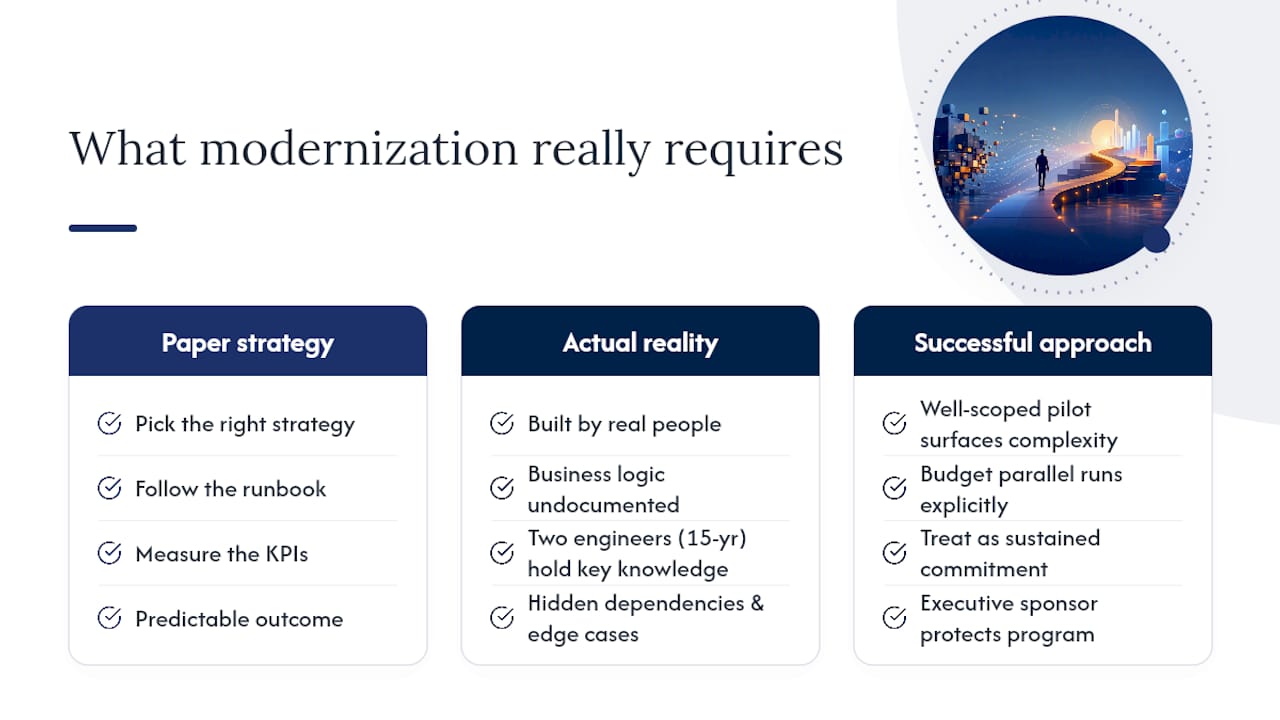
There’s a version of this conversation that makes legacy system modernization sound like a project management problem. Pick the right strategy, follow the runbook, measure the KPIs, and the outcome is predictable. That framing is useful for building a business case, but it understates the real challenge.
The hardest part of most modernization programs isn’t the technology. It’s the organizational reality that the legacy system exists because it was built by real people who made reasonable decisions under the constraints they had. Those people are often still in the organization. The system has accumulated business logic that isn’t documented anywhere except in the code and in the heads of two engineers who’ve been there for fifteen years. When you modernize, you’re not just migrating code; you’re extracting and re-encoding institutional knowledge, often under time pressure, with a team that doesn’t fully understand what the old system actually does.
This is why the pilot matters so much more than the strategy document. A pilot forces you to confront the actual complexity of the system, not the complexity you assumed it had. It surfaces the undocumented dependencies, the edge cases the old system handles silently, and the integration behaviors that no one thought to write down. Every hour spent on a well-scoped pilot saves days of mid-wave surprises.
The other thing practitioners consistently underestimate is the cost of running two systems in parallel. During a strangler migration or a phased cutover, you’re maintaining the legacy system and the new system simultaneously. That’s two deployment pipelines, two monitoring setups, two sets of on-call responsibilities. Budget for it explicitly, or the parallel-run phase will quietly consume the cost savings the program was supposed to generate.
The organizations that modernize successfully aren’t the ones with the best technology strategy on paper. They’re the ones that treat the program as a sustained organizational commitment, not a one-time project, and that have an executive sponsor willing to protect it from quarterly reprioritization.
Bowtie helps you move from assessment to production
Modernization programs stall when teams lack the right skills, the right tooling, or an independent view of what the codebase actually contains. Bowtie’s AI-enabled modernization services are built for exactly that gap: we run discovery and dependency mapping, deliver AI-assisted refactoring and test generation, and execute wave-based delivery with explicit exit criteria at every phase.

We work with CTOs, product leaders, and engineering teams at companies ranging from regulated enterprises to growth-stage startups. Our engagement model starts with a structured discovery and code audit that gives you a clear picture of technical debt, integration risk, and the right strategy for each system in your portfolio. From there, we run a scoped pilot, validate the approach, and deliver subsequent waves with your team alongside ours. Every engagement ends with your team owning the modernized system, not dependent on us to keep it running.
If you’re ready to move from a legacy estate that’s slowing you down to a platform that ships features in days, start with a discovery conversation and we’ll tell you exactly what we’d recommend for your situation.
Sources
- A Survey of Legacy System Modernization Approaches
- 7 Options To Modernize Legacy Systems - Gartner
- Five Fifty: the legacy threat - McKinsey
- How to Modernize Legacy Applications: A Step-by-Step Guide | Catio
- Modernize Legacy Apps with AMP: Up to 3x Times Faster | MongoDB






