
Enterprise AI integration is the deliberate wiring of AI into your existing systems and workflows to produce measurable gains in speed, accuracy, and decision quality, not a standalone model deployment. It only works when three things are in place: clean,
governed data; an orchestration layer connecting AI to your systems of record; and embedded oversight that catches mistakes before they reach customers. What follows is a practical, timeboxed path from pilot to production, built around the parts most vendors skip.
TL;DR:
- Successful enterprise AI integration relies on governed data, an orchestration layer, and embedded oversight to ensure real data action and mistake prevention.
- High-repeatability use cases like ticket triage, invoice matching, and document drafting are best for quick wins, while complex workflows require more governance and maturity.
- Building a layered architecture with clear data sources, normalization, routing, reasoning, and logging is crucial, especially for integrating legacy systems without disruption.
- Data readiness and proper governance are essential, with focus on canonical, current, and accessible data, along with scoped permissions to prevent security risks.
- Pilot projects should be timeboxed to around eight weeks, with specific KPIs, clear decision gates, and organizational ownership to ensure smooth transition to production.
Table of Contents
- What Enterprise AI Integration Actually Means
- Why It Matters: Business Benefits And High-Value Use Cases
- Core Integration Layers And Reference Architecture
- Data Readiness, Governance, And Security Controls
- Pilot And Rollout Plan: Timeboxed Pilots, KPIs, And Scaling Decisions
- Organization, Roles, And The Operating Model That Converts Pilots Into Production
- Technology Choices And Deployment Patterns
- How Bowtie Runs Pilots And Scales Enterprise AI
- What Decision-Makers Consistently Underestimate
- Get Your Enterprise AI Integration Pilot Scoped Right
- Sources
- FAQ
What Enterprise AI Integration Actually Means
Most executives picture “AI integration” as swapping in a smarter chatbot or adding a copilot to an existing app. That’s point AI: useful, but narrow, disconnected from your systems of record, and incapable of touching a real business process end to end.
Enterprise AI integration is different in kind, not just scale. It means connecting AI models and agents to the systems that actually run your business, your ERP, your CRM, your claims database, your ticketing queue, so that AI can read real data, take real actions, and hand off cleanly to humans when it hits the edge of its competence. The framing that matters here isn’t which model you pick. It’s orchestration: the governed layer that links legacy systems, new agentic workflows, and unified data so AI doesn’t operate as an island.
A working enterprise AI stack usually has five parts:
- Data fabric: a unified, queryable layer that gives AI systems consistent access to information scattered across departments.
- Orchestration and business context: the routing logic that decides which agent or model handles which task, and under what rules.
- Model and agent layer: the actual language models, classifiers, or agents doing the reasoning and drafting.
- Sinks and actuators: the systems AI writes back to, whether that’s updating a CRM record, filing a claim, or triggering a shipment.
- Observability and logging: the audit trail that tells you what an agent did, when, and why.
When this stack is built correctly, business processes change shape. A claims adjuster stops manually cross-referencing five systems and instead reviews an AI-drafted summary with source citations. A finance team stops chasing month-end reconciliations line by line and instead reviews exceptions an agent has already flagged. The work doesn’t disappear. It moves from manual assembly to judgment and exception handling, which is exactly where humans add the most value.
Why It Matters: Business Benefits And High-Value Use Cases
The pitch for enterprise AI integration is straightforward: less manual work, faster cycle times, and fewer errors slipping through review. The harder part is knowing which use cases actually deliver that pitch versus which ones just generate a demo.
Four benefit categories show up consistently across enterprise deployments:
- Efficiency: reclaiming hours from repetitive, rules-based tasks like data entry, document review, and status updates.
- Speed: cutting cycle time on processes that used to require multiple handoffs, like support resolution or loan underwriting.
- Scale: handling volume spikes without proportional headcount growth.
- Risk reduction: catching anomalies, fraud patterns, or compliance gaps earlier than manual review would.
Mapped to business function, the pattern holds up well:
| Function | Use case | Typical pilot metric |
|---|---|---|
| Customer support | Triage and drafted responses for common tickets | Resolution time, first-contact resolution rate |
| Finance | Fraud flagging, invoice matching, close automation | Hours saved, exception rate |
| Operations | Predictive maintenance, demand forecasting | Downtime avoided, forecast accuracy |
| Security | Log anomaly detection, access review automation | Mean time to detect, false positive rate |
Pro Tip: Score every candidate use case on repeatability and exception rate before you score it on business impact. A high-value process with too many edge cases will blow your pilot timeline before it proves anything.
Quick wins tend to sit in narrow, high-volume, low-ambiguity tasks: ticket triage, invoice matching, first-draft document generation. These have clear inputs, clear outputs, and enough historical data to validate accuracy fast. Long-term transforms, like end-to-end claims processing or autonomous procurement, require more governance maturity and usually follow, rather than lead, your integration roadmap.
Microsoft’s internal push to embed AI into its own operations offers a useful data point here. Using process mining and digital twins to measure live workflow performance, the company treated AI as an operational platform rather than a one-off tool, building reusable agents it could redeploy across different processes instead of starting from scratch each time. That reuse is where the real efficiency compounds.
Core Integration Layers And Reference Architecture
Enterprise AI integration succeeds or fails at the architecture level, well before anyone debates which model to use. The mistake most teams make is treating AI as an add-on bolted to the front end of an app. The teams that get production results build a layered pipeline instead, one where each layer has a specific job and a clear handoff to the next.
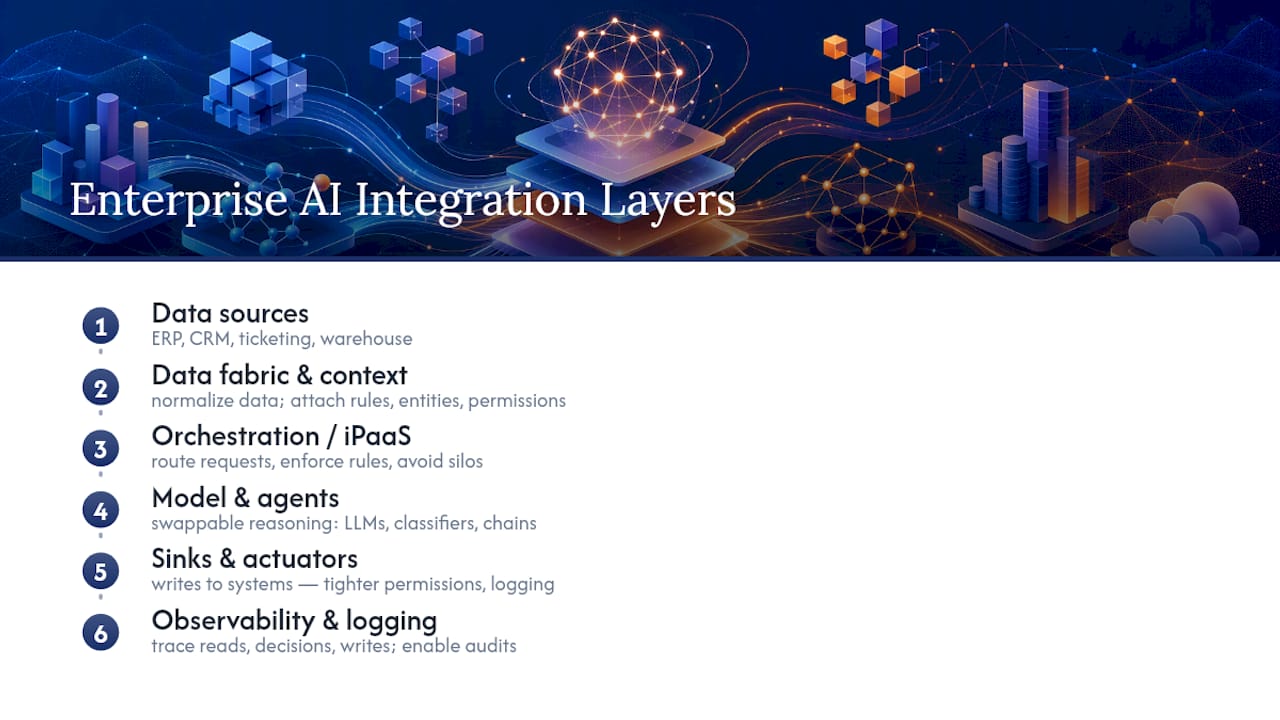
1. Data sources. These are your systems of record: the ERP, the CRM, the ticketing platform, the data warehouse. Nothing about this layer changes. AI reads from it; it doesn’t replace it.
2. Data fabric and business context. This layer normalizes and contextualizes raw data so that a model or agent isn’t guessing at what a field means. It’s where you attach business rules, entity definitions, and permissions to raw records before anything touches an AI system.
3. Orchestration and iPaaS. This is the connective tissue, and it’s the layer most enterprises underbuild. SAP frames AI integration as fundamentally an orchestration challenge: the job is routing requests to the right model or agent, enforcing business rules, and preventing the “AI silos” that show up when every department builds its own disconnected pilot. A governed orchestration layer, whether that’s an integration platform as a service (iPaaS) or a custom routing service, is what lets you add new AI capabilities without re-architecting your core systems every time.
4. Model and agent layer. This is where the actual reasoning happens, whether that’s a large language model drafting a response, a classifier flagging a transaction, or an agent chaining several steps together. This layer should be swappable. If your architecture ties business logic directly to a specific model provider, you’ve built a dependency you’ll regret in eighteen months.
5. Sinks and actuators. These are the systems AI writes back to: updating a record, sending a notification, filing a document, triggering a downstream process. This is also where the risk concentrates, since a write action is much harder to undo than a read action. It’s why sinks typically need tighter permission scopes and more logging than any other layer.
6. Observability and logging. Every action an agent takes should be traceable: what it read, what it decided, what it wrote, and why. Without this, you cannot audit failures, and you cannot improve the system over time.
Three design principles hold this whole architecture together. First, make non-invasive changes: AI should read from and write to existing systems rather than replacing them outright, which protects your existing investment and reduces rollout risk. Second, keep the system of record intact. AI outputs feed into your ERP or CRM; they don’t become a shadow database that drifts out of sync with the real one. Third, favor event-driven triggers over polling wherever possible. A new support ticket, a flagged transaction, or a completed shipment should trigger an agent action directly, rather than having a batch job check for changes every few minutes.
For legacy systems that can’t be touched directly, three patterns cover most situations. An adapter pattern wraps an old system’s data format in a translation layer so newer tools can read it without touching the legacy code. An API façade puts a modern interface in front of a system that only speaks in outdated protocols. A scheduled sync handles systems too brittle for real-time connections, batching updates on a fixed interval instead. None of these require ripping out the legacy platform, which is usually the fastest way to kill executive support for the whole project.
If you want a deeper walkthrough of how these layers translate into an actual ai workflow integration plan, the decision points are largely the same regardless of industry: what gets automated first, what stays human-reviewed, and where the orchestration layer sits relative to your existing IT stack.
Data Readiness, Governance, And Security Controls
Every stalled AI pilot traces back to one of two root causes: the data wasn’t ready, or nobody defined who, or what, was allowed to act on it. Both are fixable, but only if you tackle them before you scale, not after.
Bad data is not a minor inconvenience. It’s an economic drag researchers have put at $3 trillion a year in the U.S. alone, and that cost multiplies once AI is reading and acting on that data at machine speed. An agent making decisions on stale, duplicated, or inconsistently labeled records doesn’t just produce a bad answer. It produces a bad answer fast, at scale, before anyone notices.
Assess readiness by asking three questions of your core datasets: Is the data canonical, meaning does every system agree on what a customer, product, or transaction record actually looks like? Is it current, meaning does it reflect reality within a window your business can tolerate? And is it accessible, meaning can an authorized system actually query it without a manual export?
Governance for AI agents needs to mirror the discipline you already apply to human employees, just automated. Agent identities and permissions should be scoped the way you’d scope a new hire’s access: narrowly, with explicit boundaries, and never with blanket administrative rights just because it’s convenient during a pilot. An agent that can read customer records to draft a support response doesn’t need write access to billing systems. Over-permissioning agents is one of the fastest ways to turn a helpful pilot into a data exfiltration risk.
Here’s a prioritized remediation path for teams starting from a messy data environment:
- Inventory your systems of record and flag which ones disagree with each other on shared entities like customer or product IDs.
- Deduplicate and canonicalize the highest-traffic datasets first, usually customer and transaction records, before touching anything niche.
- Define agent identity and access scopes explicitly, treating each agent like a role with a job description, not an all-access credential.
- Build lineage tracking so every AI-touched record shows where the data came from and what transformed it.
- Set retention and privacy rules that match your regulatory obligations, particularly for anything touching personal or financial data.
- Log every agent action with enough detail to reconstruct a decision months later during an audit.
Architecture matters as much as policy here. Enterprises in regulated industries need strong governance and lineage tracking built into the machine learning platform itself, not bolted on as a compliance afterthought. That means account and network design, model serving architecture, and pipeline monitoring all need security review before a single production workload runs through them.
Pro Tip: Run a data quality audit on your top three pilot datasets before you write a single line of orchestration code. Most integration delays trace back to data problems discovered mid-build, not architecture problems.
Pilot And Rollout Plan: Timeboxed Pilots, KPIs, And Scaling Decisions
Pilots fail for a predictable reason: they run too long, measure too little, and never get a clean go or no-go decision. The fix is a tight, timeboxed structure with metrics defined before the pilot starts, not after someone asks how it’s going.
Start with selection criteria. A good pilot candidate is repeatable (the same task happens often enough to generate meaningful data quickly), measurable (you can define a before-and-after number), and bounded (the exception rate is low enough that a small team can handle edge cases manually during the test). Skip anything that requires solving five ambiguous judgment calls before the AI even touches real work.
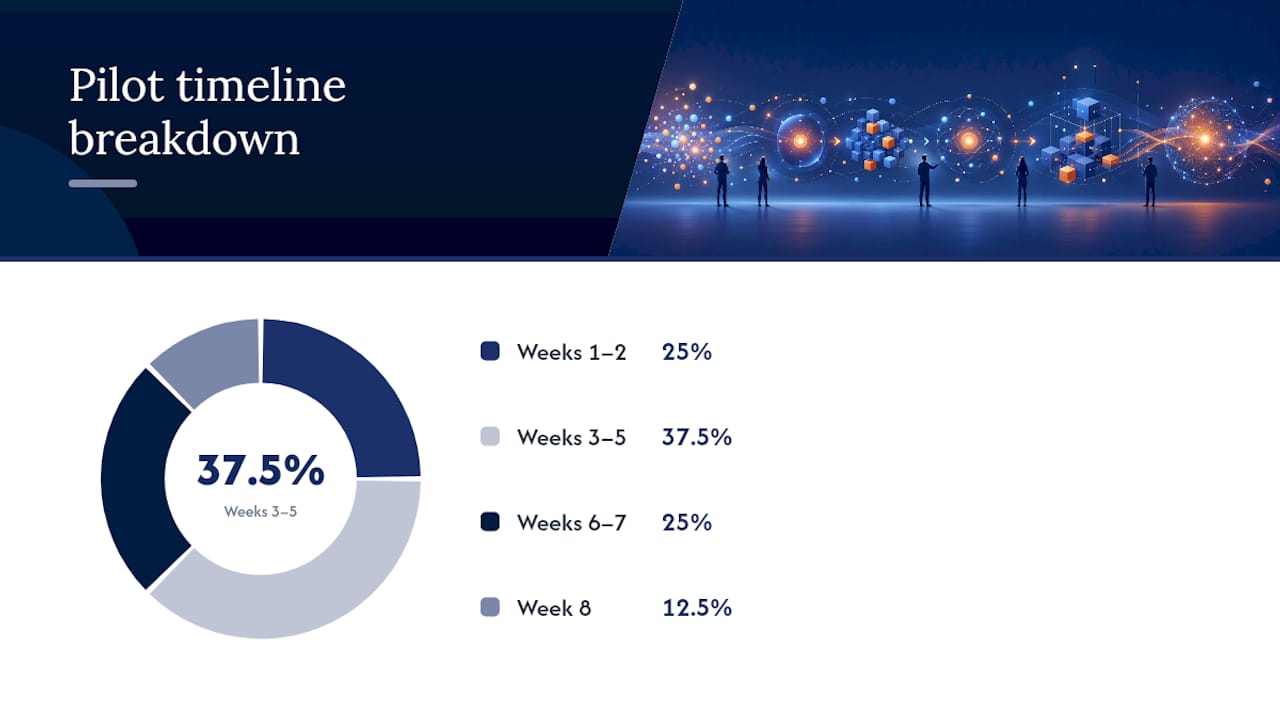
An 8-week pilot timeline is a reasonable operational benchmark, long enough to gather real usage data, short enough to keep organizational attention. A practical breakdown looks like this:
- Weeks 1 to 2: scope the use case, connect data sources, and define baseline metrics before any AI touches production data.
- Weeks 3 to 5: build the integration, wire up orchestration, and run the agent in shadow mode alongside existing manual processes.
- Weeks 6 to 7: go live on a limited slice of real traffic, with human review on every output.
- Week 8: compare results against baseline, present findings, and make the scale or kill decision.
The KPIs that matter most are the ones that translate directly into dollars or hours: hours saved per week, cycle time reduction, accuracy against a human-reviewed baseline, and cost per transaction before and after. Instrument these from day one, not as an afterthought at week 7, because you need a real baseline to compare against.
Size the pilot’s cost buckets narrowly. Treat it as a modular effort focused on a specific, limited cost category, like admin labor hours in a single department, rather than a sprawling transformation initiative. Pilot fatigue sets in fast when a project’s scope keeps expanding mid-flight, and a narrow, well-measured pilot is far easier to fund for scale-up than a broad one nobody can cleanly evaluate.
Decision gates should be explicit before the pilot starts, not negotiated after the results come in. If it falls short, the team documents why and either adjusts scope or shelves the use case, rather than quietly extending the pilot indefinitely. Funding for scale-up should come from a separate budget line than the pilot itself, so a successful pilot isn’t stuck waiting for next year’s planning cycle to get resourced.
Continuous measurement doesn’t stop once a pilot graduates to production. Process mining and digital twins let teams keep watching live workflow performance after go-live, catching drift in accuracy or cost per transaction before it becomes a visible problem.
Organization, Roles, And The Operating Model That Converts Pilots Into Production
The single biggest reason pilots die in the handoff to production isn’t technology. It’s organization. Nobody owned the transition, so nobody drove it.
The forward-deployed engineer model solves this by embedding technical staff directly with the business unit running the pilot, rather than having a central AI team build in isolation and hand off a finished product. That embedding shortens feedback loops dramatically. An engineer sitting with the claims team sees the messy exception cases in real time instead of reading about them three weeks later in a status report, and validates evaluation criteria with the people who actually do the work before a single line of production code gets written.
A workable operating model needs three layers of ownership:
- Line owners: the business unit leader accountable for the process being automated, who defines success criteria in business terms, not technical ones.
- A center of excellence (COE): a small central team maintaining shared infrastructure, reusable components, and technical standards across pilots so every department isn’t rebuilding the same orchestration logic.
- A governance steering committee: cross-functional oversight covering security, compliance, and risk, meeting regularly enough to unblock decisions without becoming a bottleneck.
Human-in-the-loop design isn’t optional in early deployments. Every agent workflow needs a defined exception path: what happens when the AI is uncertain, when confidence scores drop below a threshold, or when the action carries enough risk that a human sign-off makes sense regardless of confidence. Building this in from day one, rather than retrofitting it after a bad output reaches a customer, is worth the design time.
Pro Tip: Keep your pilot team small, two to four people including the embedded engineer, and only expand headcount once the use case is funded for production. A bloated pilot team is usually a sign the use case wasn’t scoped narrowly enough.
Sizing shifts from pilot to production. A pilot team of two to four people can run the initial 8-week test. Production usually needs a dedicated line owner, a rotating on-call technical resource from the COE, and clear escalation paths back to governance, not a permanent standing army.
Technology Choices And Deployment Patterns
Vendor evaluation for enterprise AI integration goes sideways when teams start with “which model” instead of “which architecture.” The model is replaceable. The orchestration and governance layer you build around it is not, at least not without significant rework.
Five tool categories cover most of what you’ll need to evaluate:
- Orchestration and iPaaS platforms: the routing and integration layer connecting AI to your existing systems and enforcing business rules across departments.
- MLOps platforms: tools for managing model training, deployment, versioning, and monitoring in production. Open-source options like ZenML offer reproducible pipelines and agent evaluation tooling that keep data and artifacts inside your own infrastructure, which matters if vendor lock-in is a board-level concern.
- Model hosting: where the actual inference runs, whether that’s a managed API, a self-hosted open-weight model, or a hybrid split by workload sensitivity.
- Agent frameworks: the scaffolding for chaining reasoning steps, tool calls, and multi-step workflows into a single agent action.
- Knowledge grounding tools: retrieval systems that keep agents anchored to your actual documents and data instead of relying purely on a model’s training data.
The build versus buy decision usually comes down to how differentiated the use case is. Commodity tasks like document summarization or ticket triage rarely justify custom-built infrastructure. Processes tied to a genuine competitive advantage, like a proprietary risk model, often do.
Cloud-first deployment is the default for most enterprises, but regulated industries or highly sensitive data sometimes push toward on-prem or hybrid model hosting, trading convenience for control. Whichever direction you go, demand three things from any vendor before signing: exportable logs so you’re never locked out of your own audit trail, prompt and configuration export so you can migrate if the relationship ends, and clear, written data handling guarantees covering where your data lives and who can access it.
Standardized AI capabilities also pay off across departments once they’re built once. Teams that treat a working integration as a reusable capability, rather than a one-off project, tend to see multiplied returns as the same infrastructure gets applied to new use cases instead of starting from zero each time.
How Bowtie Runs Pilots And Scales Enterprise AI
We built Bowtie around the gap most enterprises hit after a promising demo: turning a working prototype into production software that survives contact with real data, real edge cases, and real compliance review. Our work spans custom application builds, AI code audits for teams inheriting AI-generated or vibe-coded systems, and agentic workflow design that connects directly to your existing systems of record.
A typical Bowtie engagement mirrors the pilot structure outlined above: scoped discovery, an integration build against your actual data (not a sandbox), and a measurement plan tied to the KPIs that matter to your business, not vanity metrics. We stay engaged after launch, because AI systems drift, and a pilot that worked at week 8 needs monitoring at month 8 too.
We have experience helping clients transition AI-driven systems from working demos to production-ready software suitable for executive review.
What Decision-Makers Consistently Underestimate
Here’s the pattern I keep seeing after looking at how enterprise AI pilots actually die: it’s almost never the model. Teams spend weeks benchmarking which large language model performs best on a sample dataset, then lose months to an orchestration layer nobody designed, permissions nobody scoped, and an exception path nobody built. The model choice is the easiest decision in the whole project and the one that gets the most attention.
The non-obvious rule: embed a technical person with the business team before you write any integration code, not after the first pilot stumbles. That person’s job isn’t to build yet. It’s to sit through a week of the actual manual process, catalog every exception case a spreadsheet won’t show you, and come back with a scoped, honest estimate of what’s repeatable and what isn’t.
Before you greenlight a pilot, run this checklist:
- Is the target process’s exception rate low enough to pilot safely on real traffic?
- Do you have a canonical, current dataset for this specific use case, not just “good enough” data somewhere in the warehouse?
- Have you defined the KPI and baseline number before writing a single line of orchestration logic?
- Is there a named line owner accountable for the go or no-go decision at week 8?
If you can’t answer all four with confidence, you’re not ready to pilot. You’re ready to spend another two weeks on discovery, and that’s a better use of the time than launching something that quietly fails in production.
— Chad
Get Your Enterprise AI Integration Pilot Scoped Right
If you’ve read this far, you already know the model isn’t the hard part. The hard part is the orchestration layer, the data cleanup, the permission scoping, and the organizational buy-in that turns a pilot into something a board will fund for production. That’s the work Bowtie does day in and day out, whether you’re modernizing a legacy claims system, auditing AI-generated code that’s already live, or scoping a first agentic workflow from scratch.

An initial engagement with us starts with discovery: a focused look at your systems of record, your data readiness, and the specific process you’re trying to automate, followed by a scoped pilot plan with defined KPIs and a realistic timeline, not a vague roadmap. We work alongside your team rather than disappearing for three months with a black box.
If you’re based near Michigan, our AI integration and enterprise modernization services in Detroit are a direct starting point for a discovery conversation. Wherever you’re located, reach out through Bowtie to scope your first pilot and get a straight answer on what it will actually take to get from demo to production.
Sources
- What is AI integration — SAP Resources
- Streamlining business operations at Microsoft with an AI toolkit
- How to make AI work in your enterprise through integration and not silos - WEF
FAQ
What Is Enterprise AI Integration?
It’s the process of connecting AI models and agents to your existing business systems, like your ERP, CRM, and data warehouse, through a governed orchestration layer so AI can act on real data and hand off cleanly to humans, rather than running as an isolated tool disconnected from your workflows.
How Is AI Being Used In Enterprise Settings Today?
Enterprises use AI for customer support triage, fraud detection and invoice matching in finance, predictive maintenance in operations, and security log anomaly detection, typically starting with narrow, high-volume, low-ambiguity tasks before expanding to broader processes.
What Are Common Examples Of Enterprise AI?
Common examples include AI-drafted support responses reviewed by humans, automated invoice matching and close processes in finance, predictive maintenance alerts in operations, and agent-assisted claims processing with a human-in-the-loop exception path.
What Does A Successful Enterprise AI Pilot Look Like?
A successful pilot runs on a tight timeline, often around eight weeks, with predefined KPIs like hours saved, cycle time, and accuracy against a human baseline, and ends in a clear scale-or-kill decision rather than an open-ended extension.
Why Do Enterprise AI Pilots Fail To Reach Production?
Most failures trace back to poor data readiness, missing governance around agent permissions, or an organizational gap where nobody owned the handoff from pilot to production, not a shortcoming in the underlying model.






