
A custom web app is software built from scratch around your specific workflows, data, and users, not a template you skin with your logo. You need one when your business runs on processes that off-the-shelf tools force you to bend
around, when you need to own your data and code outright, or when you’re scaling past what a no-code platform can handle. If that’s you, the path forward involves a real discovery phase, a prototype, a build, and a partner who can carry the project through production and beyond.
TL;DR:
- Custom web apps are necessary when workflows require complex logic, multiple integrations, or data ownership that off-the-shelf tools cannot support.
- AI-assisted development accelerates prototyping but still requires traditional engineering oversight for security, stability, and compliance in production.
- Projects should follow a five-phase process: discovery, prototyping, building, testing, and deployment, with skipping phases often leading to budget and schedule overruns.
- Costs vary widely based on feature complexity, integrations, and security needs, ranging from tens of thousands to over half a million dollars for enterprise-level apps.
- Contracts must specify ownership rights, security measures, and ongoing support to prevent liabilities and ensure long-term control of the application and data.
Table of Contents
- What Is a Custom Web App, and When Does Your Project Need One?
- Traditional Engineering, Low-Code, or AI-Assisted: Which Fits Your Project?
- How to Plan, Build, or Commission a Custom Web App
- Which Tech Stack and Architecture Should You Choose?
- How Much Does a Custom Web App Cost, and How Long Does It Take?
- What Belongs in Every Custom Web App Contract?
- How Does an Experienced Provider Build and Support a Custom Web App?
- What Actually Determines Whether a Custom Build Pays Off
- Ready to Build Something That Actually Fits Your Business?
- Sources
- FAQ
What Is a Custom Web App, and When Does Your Project Need One?
A custom web app is a bespoke piece of software built to match your exact workflows rather than a generic template. Unlike a standard website, which mostly displays information, a web app lets people log in, store data, and manipulate it inside the browser: creating records, updating status, running reports, moving files between systems. That distinction between “read-only” and “read-write” is the cleanest way to separate a website from an application, and it’s the definition Elementor uses when explaining the category to founders who’ve never commissioned software before.
You’ll recognize the need for one in a handful of recurring situations. A logistics company needs a dispatch dashboard that talks to three different carrier APIs at once. A clinic needs a patient portal that syncs with an existing electronic health record system but adds scheduling logic no vendor sells. A manufacturer needs an internal tool that turns a five-step Excel process into a two-click form. None of these are edge cases. They’re the normal shape of a business that has outgrown the tools it started with.
Run your project through this checklist before you commit budget to anything:
- Unique workflows. Does your process require branching logic, approvals, or calculations that a generic form builder can’t express?
- Required integrations. Do you need to connect to a CRM, payment processor, EHR, or internal database that a template doesn’t support out of the box?
- Data ownership. Do you need to own your database outright, rather than renting access inside someone else’s platform?
- Scale and performance. Will you outgrow the user limits, API caps, or performance ceilings of a subscription tool within 12 to 18 months?
If you answered yes to two or more, you’re past the point where templates, SaaS subscriptions, or no-code builders solve the problem. Those categories still have a place for simple internal tools or fast market tests, but they’re not a substitute for software built around how your business actually operates.
Traditional Engineering, Low-Code, or AI-Assisted: Which Fits Your Project?
Every custom web app project sits somewhere on a spectrum between speed and control. Picking the wrong point on that spectrum is the single most common reason projects stall out or need to be rebuilt within a year.
- Low-code and no-code platforms get a working prototype in front of users fastest, often in days, and they’re a legitimate choice for an internal tool with a small user base and no unusual security requirements.
- AI-assisted development has changed the early stages of a build dramatically. Tools that generate scaffolding, boilerplate, and even full features from a prompt can compress weeks of setup into days, which is why most modern how-to guides for building web apps now treat AI-assisted workflows as a distinct third path alongside traditional coding and no-code platforms.
- Traditional engineering remains the right call when you need strict security controls, complex integrations, high concurrency, or long-term maintainability that survives staff turnover.
The trap is assuming AI-assisted prototyping replaces engineering entirely. It doesn’t. No-code and AI builders shorten the distance to a demo, but production-grade applications still need engineering oversight for security hardening, error handling under real load, and the unglamorous work of making sure the thing doesn’t break when 200 people use it at once instead of 3. If your project touches payment data, health information, or anything with a compliance requirement, that oversight isn’t optional. It’s the difference between a demo and a product.
How to Plan, Build, or Commission a Custom Web App
Every serious custom web app project moves through the same five phases, whether you’re building in house or hiring an outside team. Skipping one is how projects end up over budget, over schedule, or shipped with gaps nobody caught until a customer did.
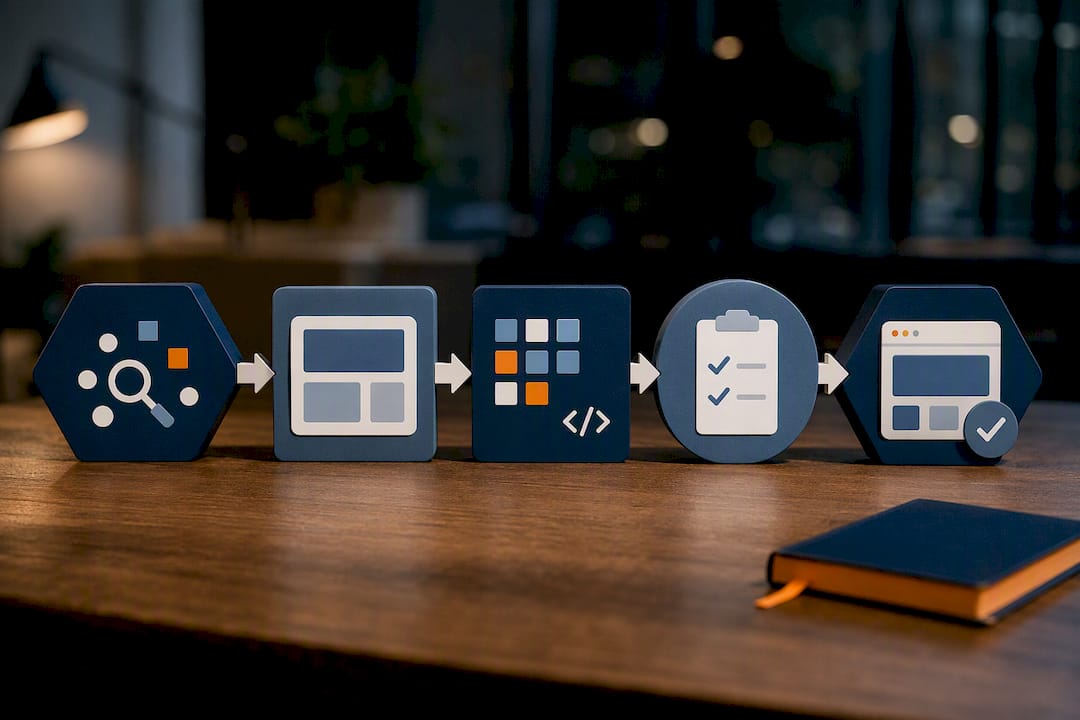
Phase 0: Discovery. Before anyone writes a line of code, you need clarity on four things: your goals, your users, the metrics that define success, and your hard constraints (budget, timeline, compliance requirements). This phase produces a written brief, not a slide deck. Vague goals like “make things more efficient” produce vague software. A goal like “cut manual invoice entry from 20 minutes to under 3” gives a development team something to build against and you something to measure later.
Phase 1: Specs and prototype. This is where wireframes turn into a clickable prototype and your data model gets defined: what entities exist (users, orders, appointments), how they relate, and what fields matter. A good prototype phase, whether it follows a traditional discovery to prototype flow or an AI-assisted rapid mockup process, lets you and your stakeholders click through the app before a dollar goes into the actual build. Catching a missing feature here costs an afternoon. Catching it after launch costs a rebuild.
Phase 2: Build. Development happens in sprints, typically one to two weeks each, with specific acceptance criteria attached to every feature. “The dashboard should load fast” is not an acceptance criterion. “The dashboard should return results in under 2 seconds for a dataset of 10,000 records” is. Integrations get built and tested individually during this phase, not bolted on at the end.
Phase 3: QA and security testing. Automated tests catch regressions before they ship. Penetration testing catches vulnerabilities before an attacker does. User acceptance testing catches the gap between what the spec said and what actually solves the problem, because those two things are not always the same. Skipping this phase to hit a launch date is the single most common regret vendors hear from clients who launched too fast.
Phase 4: Deployment and operations. Launch isn’t the finish line. You need a hosting plan, a CI/CD pipeline so updates ship without downtime, monitoring that alerts someone before users notice a problem, and a clear answer to “who gets paged at 2 a.m. if this goes down?”
Pro Tip: Before you sign anything, check whether your app’s name or brand is available. A quick USPTO trademark search takes ten minutes and can save you a rebrand six months after launch, when your app already has real users and a real domain.
If you’re commissioning this work rather than building it yourself, bring a procurement checklist to every vendor conversation:
- Who owns the source code and the underlying database once the project ends?
- What’s the acceptance criteria for “done” on each feature, in writing?
- What does the maintenance and support plan look like after launch, and what does it cost?
- Can they show a comparable project, and can you talk to that client?
Watch for a few red flags during vendor calls: no mention of testing or QA at all, reluctance to put acceptance criteria in writing, or a proposal that skips discovery and jumps straight to a price quote. A team that can’t tell you how they’ll measure success before they start probably can’t tell you why the project went over budget after they finish.
Which Tech Stack and Architecture Should You Choose?
The stack behind your custom web app determines how easily it scales, how fast bugs get fixed, and how hard it is to hire someone to maintain it after your original developer moves on. Practitioners commonly point to React or Next.js paired with TypeScript as a frontend baseline, largely because the talent pool is deep and the tooling is mature, which matters more for long-term maintainability than any performance benchmark.
On the backend and infrastructure side, your choices come with real trade-offs:
- Managed databases (like managed PostgreSQL or MySQL instances) reduce operational overhead but cost more at scale than self-hosted alternatives.
- Serverless architecture scales automatically and charges you only for what you use, which fits unpredictable traffic patterns better than a fixed server.
- Containerized deployments (Docker, Kubernetes) give you portability across hosting providers, at the cost of more upfront configuration work.
Integration patterns matter just as much as the stack itself. REST APIs remain the default for most third-party integrations because nearly every platform supports them. GraphQL earns its complexity when your app needs to pull specific slices of data from multiple sources without over-fetching. Webhooks handle the “notify me when something changes” pattern, like a payment succeeding or a form submission arriving, without your app having to poll constantly for updates.
None of this happens in a vacuum. Many real-world projects lean on a mix of open-source components and managed services rather than building everything from zero, and tooling ecosystems like Budibase’s open-source repository show how common that blended approach has become. The trade-off is dependency management: every open-source library you adopt needs a patching plan, or it becomes tomorrow’s security liability.
Finally, your CI/CD pipeline decides your release cadence. A team that can push a tested update to production in an afternoon ships fixes fast. A team without automated deployment pipelines treats every release like a fire drill, which slows everything down and raises the odds someone skips a step under pressure.
How Much Does a Custom Web App Cost, and How Long Does It Take?
Cost and timeline scale directly with complexity, not with how impressive the idea sounds in a pitch meeting. A simple MVP with a handful of screens and one integration might run in the tens of thousands of dollars over 6 to 10 weeks. A small business application with multiple user roles, several integrations, and real data modeling typically stretches into a multi-month build. A complex enterprise platform, with compliance requirements, custom security architecture, and dozens of integrations, can take the better part of a year and cost well into six figures.
Statistic Callout: Vendor pricing pages and industry overviews consistently point to the same underlying drivers behind cost swings, regardless of the exact dollar figure quoted: feature complexity, the number and difficulty of integrations, regulatory requirements, and the team model used to build the project, according to Web & Rank’s overview of bespoke development.
That last variable, team model, matters more than most buyers expect. An in-house hire brings ongoing overhead but full control. A freelancer costs less upfront but usually can’t guarantee availability after launch. An agency or specialized development partner sits in the middle: higher hourly cost, but continuity, accountability, and a support structure that outlives any single developer’s schedule.
A few practical levers control cost without gutting your requirements:
- Phase your launch. Ship the features that solve the core problem first, and hold nice-to-haves for a version two.
- Nail down integrations early. A vaguely scoped integration is one of the most common sources of mid-project cost overruns.
- Ask every vendor for the same breakdown. Request a phase-by-phase estimate (discovery, build, QA, deployment) so quotes are comparable instead of apples to oranges.
If a proposal comes back suspiciously cheap or suspiciously fast relative to everyone else’s, ask what’s being skipped. Usually it’s testing, security review, or the maintenance plan, and all three cost you more later than they would have cost up front.
What Belongs in Every Custom Web App Contract?
Ownership, security, and maintenance terms decide whether your custom web app is an asset you control or a liability you’re renting from someone else. Get these into the contract before development starts, not after a dispute forces the conversation.
On ownership, the contract needs to state plainly that you own the source code and the data once the engagement ends, with a portability clause guaranteeing you can export your database and move hosting providers without the vendor’s cooperation. If a vendor hesitates on that clause, that hesitation is the answer to whether you should sign.
On security, require these as baseline, non-negotiable terms:
- Authentication and role-based access control, so users only see and touch what their role permits.
- Encryption for data both at rest and in transit.
- A defined dependency-patching cadence, since outdated libraries are one of the most common entry points for attackers.
- Audit rights, so you can commission an independent review of the codebase if you have concerns later.
On maintenance, agree on a service level up front: patching cadence (monthly, at minimum, for security updates), an uptime target, and a defined incident response time for critical bugs.
Pro Tip: Budget for a code audit every 12 to 18 months even if nothing seems wrong. Dependencies drift, security assumptions age, and the fastest way to catch a slow-building problem is a scheduled second look, not waiting for something to break.
How Does an Experienced Provider Build and Support a Custom Web App?
Bowtie built its process around a problem most vendors would rather not talk about: a lot of software, including AI-generated software, launches looking finished and then falls apart the moment real users hit it with real data. That gap between “looks done” and “actually production-ready” is where most custom app budgets get wasted, whether the client is a startup or a company the size of the NFL.
A serious provider’s process runs through four phases that clients should expect:
- Scoping, where goals, users, and integration requirements get nailed down before a line of code is written.
- Build, using AI-assisted engineering to move fast without skipping the security and testing work that makes code production-ready.
- Audit, a dedicated review pass, including audits of code written by AI tools or other developers, to catch what a rushed launch missed.
- Support, ongoing maintenance so the app keeps working as dependencies, traffic, and business needs shift.
Use that four-phase structure as your own evaluation rubric: any provider you’re vetting should be able to describe their version of scoping, build, audit, and support in specific terms, not vague reassurances.
What Actually Determines Whether a Custom Build Pays Off
A custom web app is a strategic investment when the workflow it replaces is costing you real time or real errors every week, not when it’s a nice-to-have someone floated in a planning meeting. The providers that deliver lasting value are the ones who treat scoping and post-launch audits as core deliverables, not upsells, because that’s where most of the actual risk in a software project lives. If you’re weighing whether to move forward, start with a scoping conversation before a full proposal. It’ll tell you more about a vendor’s judgment than any pitch deck will.
— Chad
Ready to Build Something That Actually Fits Your Business?
Templates and generic platforms force you to reshape your workflow around someone else’s software. Bowtie builds the app around your workflow instead, using AI-assisted engineering to move fast without skipping the security testing, code audits, and maintenance planning that keep a custom web app reliable for years, not just at launch.

Bowtie’s services cover the full lifecycle a custom build actually needs: custom application development, AI integration and workflow automation, and standalone code audits for teams who already have an app but aren’t confident in what’s under the hood. If you’re deciding between vendors right now, Bowtie’s own guide to choosing a development partner is worth reading before you sign anything, ours or anyone else’s.
The next step is simple: bring your project brief, however rough, to a scoping conversation on the Bowtie homepage, and find out what a production-ready version of your idea actually looks like.
Sources
- What are custom web applications? (Elementor)
- How to Build a Web App: Beginner’s Guide (Budibase)
- USPTO trademark search
FAQ
What Is a Custom Web App?
A custom web app is software built from scratch around a specific business’s workflows, letting users store, edit, and manage data directly inside a browser rather than just viewing static content, as Elementor’s overview explains.
How Much Does a Custom Web App Cost?
Costs range from tens of thousands of dollars for a simple MVP to well into six figures for a complex enterprise platform, with feature complexity, integrations, and compliance needs acting as the main cost drivers.
Can You Build a Web App for Free?
You can prototype for free on many no-code and low-code platforms, but free tiers typically cap users, storage, or features, and most production apps eventually move to a paid plan or custom engineering to handle scale and security.
How Do I Make My Own Online App?
Follow the same five-phase path professionals use: discovery, prototype, build, QA and security testing, then deployment, adjusting the tools (no-code, AI-assisted, or traditional engineering, as outlined in Budibase’s guide) to match your technical skill and project complexity.
Should I Hire an Agency Like Bowtie or Build It Myself?
Build it yourself if you’re comfortable with code and the project is simple; hire a provider like Bowtie when you need production-grade security, integrations, and long-term maintenance support that a solo build can’t reliably sustain.






