
Production-grade CRM workflow automation now means agentic AI systems that orchestrate integrations and decisions across your software stack, not scripted point automations. The right way to build one is to treat it like any other engineering project: run an Integration
Surface Audit first, then pilot under staged governance before anything touches production. If you’re evaluating agencies, that audit is the litmus test. Bowtie runs this process for clients who need automations that survive contact with real systems.
TL;DR:
- Successful agentic CRM automation relies on a comprehensive Integration Surface Audit to assess system complexity, authentication, and owner mapping before any development begins.
- Core architecture must include a control plane, agent registry, orchestration pattern, and memory layers, each with rigorous testing and observability to prevent governance failures.
- Clear, measurable acceptance criteria and a golden trajectory library are essential to ensure reliable behavior and simplify rollback in case of behavioral drift.
- Privacy and security require strict scoped permissions, detailed audit trails, and policies aligned with data protection laws, especially when handling sensitive customer data.
- Projects can range from days to months depending on system complexity, with risk most concentrated in legacy systems and integration issues rather than model quality.
Table of Contents
- What CRM Workflow Automation Actually Means for Engineering Teams
- Core Architecture and Runtime Components You Must Require in Proposals
- The Integration Surface Audit: Scoping Risk Before You Sign Anything
- Agentic SDLC and Evaluation-Driven Development
- Observability and Operational Controls for Non-Deterministic Systems
- Scoping Delivery: Timelines, Red Flags, and What Belongs in Your SOW
- The Discovery Call: Questions That Separate Real Vendors From Deck Builders
- Common Use Cases and Benefits of CRM Workflow Automation
- Key CRM Platforms and Tools That Support Workflow Automation
- Best Practices for Designing Effective CRM Workflows
- Data Privacy and Security Considerations in CRM Automation
- Bowtie’s Take on Building Agentic CRM Automations That Actually Ship
- Get Your CRM Automation Built Right the First Time
- Sources
- FAQ
What CRM Workflow Automation Actually Means for Engineering Teams
Forget what most CRM vendors sell you. This isn’t about drag-and-drop lead scoring or email sequences baked into Salesforce or HubSpot. That’s workflow automation inside a CRM. What we’re talking about is different: custom, agentic orchestration that connects your CRM to the rest of your business systems and makes decisions, not just triggers.
An agentic CRM automation might read a support ticket, check inventory across three internal systems, update a customer record, and escalate to a human, all without a human writing the rule for that exact sequence in advance. That’s a meaningful shift, and agentic software development is already moving from point tools toward orchestrated agents across the SDLC, according to Forrester’s coverage of the trend.
Agents now touch stages most teams assumed were human-only:
- Planning: agents draft acceptance criteria from tickets and flag ambiguous requirements before a sprint starts.
- Testing: agents generate and run regression suites against prior behavior, not just prior code.
- Release: agents stage rollouts and monitor early signals before full traffic hits.
Once agents make decisions instead of following fixed rules, integration and governance outrank raw coding speed as your primary risk.
Core Architecture and Runtime Components You Must Require in Proposals
Any agency worth hiring should walk in with an architecture diagram, not a demo. Four components separate a durable system from a fragile pilot.
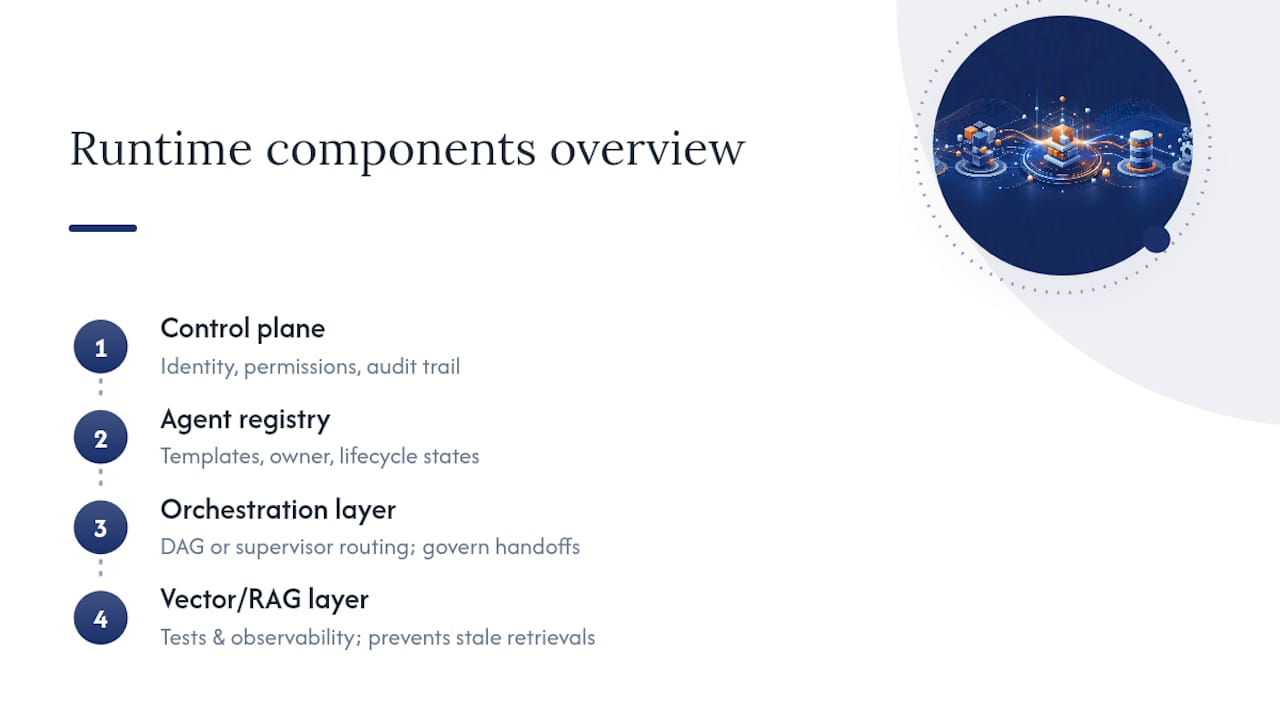
The control plane is the nervous system. It manages identity (which agent is acting, on whose behalf), scoped permissions (what that agent can actually touch), and an audit trail (what it did and when). Without one, agent sprawl creates governance failures that surface only after something breaks in production.
The agent registry is your inventory. Every agent needs a template, a named owner, and a defined lifecycle state (draft, staged, production, deprecated). Ask an agency how they track this. “We keep notes in Notion” is not an answer.
Orchestration determines how agents hand work to one another. A directed acyclic graph (DAG) pattern works well for predictable, linear processes. A supervisor pattern, where one agent routes work to specialists, handles ambiguity better but needs tighter governance on handoffs, since an ungoverned handoff is where errors compound silently.
Finally, if your automation touches a vector store or RAG layer for memory or retrieval, that layer needs its own test and observability plan. Retrieval quality drifts as your underlying documents change, and nobody notices until an agent confidently returns a stale answer.
The Integration Surface Audit: Scoping Risk Before You Sign Anything
Here’s the uncomfortable truth: integration problems, not model quality, cause the vast majority of production failures in enterprise agent deployments. Legacy APIs, brittle auth, and unclear system ownership do more damage than a weak model ever will. That’s why the Integration Surface Audit (ISA) comes before a single line of orchestration code.
The ISA sorts every touched system into an Integration Complexity Tier (ICT):
- Tier 1: modern REST APIs with documented auth. Days to integrate.
- Tier 2: stable but older APIs, minor auth quirks. One to two weeks per system.
- Tier 3: legacy systems, undocumented behavior, shared credentials. Three to six weeks.
- Tier 4: systems with no API, screen-scraping, or an owner who left the company two years ago. Budget months, not weeks.
Run the ISA in this order: enumerate every system the automation will touch, audit each system’s authentication method and token lifecycle, map a human owner to every system (not a department, a person), and build change management milestones around whichever tier dominates the list.
Pro Tip: Ask every vendor a single question before you sign: “What’s the highest ICT tier in our stack?” If they can’t answer, they haven’t done the audit, and your timeline estimate is fiction.
Auth is the silent timeline killer. Expired service accounts, undocumented OAuth scopes, and shared logins routinely add weeks that never show up in the original SOW.
Agentic SDLC and Evaluation-Driven Development
Evaluation-driven development (EDD) replaces the old model where QA happens at the end. Instead, evaluation runs continuously and steers the build, catching behavioral drift before it reaches a human tester.
The centerpiece is the golden trajectory, a recorded, approved sequence of an agent’s decisions and actions for a known scenario. Every code or prompt change gets tested against the full library of golden trajectories before release. If an agent’s behavior diverges from a golden trajectory without a documented reason, that’s your rollback trigger.
This only works if you version everything the same way you version code:
- Prompts, tied to a commit hash, not a shared doc someone edits live
- Tool manifests, defining exactly what each agent can call and with what parameters
- Policy configs, governing permission scopes and escalation rules
Practitioner research on agentic systems confirms this pattern: teams that treat evaluation datasets and golden trajectories as first-class engineering artifacts, versioned alongside code, ship more reliably than teams bolting evaluation on afterward. InfoQ’s agentic development playbook calls this treating prompts as infrastructure as code, and it’s the right mental model. A prompt change without version control is a production change with no rollback plan.
Observability and Operational Controls for Non-Deterministic Systems
Agents don’t behave the same way twice, which means your observability stack has to work differently than a standard application monitor. You need tracing tools built for this, like LangSmith or OpenTelemetry-based pipelines, that capture every step of an agent’s reasoning and action, not just the final output.
A production-grade setup needs:
- Full trace retention for every agent run, with a defined retention window tied to your audit and compliance needs
- Automated comparison of live runs against golden trajectories, flagging divergence for review
- Scoped permissions enforced centrally through the control plane, not scattered across individual agent configs
- Human-in-the-loop checkpoints gating any high-risk action, like a refund, a data deletion, or a customer-facing message above a defined value threshold
Roll out new agent behavior progressively. Route a small percentage of traffic to the new version, watch the trace comparisons, and expand only when divergence stays inside your tolerance. This is the same discipline behind canary deployments, applied to something that thinks for itself. Skip it, and your first sign of trouble is a customer complaint instead of a dashboard alert.
Scoping Delivery: Timelines, Red Flags, and What Belongs in Your SOW
A feature touching one or two Tier 1 systems is a days-to-weeks job. A feature spanning three Tier 3 systems and a Tier 4 legacy database is a months-long engagement, no matter what a sales deck promises.
Push back hard if a proposal skips the ISA, leaves system owners unnamed, or writes acceptance criteria in vague language like “the agent will handle customer inquiries effectively.” Ambiguous intent is the new failure point in agentic projects, and loose acceptance criteria multiply rework fast.
Your SOW should require measurable acceptance criteria tied to specific golden trajectories, a documented rollback plan for every release, and a written policy for handling underlying model updates. Model providers change model versions without warning, and your agents’ behavior can shift under you if nobody owns that risk.
The Discovery Call: Questions That Separate Real Vendors From Deck Builders
Ask these on the first call, in this order.
- What does your ISA deliverable actually look like, and can I see a redacted example?
- How do you map ICT tiers, and what’s your typical timeline per tier?
- Who owns authentication and system access mapping on your side versus mine?
- Can you show me a control plane diagram from a past engagement?
- Do you have working golden trajectory examples, and how do you run CI tests against agent behavior?
- What’s your incident SLA once this is in production?
- What triggers a rollback, and who has the authority to call it?
- How do you handle a model version update from the underlying provider?
Pro Tip: If a vendor can’t produce a real control plane diagram or a real golden trajectory example within a day of asking, they haven’t built one before. That’s not a hard no, but it’s a serious yellow flag.
Week one deliverables should always include the ISA, an ICT tier map, an auth plan, and a named owner for every system in scope.
Common Use Cases and Benefits of CRM Workflow Automation
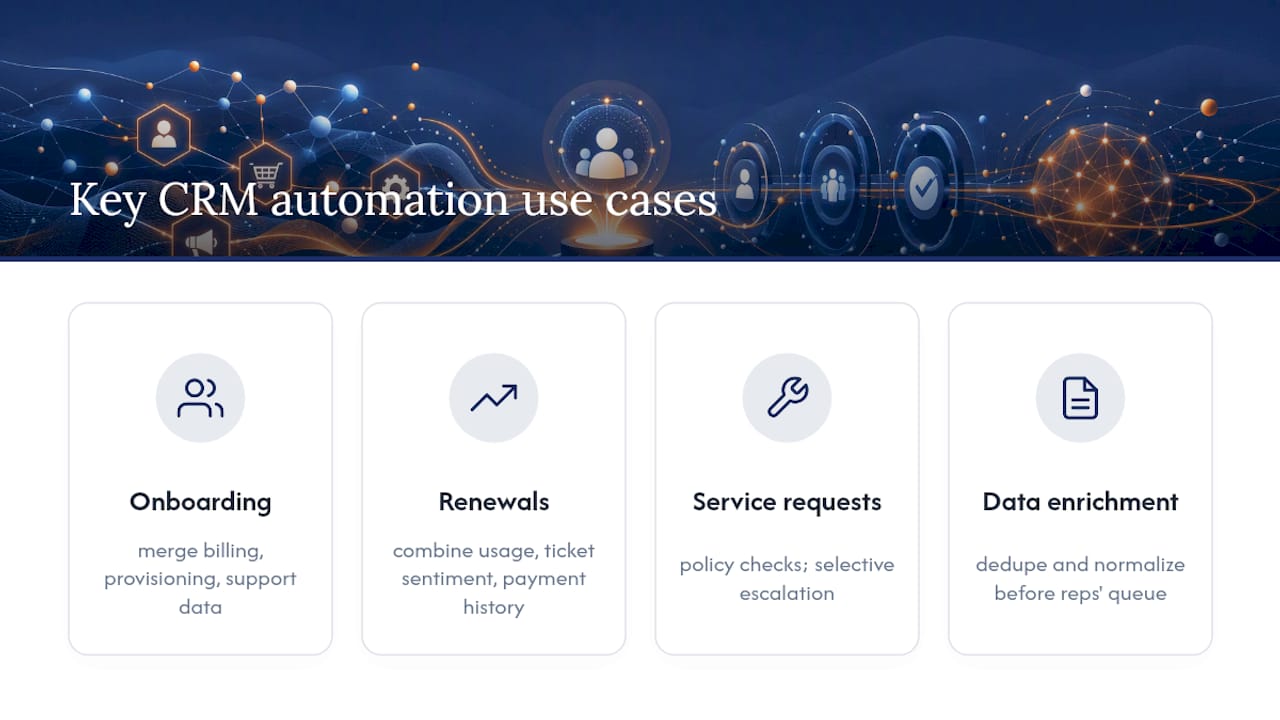
The highest-value automations tend to cluster around a few patterns. Customer onboarding sequences that pull data from billing, provisioning, and support systems into one coherent record save teams hours per new account and eliminate the copy-paste errors that come with manual handoffs. Renewal and churn-risk workflows that combine usage data, support ticket sentiment, and payment history give account teams a real signal instead of a gut feeling.
Internal service requests, like a sales rep asking for a custom pricing exception, benefit enormously from agentic routing that checks policy, pulls approval history, and escalates only the genuinely ambiguous cases to a human. That’s a meaningful shift from a static approval chain that routes everything to the same overloaded manager regardless of complexity.
Data enrichment is another strong use case: an agent that checks a new lead against multiple internal and external sources, flags duplicates, and normalizes formatting before a record ever reaches a rep’s queue. Done well, this cuts the manual cleanup that eats hours of every sales operations person’s week.
The benefit underneath all of these is the same: fewer manual handoffs, faster decisions, and an audit trail for every action an agent took. That last point matters more than most teams realize until a compliance review or a customer dispute requires proof of exactly what happened and why.
Key CRM Platforms and Tools That Support Workflow Automation
Most modern CRM platforms, including Salesforce, HubSpot, and Microsoft Dynamics 365, expose APIs and webhook systems that agentic automations can hook into for reading and writing records. The platform itself isn’t the hard part. The orchestration layer sitting on top of it, and the systems around it, is where the engineering work actually lives.
For the orchestration and agent layer, teams typically choose from a mix of frameworks like LangChain or LangGraph for building agent logic, combined with tracing tools like LangSmith for observability. Containerization tools like Docker keep dependency versions stable across environments, which matters enormously given how often agent frameworks update their underlying libraries. Practitioner research on engineering challenges in agent systems flags dependency drift as a recurring source of production breakage, right alongside orchestration complexity.
The right stack depends entirely on your existing systems and your ICT tier map, not on which tool has the flashiest demo. A vendor who recommends the same stack for every client regardless of your integration surface hasn’t actually looked at your integration surface.
Best Practices for Designing Effective CRM Workflows
Start with the decision the automation needs to make, not the systems it needs to touch. Write the acceptance criteria before any code exists: what does correct behavior look like, and what does a failure look like? This single habit prevents more scope creep than any amount of upfront architecture diagramming.
Keep individual agents narrow in scope. An agent that does one thing well, like enriching a lead record, is easier to test, version, and roll back than an agent trying to handle intake, enrichment, and escalation all at once. Chain narrow agents together through your orchestration layer instead of building one agent that tries to do everything.
Build your golden trajectory library before you need it for a dispute. Every common scenario your automation handles should have an approved, recorded example of correct behavior sitting in version control, ready to test new changes against.
Design for the exception path first, not the happy path. The happy path is easy. What happens when the CRM record is missing a field, or the downstream system times out, or the customer’s request falls into a genuine gray area? That’s where trust in the automation gets built or lost, and it’s the part most rushed builds skip.
Data Privacy and Security Considerations in CRM Automation
CRM data is some of the most sensitive information a business holds: names, contact details, purchase history, sometimes payment data. An agent with broad, unscoped access to that data is a liability waiting to surface, regardless of how well it performs in a demo.
Scoped permissions enforced through your control plane are non-negotiable here. An agent handling billing inquiries shouldn’t have read access to every customer record in the system, only the ones relevant to the task at hand, and only for as long as the task requires. Every action an agent takes against customer data needs to land in an audit trail that a compliance team can actually query later.
Retention policy matters just as much as access control. Decide, in writing, how long trace data and agent logs containing customer information stay stored, and make sure that decision aligns with whatever data protection obligations apply to your business and your customers’ jurisdictions. If your CRM automation touches health, financial, or other regulated data categories, that retention and access policy needs sign-off from whoever owns compliance, not just engineering.
Test your permission scoping the same way you test agent behavior: with real scenarios, run against golden trajectories, checking not just what the agent did but what data it touched to do it.
Bowtie’s Take on Building Agentic CRM Automations That Actually Ship
Most of the failures we see trace back to teams skipping the boring part. They build an impressive agent demo, skip the Integration Surface Audit, and discover the real Tier 3 legacy system three weeks before launch. Bowtie runs the ISA first, every time, because it’s the only way to give a client a timeline we’ll actually hit.
We build the control plane, the agent registry, and the golden trajectory baselines as core deliverables, not afterthoughts bolted on post-launch. Clients ranging from major corporations to startups have needed the same thing underneath: automations that keep working after the initial launch excitement fades, with support that continues once the contract’s first milestone is behind us.
— Chad
Get Your CRM Automation Built Right the First Time
Bowtie is the alternative to a traditional agency for agentic CRM automation: you get an integration audit before a proposal, not after a missed deadline. We scope the real risk in your systems in week one, then build the control plane, agent registry, and golden trajectory baselines your production system actually needs.

Our engagement path runs audit, then pilot, then production. You get an ISA report with your ICT tier map, a working agent registry, golden trajectory baselines for your core workflows, and CI tests that catch behavioral drift before your customers do. If you’re deciding between building this in house or bringing in a partner, our guide to choosing the right software development partner walks through the tradeoffs plainly.
Start with our AI workflow automation service page to see how we structure engagements, or bring your integration questions straight to our AI workflow integration planning guide and book a discovery call. If your team already has an agentic system that’s stalled or misbehaving, our AI code audit service can tell you exactly why.
Sources
- AI Agent Integration Challenges: Why Connecting Agents to Production Systems Is the #1 Enterprise Deployment Blocker
- Prompts to production: a playbook for agentic development — InfoQ
FAQ
What Is CRM Workflow Automation in an Agentic Context?
It’s custom, AI-driven orchestration that connects your CRM to other business systems and makes decisions, distinct from the built-in automation features inside a CRM platform itself.
What Is an Integration Surface Audit?
It’s a week-one engineering audit that enumerates every system an automation will touch, sorts each into an Integration Complexity Tier, and maps a named owner to each one before any build work starts.
How Long Does a CRM Automation Project Typically Take?
A project touching only Tier 1 systems can ship in days to weeks, while one spanning Tier 3 or Tier 4 legacy systems typically needs three to six weeks per system or longer.
What Is a Golden Trajectory?
It’s a recorded, approved example of an agent’s correct decisions and actions for a given scenario, used to test new changes for behavioral regression before release.
Why Do Integration Problems Cause More Failures Than Model Quality?
Legacy APIs, authentication issues, and unclear system ownership create the majority of production breakdowns, which is why integration complexity is the leading enterprise deployment blocker, not the underlying AI model.






