
Hiring a production-focused AI agency is the right move once you need a system that stays reliable after launch, not just a demo that impresses in a boardroom. Before your next vendor call, run a deployment-debt audit and score each
candidate against the six seams where AI projects actually break. One option built around exactly that gap between prototype and production is available.
TL;DR:
- Most AI agencies can deliver prototypes quickly but often fail to provide the operational artifacts necessary for reliable, long-term production deployment.
- Evaluating vendors with the Seam Index framework, especially requesting architecture diagrams and proof of real monitoring, helps identify true production readiness.
- Costs and timelines vary significantly based on the complexity of seams, data integration, compliance needs, and system authentication rather than model sophistication alone.
- Pre-launch checks should include data lineage, observability setup, cost controls, rollback plans, and containerized deployment to avoid demo-like systems.
- Managing legacy systems, inconsistent data formats, and overlapping permissions typically cause the most integration challenges and project delays.
Table of Contents
- What Does It Actually Take to Build an AI App for Production?
- How Do You Evaluate and Pick an AI Development Agency?
- What Does an AI App Project Cost and How Long Does It Take?
- What Must Be in Place Before You Launch an AI App?
- What Are the Red Flags That Predict Deployment Debt?
- How Should an AI App’s Interface Actually Work?
- What Systems Cause the Most Integration Headaches?
- Bowtie’s Perspective: Closing the Gap Between Demo and Deployment
- How Bowtie Can Help You Close the Seams
- Sources
- FAQ
What Does It Actually Take to Build an AI App for Production?
Most agencies can show you a slick prototype in two weeks. Far fewer can hand you the architecture, security posture, and operational tooling that keep that same app running six months later without a 2 AM phone call. That gap is the entire reason the Deployment Wall framework exists: most AI value gets lost not at the model layer, but at the integration seams around it, things like identity, data governance, and cost control.
A genuinely production-ready agency delivers artifacts you can inspect, not just outputs you can screenshot. That means:
- Architecture diagrams showing data pipelines, vector database design, retrieval-augmented generation (RAG) flow, and the orchestration layer that ties model calls together
- Identity and access controls, audit logging, monitoring dashboards, CI/CD pipelines, infrastructure as code, and proper secrets management
- A documented plan for who owns monitoring and incident response after launch, how model and version updates get tested and rolled out, how token and compute costs get tracked, and how knowledge transfers to your internal team
Notice what is missing from that list: a benchmark score. Model performance matters, but it is rarely what kills a project. Coverage of production AI failures consistently points to missing observability, absent cost controls, and tight coupling between model logic and application code as the actual causes of collapse. If a vendor’s pitch deck is all model comparisons and no operational plan, you are looking at a demo-shop, not a production partner.
How Do You Evaluate and Pick an AI Development Agency?
Every agency will tell you they build “production-ready” AI applications. Very few can prove it with artifacts instead of adjectives. The fix is to stop asking vendors to describe their process and start scoring it.
Apply the Seam Index directly to your shortlist. The framework scores six integration seams, identity, data, governance, security, change management, and cost, on a 0 to 12 scale, and it works just as well as a vendor scorecard as it does as an internal diagnostic. Any seam scoring above zero should come with a documented artifact, not a verbal assurance.
Here is a practical sequence for running that evaluation:
- Ask for architecture diagrams and a written data flow before any contract discussion.
- Request proof of SSO or identity integration on a prior engagement, not a description of capability.
- Ask to see a live monitoring dashboard from an existing client deployment.
- Have them walk through their vector-store design and how they handle retrieval accuracy on real data, not sample data.
- Request their test suite structure and at least one runbook for incident response.
- Run a short technical pilot, two to four weeks, that specifically stresses integration, governance, and adoption metrics rather than raw model output quality.
That pilot step matters more than most buyers realize. A practical hiring checklist for AI agencies recommends testing exactly this kind of scoped engagement, SSO integration, live-data search accuracy, traceable audit logs, before committing to a full build. It is a lower-risk way to see how a vendor actually behaves under real constraints instead of trusting their sales narrative.
Pro Tip: Ask the vendor how much consulting time they expect their platform to require before it becomes usable. Heavy consulting hours are frequently a symptom of unresolved integration friction the vendor hasn’t engineered away, not a sign of thoroughness.
What Does an AI App Project Cost and How Long Does It Take?
Budgets and timelines both scale with seam complexity, not model sophistication. A chatbot that only answers FAQs from a static document set is a very different build than an agent that needs to write to several legacy systems under strict compliance rules, even if both use similar underlying models.
Engagements typically move through several phases, including discovery, pilot or proof of concept, production build, hardening, and ongoing maintenance or retainer support. The duration of each phase varies based on project scope and complexity.
On pricing, a detailed agency-hiring guide puts pilot engagements around $5,000 to $15,000, mid-market custom builds in the $60,000 to $150,000 range, and enterprise-grade production systems starting around $250,000. The variables that push a budget toward the top of any range are rarely about the model. They are data cleanup and pipeline work, compliance requirements like HIPAA or SOC 2, and the number and messiness of systems you need integrated.
What Must Be in Place Before You Launch an AI App?
Treat this as your pre-launch gate, not a wish list. If any of these pieces are missing, you have a demo wearing a production costume.
A reliable reference architecture generally includes an API layer, an orchestration or control plane that manages model calls and tool use, a retrieval layer with a vector database for grounding responses in your own data, and a tool-execution layer for anything the agent needs to actually do rather than just say. Reference architecture guidance from production AI teams commonly points to stacks combining an API framework, an orchestration layer, a vector store such as FAISS, Qdrant, or Pinecone, and observability tooling like OpenTelemetry or Prometheus.
Beyond architecture, verify these before go-live:
- Data lineage tracking, documented connectors, encryption in transit and at rest, and a clear policy for handling personally identifiable information
- Observability covering model evals and drift detection, not just server uptime
- Token and cost tracking with rate limits, since uncontrolled model spend is one of the fastest ways an AI budget spirals
- Rollback procedures and a written incident response plan, tested before you need it, not after
- Containerized deployment, infrastructure as code, CI/CD pipelines, autoscaling, and proper secrets management
RAG deployments carry an extra layer of risk worth naming directly: your vector store needs a freshness strategy so retrieved answers don’t quietly go stale, a governance plan for source attribution, and a feedback loop that captures user corrections to reweight retrieval relevance over time. Skip that evaluation loop and your RAG system degrades silently, which is often worse than an obvious failure because nobody notices until a customer does.
What Are the Red Flags That Predict Deployment Debt?
Some warning signs show up before you sign anything, if you know where to look.
- A vendor that can’t produce a single architecture diagram or runbook when asked directly
- Sales conversations dominated by model benchmark comparisons and silent on monitoring, rollback, or cost tracking
- No mention of observability tooling anywhere in the proposal
- A heavy consulting-hours requirement bundled into the “platform” cost, which often signals unresolved integration friction the vendor is passing on to you
On the contract side, insist on explicit code and artifact ownership, written SLAs covering uptime and incident response times, audit log access you control, clear data retention and handling terms, and a defined handover and training period. Analysis of enterprise AI adoption frames this as an organizational problem as much as a technical one. If a vendor’s consulting intensity feels disproportionate to what they’re delivering, that friction rarely disappears after signing. It gets billed to you quarterly instead.
How Should an AI App’s Interface Actually Work?
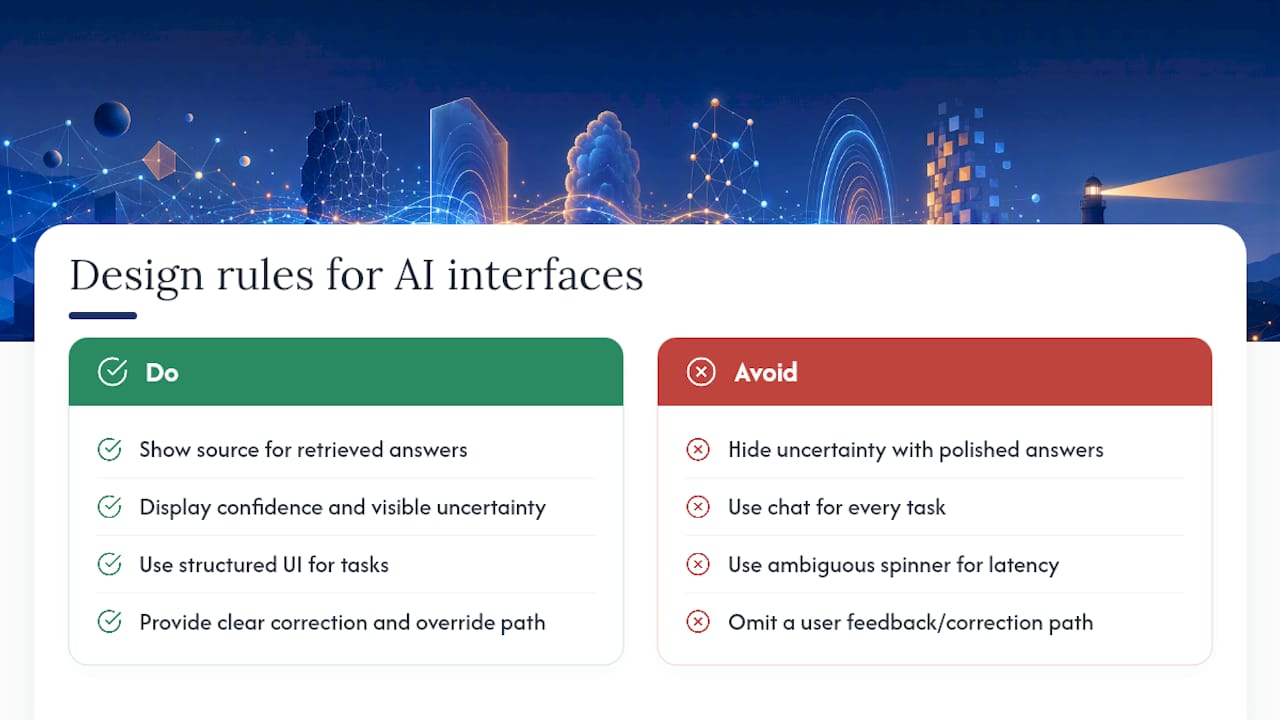
AI interfaces fail in a specific way traditional software doesn’t: they invite trust in outputs that are sometimes wrong, and a clean UI can mask that risk instead of managing it.
Good design starts with visible uncertainty. If a model is retrieving from a knowledge base, show the source. If confidence is low, say so instead of presenting every answer with identical polish. Chat interfaces are the default pattern for a reason, but they aren’t always right. A structured task, filling a form, approving a transaction, reviewing a summary, usually needs a structured interface with the AI output embedded in it, not a freeform conversation bolted on top.
Latency also shapes trust more than most teams expect. A RAG query that takes four seconds needs a visible loading state that communicates progress, not a spinner that looks identical to a hang. Streaming partial responses, where technically feasible, keeps users engaged instead of wondering if the system crashed.
The most overlooked design decision is the correction path. When the model gets something wrong, what does the user do next? If there is no clear way to flag, correct, or override an AI output, you’ve built a system users will quietly stop trusting and start working around, which defeats the entire investment. Building that feedback path into the interface, not just the backend, is what separates an application people rely on from one they tolerate.
What Systems Cause the Most Integration Headaches?
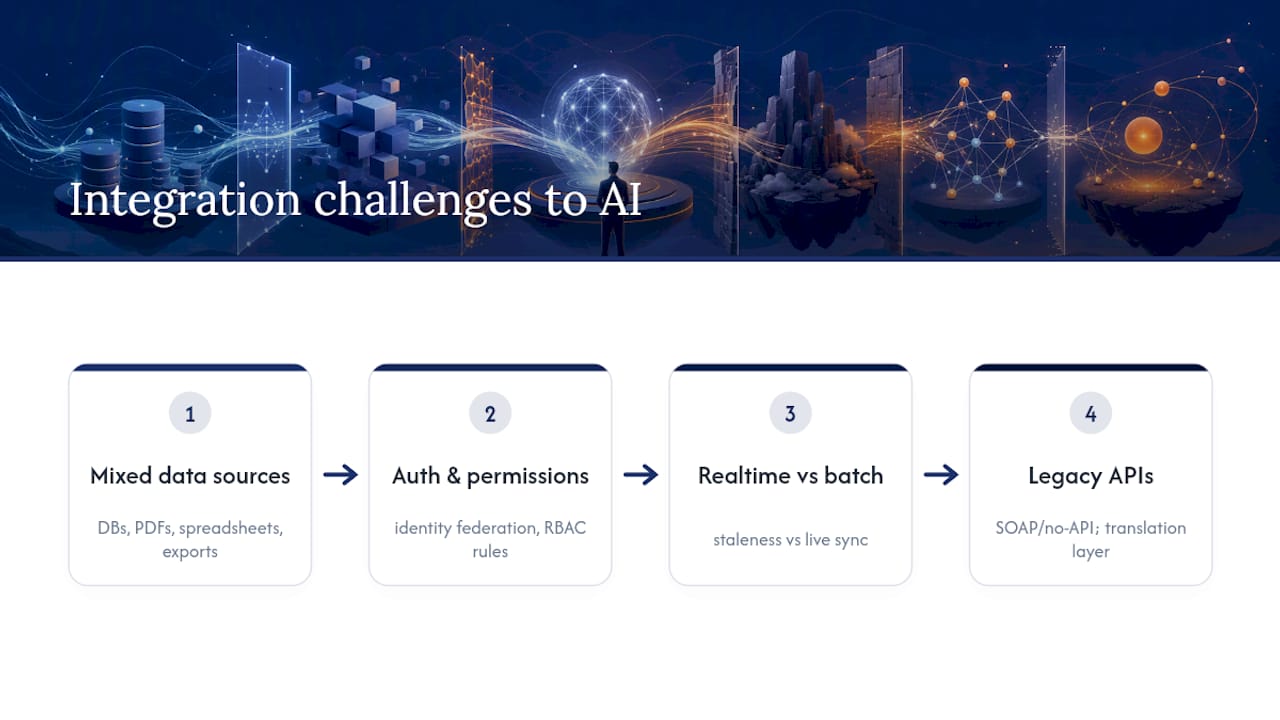
Legacy systems rarely speak the language your AI application needs. That mismatch, not the model, is usually the longest line item on the project plan.
The first challenge is data format and access. Your AI application needs clean, queryable data, but production data usually lives in a mix of relational databases, PDFs, spreadsheets, and CRM exports with inconsistent schemas. Building the pipeline that normalizes all of that into something a retrieval system can use well is often the single most time-consuming part of a build, more than model selection or prompt engineering combined.
The second is authentication and permissions. If your AI application needs to act on behalf of users across multiple internal systems, you need identity federation that respects existing role-based access controls. Get this wrong and you either lock the AI out of the data it needs or, worse, give it access it shouldn’t have.
Third, real-time versus batch data matters more than teams initially plan for. A support agent that answers based on data updated nightly behaves very differently from one syncing in real time, and customers notice the gap fast when a resolved ticket still shows as open.
Finally, legacy APIs, especially older SOAP services or systems with no API at all, sometimes require building a translation layer just to make integration possible. That layer adds real engineering time, and any agency quoting a build without accounting for it is quoting the wrong number.
Bowtie’s Perspective: Closing the Gap Between Demo and Deployment
Most AI projects don’t fail because the model was wrong. They fail because nobody built the plumbing around it, the monitoring, the rollback plan, the cost controls, the audit trail a compliance team can actually read. That’s the entire premise behind Bowtie’s approach: production-ready code, systematic code audits, and agentic workflows built to survive contact with real users, not just a demo audience.
A common pattern we see: a team ships a working prototype, celebrates, and then discovers three months later that nobody owns monitoring, nobody tracks token spend, and the vector store hasn’t been refreshed since launch. The fix isn’t a better model. It’s closing the seams the prototype never addressed.
— Chad
How Bowtie Can Help You Close the Seams
An agency that focuses on bridging the gap between a working AI demo and an application operable, auditable, and trustworthy by operations teams emphasizes production-ready code, security review, and continuous support to catch drift and cost creep before they become incidents.

If you’re evaluating agencies right now, there are two concrete moves worth making before you sign anything. First, run a deployment-debt audit against your current architecture, or a vendor’s proposed one, using the seam categories covered above. Second, scope a short technical pilot that specifically tests integration, governance, and monitoring, not just output quality. Bowtie can run either one, and if you’re auditing code that’s already deployed, our AI code audit is a direct starting point. For teams evaluating third-party model outputs across providers, a tool like BabyLoveGrowth’s multi-LLM audit is worth pairing with your own internal review.
Start with a scoping conversation about your AI integration and enterprise modernization needs, and bring your architecture diagrams. If you don’t have any yet, that’s useful information too.
Sources
- The Deployment Wall: A Diagnostic Framework and Instrument for Enterprise AI in the Deployment Era
- Why most AI projects fail after the demo actually works - The New Stack
- How to Hire an AI Development Agency: Complete Guide for 2026 - Software Outsourcing Journal
FAQ
What Is the Difference Between a Prototype and a Production AI App?
A prototype demonstrates that a model can produce a correct output under controlled conditions. A production app adds monitoring, cost controls, security, rollback procedures, and the operational ownership needed to keep working after real users start relying on it.
How Much Does It Cost to Build an AI App With an Agency?
Pilots typically run $5,000 to $15,000, mid-market custom builds fall between $60,000 and $150,000, and full enterprise production systems often start around $250,000, depending on data complexity and compliance requirements.
What Is the Seam Index and Why Does It Matter?
The Seam Index scores an AI system across six integration points, identity, data, governance, security, change management, and cost, on a 0 to 12 scale. It matters because most AI project failures happen at these seams, not at the model layer.
How Long Does It Take to Build a Production-Ready AI App?
Discovery usually takes one to three weeks, a pilot runs three to six weeks, and a full production build ranges from six weeks to several months depending on how many systems need integration and how strict the compliance requirements are.
What Should I Ask an AI Agency Before Hiring Them?
Ask for architecture diagrams, proof of prior SSO or identity integration, a live monitoring dashboard example, their vector-store design approach, and their incident response runbook, then run a short pilot before committing to a full build.
Can Bowtie Help Fix an AI App That’s Already Failing in Production?
Yes. Bowtie’s code audit process is designed specifically to diagnose deployment debt in existing AI applications and identify which seams need repair before further investment.






