
An application security assessment is a systematic evaluation of an app’s code, configurations, dependencies, infrastructure, and APIs designed to find exploitable weaknesses and prioritize fixes by business impact. Start here:
- Define scope and identify sensitive data (PII, payment info,
credentials).
- Map the attack surface: endpoints, dependencies, third-party integrations.
- Run baseline automated scans (SAST, DAST, SCA) before scheduling manual tests.
- Score findings using CVSS plus business impact, then build a remediation roadmap.
The work should map cleanly to OWASP ASVS, the OWASP WSTG, and CVSS scoring from day one, not bolted on after the fact.
Key Takeaways
An application security assessment works because it combines automated scanning, manual testing, and business-context risk scoring into one prioritized remediation plan, not a disconnected list of vulnerabilities.
| Point | Details |
|---|---|
| Scope before scanning | Define data classification and attack surface before any automated or manual testing begins. |
| Combine methods | Pair SAST, DAST, and SCA with manual code review to catch what automation misses. |
| Score with context | Weigh CVSS against business impact, exposure, and compensating controls before prioritizing fixes. |
| Map to standards | Document findings against OWASP ASVS, WSTG, and NIST to satisfy auditors and contracts. |
| Get vendor help when needed | Bowtie runs scoped assessments and AI-specific code audits with remediation and retest support built in. |
Table of Contents
- What Does an Application Security Assessment Actually Cover?
- How Do You Run an Application Security Assessment Step by Step?
- Application Security Checklist: Controls to Verify
- Which Testing Techniques and Tools Should You Use?
- How Do You Align Assessments With OWASP, NIST, and CIS?
- How Should You Prioritize and Score Findings?
- How Do You Integrate Security Assessments Into the SDLC?
- What Should an Assessment Report Actually Include?
- What Do Most Teams Get Wrong About Application Security Assessments?
- How Bowtie Approaches Application Security Assessments
- Sources
What Does an Application Security Assessment Actually Cover?
A real assessment looks past the codebase. It examines dependencies, CI/CD pipelines, cloud configurations, identity and access controls, API surfaces, logging pipelines, and, increasingly, any AI or agentic components riding along inside the app. That breadth is the whole point: a comprehensive assessment accounts for supply-chain risk and AI-generated code, not just the functions a developer wrote by hand.
People often use “assessment,” “pentest,” and “audit” interchangeably. They aren’t the same thing, and confusing them leads to gaps in coverage.
| Activity | What it answers | Scope |
|---|---|---|
| Vulnerability scan | What known issues exist right now? | Automated, broad, shallow |
| Penetration test | Can an attacker break in through a specific path? | Manual, narrow, deep |
| Security audit | Do we follow policy and meet compliance? | Process and configuration |
| Application security assessment | What are our risks, and what do we fix first? | Full lifecycle, risk-ranked |
A finished assessment hands you three things:
- Risk-ranked findings tied to CVSS scores and business context.
- A remediation roadmap with owners and timelines.
- A retest plan confirming fixes actually closed the gaps.
How Do You Run an Application Security Assessment Step by Step?
The process below is the one we return to on every engagement, whether the target is a decade-old monolith or a two-week-old AI agent. Skipping steps is how teams end up with a stack of PDF findings nobody acts on.
- Define scope and data classification. Identify which environments, branches, and data types (PII, payment data, health records) are in play. This determines how aggressive testing can be and what compliance framework applies.
- Inventory assets and map the attack surface. Catalog every API, service, third-party integration, and exposed endpoint. Include shadow IT and forgotten staging environments; they’re where a surprising share of real breaches start.
- Threat model. Identify likely threat actors (opportunistic scanners, targeted attackers, malicious insiders) and the assets they’d want. This step shapes which tests matter most.
- Run automated scanning. SAST catches insecure patterns in source code, DAST probes the running app, SCA flags vulnerable dependencies. This is your baseline, not your finish line.
- Layer in manual review. Automated tools miss business-logic flaws, chained exploits, and anything novel. Manual code review and hands-on penetration testing close that gap, and for apps with AI components, add specialized tests for prompt injection and model access controls.
- Score and prioritize risk. Combine CVSS vectors with business impact: what’s exposed, how easily, and what it would cost if exploited.
- Remediate and retest. Fixes get verified, not assumed. Retesting confirms the patch actually closed the hole rather than just changing the error message.
- Build the roadmap. Turn one-time findings into a continuous validation plan, so the next release doesn’t reopen the same doors.
Each step has inputs and owners. Developers supply source access and environment details. Product teams clarify what data actually flows through the app. Infrastructure and SRE teams provide network diagrams and deployment configs. Third parties (payment processors, auth providers) need to be looped in early, since their systems often fall inside the actual attack surface even when they’re outside your repo.
Pro Tip: Have test credentials, a stable test environment, and your data classification ready before you request an assessment. One university information security office found that missing this prep is the single biggest cause of delayed or rejected assessments. Automated scans typically wrap in hours; manual assessments on complex or high-value apps often require substantial time to complete due to thorough peer reviews and complexity. once reports go through peer review.
Application Security Checklist: Controls to Verify
Treat this as your working list during any app security audit, not a one-time reading exercise:
- Authentication: MFA enforced, password policy meets current standards, brute-force protections active.
- Authorization: Role checks enforced server-side, no client-controlled permission flags.
- Input validation: Server-side validation on every input path, output encoding in place.
- Session management: Secure cookie flags, session timeout, token invalidation on logout.
- Cryptography: Modern algorithms only, keys rotated and stored outside source code.
- Configuration: No default credentials, verbose errors disabled in production.
- Logging and monitoring: Security events logged and alertable, no sensitive data in logs.
- Secrets management: No hardcoded API keys or tokens anywhere in the repo history.
- Dependencies and SBOM: A current software bill of materials exists and SCA has run against it.
- API hardening: Rate limiting, schema validation, and authentication on every exposed endpoint.
- Client-side controls: No sensitive logic or secrets shipped to the browser or mobile bundle.
- AI-specific checks: Prompt injection resistance, model access controls, provenance tracking for AI-generated code.
| Control category | Specific test | Quick verification |
|---|---|---|
| Authentication | MFA and brute-force limits | Attempt repeated failed logins |
| Dependencies | SBOM and SCA coverage | Confirm SBOM exists and matches SCA scan output |
| API | Schema and auth enforcement | Send malformed and unauthenticated requests |
| AI components | Prompt injection resistance | Feed adversarial prompts and check for guardrail bypass |
Which Testing Techniques and Tools Should You Use?
No single method catches everything, which is why relying on one tool is the fastest way to miss something exploitable.
- SAST scans source code for insecure patterns before deployment. Fast and repeatable, but prone to false positives and blind to runtime behavior.
- DAST probes the running application like an attacker would. Better at catching real exploitability, weaker at pinpointing exact code locations.
- IAST instruments the app during test execution, combining code visibility with runtime context, useful in QA pipelines with good test coverage.
- Fuzzing throws malformed input at the app to surface crashes and edge-case bugs automated scanners miss.
- SCA flags known vulnerabilities in open-source dependencies, essential given how much of a modern app is third-party code.
- Manual penetration testing finds business-logic flaws and chained exploits no scanner can reason through.
| Method | Input artifact | Best cadence | Typical evidence produced |
|---|---|---|---|
| SAST | Source code | Every commit or PR | Line-level findings with severity |
| DAST | Running application | Nightly or pre-release | HTTP-level proof of exploitability |
| SCA | Dependency manifest | Every build | Vulnerable package list with CVE IDs |
| Manual pentest | Full application | Quarterly or pre-launch | Proof-of-concept exploit narrative |
For mobile targets, a platform like MobSF automates static and dynamic analysis against MASVS and plugs into CI/CD, while specialized tests for prompt injection attacks ensure these risks are effectively addressed. The strongest programs combine automated tools for coverage and cadence with manual testing for the logic flaws machines can’t reason about.
How Do You Align Assessments With OWASP, NIST, and CIS?
Standards give your findings a shared vocabulary auditors, clients, and engineering teams all recognize.
- Map authentication, session, and input-validation tests directly to OWASP ASVS verification requirements, choosing Level 1 for internal tools and Level 2 or higher for public-facing or sensitive apps.
- Structure your active testing phases around the 12 categories in the OWASP WSTG, which separates passive reconnaissance from active exploitation testing.
- Cross-check findings against the current OWASP Top 10 to confirm nothing in that baseline list got missed.
- Tie remediation outcomes to NIST Cybersecurity Framework functions (Identify, Protect, Detect, Respond, Recover) and reference NIST SP 800-series controls where contracts require it.
- Use CIS Benchmarks for infrastructure and configuration hardening checks.
Document every mapping directly in your report. Auditors and stakeholders move faster when a finding cites “ASVS 2.1.1” instead of a vague paragraph.
How Should You Prioritize and Score Findings?
Raw CVSS scores tell you severity in a vacuum. Business context tells you what actually matters.
- Start with the CVSS vector, then adjust up or down based on exposure: a critical flaw on an internal tool behind VPN is not the same risk as the same flaw on a public API.
- Weigh blast radius: does this finding expose one record or the entire customer database?
- Account for compensating controls. A vulnerability behind strict rate limiting and WAF rules may warrant a lower priority than its raw score suggests, though it still needs a fix.
- Assign an owner and SLA to every finding the moment it’s triaged, not after the report ships.
- Gate release sign-off on retest confirmation for anything scored critical or high.
The main challenge isn’t finding vulnerabilities anymore; it’s prioritizing and integrating fixes into fast-moving dev cycles without stalling releases. Teams that skip formal scoring tend to fix whatever’s loudest, not what’s riskiest.
How Do You Integrate Security Assessments Into the SDLC?
Shift-left only works if the pipeline actually enforces it, not just documents it.
- Run SCA and SAST on every pull request, with fast feedback loops so developers see results before merge, not after deploy.
- Schedule DAST against staging nightly or before each release candidate.
- Gate merges on critical and high findings; let medium and low findings flow through as tracked backlog items instead of blocking velocity entirely.
- Automate retest triggers so a fixed finding gets reverified the moment the patch lands, not weeks later.
- Route AI-generated code through the same pipeline; specialized tooling should check for prompt injection risk and provenance before it ships.
Pro Tip: Enforce incrementally. Start by blocking only critical severity findings, then tighten the gate over a few sprints. Teams that flip every rule to blocking on day one usually get bypassed, ignored, or quietly disabled within a month. A software development partner who treats security as foundational rather than an afterthought will build these gates into the release process from the start, not retrofit them later.
What Should an Assessment Report Actually Include?
A report that just lists CVEs isn’t a deliverable, it’s a data dump. A usable one includes:
- An executive summary in plain language for non-technical stakeholders.
- Technical findings with proof-of-concept detail for engineering teams to act on.
- A risk matrix connecting CVSS scores to business impact.
- A remediation plan with owners and target dates.
- Retest results confirming fixes closed the gap.
- Explicit framework mapping to ASVS, WSTG, or NIST controls.
Timelines vary by depth: automated scans finish in hours, while manual assessments on complex or high-value targets commonly take around 10 business days. Cost tends to scale with scope size, whether manual testing is required, and whether the app includes mobile, embedded, or AI components that need specialized review.
What Do Most Teams Get Wrong About Application Security Assessments?
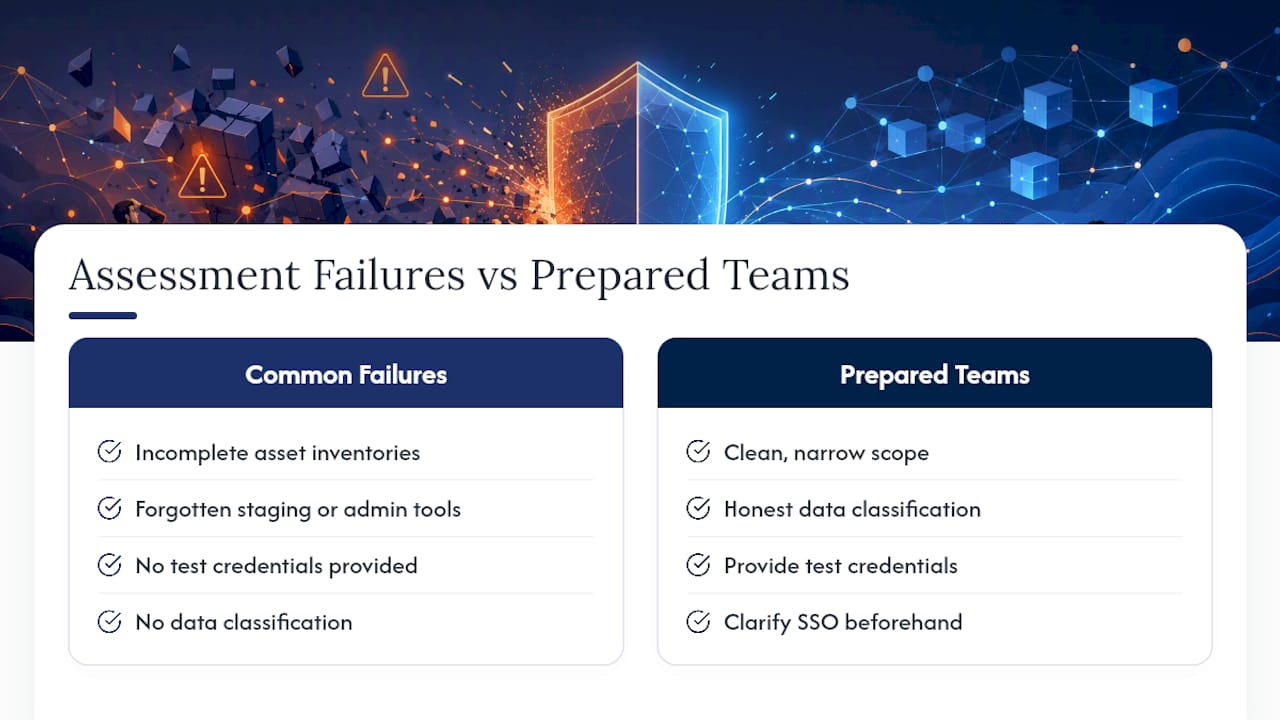
The failures we see repeat themselves across nearly every engagement. Incomplete asset inventories top the list, teams forget about the staging environment nobody decommissioned or the internal admin tool with production database access. Poor pre-submission readiness comes next: no test credentials, no data classification, no clear answer on whether SSO is in play.
Tool sprawl is its own problem. Running five overlapping scanners doesn’t multiply your coverage, it multiplies your noise. And AI-specific risk still gets waved off as someone else’s problem, even as more production code ships from AI-assisted tooling with no provenance tracking at all.
The teams that get the most value out of a third-party assessment show up prepared: clean scope, honest data classification, and a real point of contact who can answer questions during testing instead of after the report lands.
How Bowtie Approaches Application Security Assessments
Bowtie treats a security assessment as the start of a fix, not the end of a report. We scope the engagement around your actual attack surface, run SAST, DAST, and SCA where they add real signal, then pair that with manual code review for the logic flaws automated tools can’t catch.

Where most vendors stop at a PDF of findings, we go further: our AI code audits specifically target the risks that traditional static analysis misses in AI-generated and vibe-coded applications, including prompt injection paths and missing provenance tracking. If your team is also running AI integration work, we test the agentic workflows themselves, not just the surrounding app.
Remediation support and retesting come standard, not as an upsell. If you’re ready to scope an assessment or want a straight answer on what a code audit would cost for your stack, start with Bowtie and get a real scoping conversation, not a sales script.
Sources
Recommended
- Why Every AI Application Needs a Professional Code Audit - ⋈ BowTie Custom Development
- Trusted Tech Partners are Critical for Non Technical Founders - ⋈ BowTie Custom Development
- How to Choose the Right Software Development Partner - ⋈ BowTie Custom Development
- AI Integration & Enterprise Modernization by Location






