
Integrate AI into a workflow when the process is high-volume, repeatable, and measurable — and start with a pilot narrow enough to prove value in a matter of weeks rather than many months. If a workflow can’t be measured today,
don’t automate it yet. Fix the measurement problem first.
Here’s what to do this week, regardless of company size or industry:
- Assess one candidate process. Pick something with clear volume (a clear volume of instances each month) and a predictable pattern. Email triage, invoice matching, and meeting note synthesis are common starting points because they’re bounded and easy to score.
- Run a focused pilot. Scope it to one team, one workflow, and one measurable outcome. Set a firm end date rather than leaving the experiment open-ended.
- Set governance checkpoints before you launch, not after. Decide who reviews AI output, what gets logged, and what triggers a human review, before the pilot goes live.
Pro Tip: Measure your current process baseline before you automate anything. Teams that skip this step almost always overestimate the AI’s impact because they never actually knew their starting cycle time, error rate, or cost per transaction in the first place.
Table of Contents
- What Is AI Workflow Integration, Really?
- What Benefits and Use Cases Should You Expect?
- What Does the Architecture Actually Look Like?
- How Do You Plan and Implement an AI Workflow Pilot?
- Build, Buy, or Partner: How Should You Decide?
- What Do Successful Integration Patterns Look Like in Practice?
- How Does Bowtie Approach AI Workflow Integration?
- What Separates Projects That Actually Succeed?
- How Can Bowtie Help You Get Started?
- Frequently Asked Questions
- Sources
What Is AI Workflow Integration, Really?
AI workflow integration means connecting AI models and agents to your orchestration layer and business systems so they can automate routine tasks, assist with judgment calls, or fully augment a process end to end. That’s a meaningfully different animal from the rule-based automation most companies already run.
Traditional automation follows fixed logic: if X happens, do Y. It’s reliable, cheap to maintain once built, and completely blind to anything outside its rules. A workflow engine that routes an invoice to Approver A when the amount is under $5,000 and to Approver B above that threshold doesn’t “think.” It executes.
AI-enabled workflows introduce a decision-making layer that can handle ambiguity. Instead of matching exact conditions, an AI model can read an unstructured customer email, infer intent, decide whether it’s a billing question or a technical complaint, and route it accordingly, even when the wording has never appeared before. The Project Management Institute frames this as a spectrum: generative AI is genuinely reliable for low-complexity, well-bounded tasks, while higher-complexity work still needs a human reviewing or steering the output.
That variability tolerance comes at a cost. Rule-based systems rarely drift. AI models can, as underlying data shifts, as vendors update models, or as edge cases accumulate. That’s why AI workflows typically need more monitoring, not less, and why “set it and forget it” is the wrong mental model.
A quick before-and-after: A mid-size insurance operations team used to route claims documents with a rules engine that checked file names and folder structure. Anything mismatched went to a manual queue that grew every week. Swapping in a document-understanding model let the system read the actual content of scanned PDFs and classify claim type regardless of naming convention. The manual queue didn’t disappear. It shrank to the genuinely ambiguous cases, which is exactly where human judgment should be spent.
What Benefits and Use Cases Should You Expect?
The honest answer: benefits vary enormously by process, but the pattern of where they show up is consistent. Time saved, error reduction, and cycle compression cluster around a handful of workflow types.
- Time saved on repetitive cognitive work — drafting, summarizing, classifying, and extracting data from documents.
- Cycle time reduction — the gap between when something enters a queue and when it’s actioned shrinks because AI handles first-pass triage instantly.
- Error reduction on well-defined tasks — consistent application of rules and pattern recognition beats a tired analyst on task 400 of the day.
- Throughput gains without headcount growth — the same team handles more volume because the AI absorbs the repetitive layer.
A few concrete patterns worth studying:
Email and ticket triage. Support and sales teams route incoming messages by intent, urgency, and sentiment instead of a first-come queue. The gain shows up as faster first-response time and fewer misrouted tickets.

Document processing. Contracts, invoices, and claims get parsed, classified, and key fields extracted automatically. This is one of the clearest wins because the task is bounded and the data structure, while messy, is finite.
Sales lead triage. AI models score inbound leads against firmographic and behavioral signals, so reps spend their time on the leads most likely to close instead of working a flat list top to bottom.
Meeting prep and summarization. AI pulls prior notes, open action items, and relevant CRM context ahead of a call, and produces a structured summary afterward. Atlassian’s guidance on AI in project management points to this same pattern: AI can decompose a plan into tasks and surface insights automatically, which cuts a real chunk of the manual project setup that used to eat a project manager’s first two days on a new initiative.
Call analytics. Sales and support calls get transcribed and scored against a rubric, so managers coach on patterns across hundreds of calls instead of the five they happened to sit in on.
On cost and timeline: a narrow pilot on one workflow typically runs for a few weeks, and the primary cost driver is integration effort, not the model itself. Production rollout costs climb when you add more data sources, more edge cases, and more compliance review, which is exactly why NetSuite’s guidance on business process automation stresses starting with high-volume, predictable tasks before tackling the messy, judgment-heavy ones.
What Does the Architecture Actually Look Like?
Every functioning AI workflow, no matter the vendor or industry, has the same basic anatomy. Skip a piece and you’ll feel it later, usually in production, usually at the worst time.
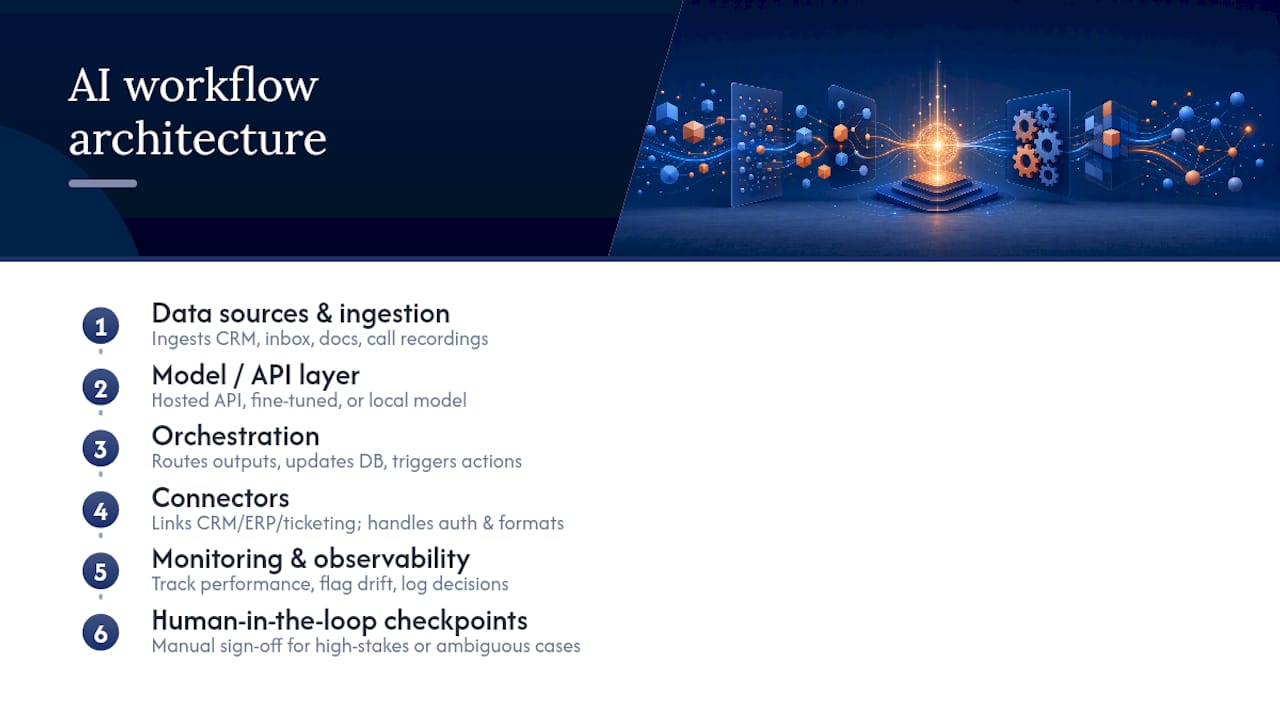
Data sources and ingestion come first. This is wherever the workflow’s raw material lives: a CRM, a shared inbox, a document repository, a call recording system. Ingestion pulls that data into a form the rest of the pipeline can use.
The model or API layer does the actual inference. This might be a hosted large language model accessed through an API, a fine-tuned model for a specific classification task, or a locally deployed model for data that can’t leave your infrastructure.
Orchestration ties the steps together: it decides what happens after the model produces an output, whether that’s writing to a database, triggering a notification, or routing to a human reviewer.
Connectors link the workflow to your existing systems: your CRM, your ERP, your ticketing platform. This is frequently the most underestimated part of a project, because every system has its own authentication quirks, rate limits, and data formats.
Monitoring and observability track model performance over time, flag drift, and log decisions for audit. Human-in-the-loop checkpoints sit wherever the stakes or the ambiguity are high enough to warrant a person’s sign-off before an action executes.
On the build question, you generally choose between hosted models (faster to start, ongoing usage costs, data leaves your environment) and local deployment (more control and data privacy, more infrastructure responsibility). Similarly, you can lean on agent-based orchestration that lets an AI system make sequential decisions, a traditional workflow engine with AI steps bolted in, or an iPaaS platform that handles connectors out of the box. Boomi’s guidance on process automation recommends using low-code or no-code orchestration wherever possible and reserving AI agents for the specific steps, like anomaly detection or repetitive resolution, where they clearly add value over simpler logic.
Pro Tip: Version your models the same way you version code. If a model update changes its output distribution, you need a documented rollback path, not a scramble. Log every automated decision with enough context that you can reconstruct why the system did what it did six months later, when someone inevitably asks.
How Do You Plan and Implement an AI Workflow Pilot?
The plan → pilot → scale sequence isn’t a formality. It’s the difference between a project that dies in a demo and one that survives contact with real data.
Step 1: Score your candidate processes. Build a simple rubric across four dimensions: transaction volume, predictability of inputs, value per transaction, and data readiness. A process scores well when it’s high-volume, follows recognizable patterns even if the exact wording varies, has meaningful cost or time attached to each instance, and already has usable data sitting somewhere accessible.
Step 2: Design the pilot with a real objective. Every pilot needs a written objective, a success KPI tied to objective measurement, a defined sample size appropriate for valid measurement, a firm timeline, and a list of exactly which systems and data the team needs access to before day one. “See if AI helps with customer support” is not a pilot objective. “Reduce average first-response time on billing tickets by measuring 200 tickets before and after AI triage over a set measurement period” is.
Step 3: Build governance in from the start, not after a near-miss. Your checklist should cover:
- Data privacy: what data the model sees, where it’s stored, and how long it’s retained.
- Human-in-the-loop rules: which decisions require sign-off and which can execute automatically.
- Logging and auditing: a record of every automated decision, retrievable later.
- Bias checks: periodic review of whether the model’s outputs skew unfairly across customer segments.
- Service-level agreements: response time and accuracy thresholds the system must hit to stay live.
PMI’s guidance on AI adoption recommends pairing AI tools with structured methodology and governance from the outset, precisely because bolting governance on after launch is far more expensive than building it in. A readiness assessment before you commit budget catches most of these gaps early.
On cost bands: a small, single-team pilot generally runs on a modest, contained budget mainly focused on integration labor. Enterprise rollout costs rise with the number of systems touched, the compliance review required, and the number of departments affected, so budget accordingly rather than assuming pilot economics scale linearly.
Build, Buy, or Partner: How Should You Decide?
There’s no universally right answer here, only a right answer for your specific volume, timeline, and risk tolerance. The matrix below maps common tool categories to the scenarios where they actually fit.
| Approach | Best-Fit Scenario |
|---|---|
| No-code/low-code orchestration | Small teams testing a single workflow fast, with limited engineering bandwidth and low customization needs |
| iPaaS connector platforms | Organizations with many existing SaaS tools that need reliable, pre-built connectors rather than custom API work |
| Hosted model-hosting platforms | Teams that want quick access to capable models without managing infrastructure, and whose data can leave the environment |
| Custom integrations | Businesses with unique systems, strict data residency needs, or workflows too specific for off-the-shelf tools |
| ERP-integrated automation | Companies that already run their operations through an ERP and want automation that spans multiple functional areas |
ERP-based automation deserves a specific mention: NetSuite notes that ERP platforms multiply automation value because they connect data across processes, enabling predictive analytics and anomaly detection that a single-point tool can’t see.
When evaluating a vendor or partner, ask directly:
- What data do you need access to, and where does it live once ingested?
- What does the integration effort look like on our side, in engineer hours, not just dollars?
- How is data secured in transit and at rest, and who can audit that?
- What’s the pricing model, usage-based, seat-based, or flat, and how does it change as we scale?
- What are your actual SLAs for uptime and support response, in writing?
- What’s the upgrade path when the underlying model changes?
Watch for a few red flags that tend to sink projects before they start: a vendor who can’t explain their data retention policy in plain language, a pricing model that looks cheap at pilot scale but has no visibility into production costs, and a sales process that skips technical discovery entirely. If nobody asks about your existing systems before quoting a price, that’s a signal, not a coincidence.
What Do Successful Integration Patterns Look Like in Practice?
Most working AI workflows fall into one of a handful of repeatable patterns. Recognizing which one fits your process saves weeks of architecture debate.
The event-driven agent pattern triggers AI action the moment something happens, a new email arrives, a form gets submitted, a record updates. The scheduled batch inference pattern runs AI processing on a set cadence, say, nightly, useful when real-time response isn’t required and you want predictable compute costs. The human-in-the-loop approval gate pattern has AI draft a decision or output that a person reviews before it executes, common in anything touching money or compliance. The embedded-in-UI pattern surfaces AI output directly inside a tool your team already uses, so nobody has to switch context. And the end-to-end iPaaS orchestration pattern chains multiple systems and AI steps together through a connector platform, useful when a workflow spans five tools and none of them talk to each other natively.
A regional logistics operator anonymized in industry case discussions moved dispatch note summarization from a manual end-of-shift task to an event-driven pattern, cutting a significant reduction in manual task duration to a brief review-and-approve action. A professional services firm used a human-in-the-loop approval gate on AI-drafted client emails, keeping full human sign-off while cutting first-draft time dramatically. Neither project touched every system in the company. Both started with one workflow.
When integrations go sideways, the friction usually shows up in the same four places:
- Authentication failures between the AI layer and downstream systems, especially after a token expires silently.
- Data mapping mismatches where a field in one system doesn’t map cleanly to the AI’s expected input format.
- Latency issues when a workflow expects real-time response but the model call takes longer than the interface allows.
- Rate limits on API calls that only surface once you scale past pilot volume.
How Does Bowtie Approach AI Workflow Integration?
Bowtie treats AI workflow integration as an engineering discipline, not a demo. Our engagement flow runs through five stages: discovery, prototype, production, audit, and ongoing support, and we don’t skip stages because a prototype looked impressive in a meeting.
Discovery means mapping your actual systems, data, and candidate processes before we write a line of integration code, the same assessment discipline PMI recommends for matching task complexity to the right level of AI autonomy and human oversight. Prototype is where we prove the concept against real data, not synthetic examples. Production is where most AI projects quietly fail elsewhere, the gap between “it worked in the demo” and “it runs reliably at 3 a.m. without anyone watching it.” Audit means we review AI-generated or AI-assisted code for security gaps and technical debt before it ships. Support means we stay engaged after launch, because a model that performed well in month one can drift by month six if nobody’s watching.
Bowtie’s clients range from major organizations, including the NFL, to early-stage startups, and the reason that range works is the same discipline applied at different scales: clean, secure, production-ready code, whether the workflow touches one team or an entire enterprise. If you want to see how this plays out for a specific engagement type, our AI integration and enterprise modernization work walks through the model in more depth.
What Separates Projects That Actually Succeed?
Here’s what conventional AI advice tends to underplay: the projects that fail rarely fail because the model was bad. They fail because nobody agreed on what success looked like before the build started.
One pattern shows up again and again. A team gets excited about an AI pilot, skips the baseline measurement step because “we already know our numbers,” and six weeks later can’t prove the AI did anything, not because it didn’t work, but because there was no before-and-after to compare. Contrast that with a team that spent a week just measuring their current process, cycle time, error rate, cost per unit, before writing a single integration script. When the pilot wrapped, they had a clean comparison and a confident go/no-go decision. The second team moved slower at the start and faster at the finish.
The other recurring failure mode is governance as an afterthought. A workflow goes live, works fine for a month, then produces one bad output that nobody catches because there was no logging in place and no human checkpoint on that particular decision path. HBR’s research on AI adoption backs this up directly: projects with early cross-functional buy-in and executive sponsorship succeed at meaningfully higher rates than ones where IT builds in isolation and rolls it out cold.
Three lessons worth carrying into your next vendor conversation:
Pro Tip: Governance first, not last. Decide who reviews what, and what gets logged, before the pilot launches, not after something goes wrong.
Pro Tip: Measure before you automate. If you can’t state your current cycle time or error rate in one sentence, you’re not ready to prove ROI on an AI pilot.
Pro Tip: Align incentives across teams before you build. A pilot that saves engineering time but creates more work for support will get quietly sabotaged, not because anyone’s malicious, but because nobody wants to inherit a broken process.
When you’re in that vendor conversation, ask them to walk through a past project where the pilot metrics didn’t hit target. How a partner talks about their failures tells you more than their case studies do.
How Can Bowtie Help You Get Started?
If you’ve read this far, you already know the gap between “we should use AI” and “we have a working AI-integrated workflow in production” is wide. Bowtie closes that gap with custom integration builds, local model deployment for teams that need data to stay in-house, AI code audits for anything already built by another team or generated by an AI coding tool, and ongoing support after launch.
A pilot engagement with Bowtie typically follows the same plan → pilot → scale structure covered above: a short discovery phase to score your candidate process, a scoped pilot with a real timeline and measurable KPI, and a clear decision gate at the end where we look at the data together and decide whether to scale, adjust, or stop. You get a working prototype, a documented integration path, and an honest read on whether the numbers support moving to production, not a sales deck dressed up as a deliverable.
If your team is weighing whether to build this in-house, hire a partner, or patch together a no-code tool, our guide on choosing the right development partner walks through the tradeoffs in more detail. And if you already have AI-generated code running somewhere in your stack that nobody’s fully reviewed, it’s worth understanding why AI applications need a professional code audit before that code touches more of your production systems.
Ready to score your first candidate process? Start a conversation with Bowtie about what a pilot would look like for your team.
Key Takeaways
AI workflow integration succeeds when teams pick a high-volume, measurable process, run a scoped pilot with governance built in from day one, and only scale after the data confirms the result.
| Point | Details |
|---|---|
| Start with the right process | Score candidates on volume, predictability, value per transaction, and data readiness before building anything. |
| Measure before you automate | Establish a clear baseline (cycle time, error rate, cost) so the pilot can prove real impact. |
| Build governance in from day one | Define human-in-the-loop rules, logging, and bias checks before launch, not after an incident. |
| Choose the right approach for your case | Match no-code tools, iPaaS, hosted models, or custom integration to your actual complexity and risk tolerance. |
| Secure cross-functional buy-in early | Executive sponsorship and stakeholder alignment raise the odds of a successful rollout. |
| Bowtie fits when custom, secure integration matters | Bowtie’s discovery-to-support engagement model suits teams that need production-ready, audited AI workflows rather than a demo. |
Frequently Asked Questions
How long does an AI workflow integration pilot typically take? A well-scoped pilot on a single workflow generally runs several weeks to a couple of months. The timeline depends more on data access and system complexity than on the AI model itself.
Do we need a dedicated AI team to integrate AI into our workflows? No. Many successful pilots run with existing engineering staff supplemented by a partner or vendor for the initial build, provided governance and measurement responsibilities are assigned clearly from the start.
What’s the biggest reason AI workflow projects fail? Lack of strategic alignment and missing baseline measurement, not model quality. Teams that can’t define success before the pilot starts usually can’t prove impact after it ends.
Should we build custom AI integrations or use off-the-shelf tools? It depends on your data sensitivity, system complexity, and timeline. No-code and iPaaS tools work well for straightforward, common workflows; custom integration makes more sense when your systems are unique or your data can’t leave your environment.
What governance controls does an AI workflow need before going live? At minimum: defined human-in-the-loop checkpoints, decision logging for audit purposes, periodic bias review, and clear data privacy rules covering what the model sees and how long it’s retained.
Sources
For teams building a business case or briefing stakeholders, these sources go deeper on specific pieces of the playbook covered here.
PMI’s framework on shaping the future of project management with AI breaks down which tasks suit automation versus human oversight by complexity level, useful when you’re scoring candidate processes. PMI’s broader guidance on AI in project management covers how to pair AI tools with structured methodology and governance. HBR’s research on enterprise AI success makes the case for cross-functional buy-in with data worth citing in an internal pitch. NetSuite’s guide to automating business processes is the clearest resource on prioritizing which processes to automate first. Boomi’s guide to process automation is worth reading for the architecture and orchestration trade-offs between low-code tools and custom builds.
- Shaping the Future of Project Management With AI
-
[10 Best Practices to Automate Business Processes NetSuite](https://www.netsuite.com/portal/resource/articles/business-strategy/automate-business-processes.shtml) - For success with AI, bring everyone on board






