
AI agent orchestration is the control layer that coordinates multiple autonomous agents so they act as one reliable system instead of a pile of scripts talking past each other. It handles task routing, shared state, and enforcement so agents hand
off work cleanly instead of duplicating it or stepping on each other. You need it the moment a workflow crosses domains, requires an audit trail, or demands parallel specialists. A single agent handling everything might work in a demo. It rarely survives production.
TL;DR:
- Using orchestration adds significant overhead, including increased cost, latency, and complexity, especially when workflows do not require multiple agents or clear task dependencies.
- Proper routing, memory management, and observability are critical components, with hybrid rule-based and LLM-driven approaches balancing flexibility and predictability in production systems.
- Sequential or handoff patterns are the safest starting points for most workflows, while more complex patterns like group chat should be avoided unless fully justified by the use case.
- Ownership, explicit success metrics, and well-defined triggers for rollback or escalation must be established before scaling from pilot to production to prevent organizational chaos.
- Effective orchestration depends on continuous monitoring of token usage, latency, success rates, and escalation triggers to identify issues early and maintain trust in multi-agent systems.
Table of Contents
- What Does AI Agent Orchestration Actually Do?
- Why Does Orchestration Matter for Enterprise AI?
- Which Orchestration Pattern Fits Your Workflow?
- What Architecture Components Do You Need to Evaluate?
- How Does the Orchestration Runtime Actually Execute a Task?
- Best Practices for Governing Multi-Agent Systems
- What Does a Practical Pilot-to-Production Roadmap Look Like?
- Where Does Multi-Agent Orchestration Pay Off in Practice?
- How Bowtie Approaches Orchestrated Agent Workflows
- The Mistake Most Teams Make Before They Even Start
- Get Your Multi-Agent Workflow Production Ready
- Sources
- FAQ
What Does AI Agent Orchestration Actually Do?
Orchestration is a governance layer, not a chatbot feature. It sits above your individual agents and decides who does what, when, with what information, and under what constraints. Think of it as the difference between a group of freelancers emailing each other and a project manager running a sprint: the work might get done either way, but only one of those setups scales past three people.
Concretely, the orchestration layer is responsible for planning, task routing, state management, inter-agent communication, and enforcing security or compliance guardrails. Break that down and you get four core jobs:
- Task decomposition and routing. A high-level goal (“ship this feature”) gets split into subtasks and routed to the agent best equipped for each one.
- State, checkpoints, and persistent memory. The system remembers what happened three steps ago, so agents aren’t re-deriving context on every call.
- Retries, handoffs, and enforcement policies. When an agent fails or produces a low-confidence result, orchestration decides whether to retry, escalate, or hand off to a different agent entirely.
- Boundary enforcement. No agent touches data or tools outside its defined scope, even if it technically could.
Picture a code implementation pipeline: one agent drafts the feature based on a ticket, a second agent writes tests against the spec, a third runs a security scan, and a fourth reviews the diff before it reaches a human. Each agent has one job. The orchestration layer decides the order, catches a failed test before it reaches review, and keeps a record of who touched what. That record matters more than most teams expect once something goes wrong and someone asks “which agent wrote this line.”
Why Does Orchestration Matter for Enterprise AI?
Most enterprises don’t fail at building an agent. They fail at running ten of them together without losing track of what happened. Orchestration exists because fragmented data access, inconsistent compliance enforcement, and a lack of auditability turn into real liabilities the moment agents start touching customer data, financial systems, or production code.
By the numbers: Databricks reports that enterprises using orchestrated multi-agent systems report faster task completion compared to unstructured, ad hoc agent deployments compared to unstructured, ad hoc agent deployments largely because orchestration eliminates the redundant back-and-forth that happens when agents lack shared state.
That gain doesn’t come free. Budget for these tradeoffs before you commit to an architecture:
- Cost. More agents mean more model calls, and coordination overhead adds token spend on top of the actual work.
- Latency. Sequential handoffs between agents add wait time that a single monolithic agent wouldn’t incur.
- Complexity. Debugging a five-agent workflow is harder than debugging one, full stop.
- Operational maturity. You need monitoring, rollback plans, and someone accountable for the whole system, not just each piece.
Orchestration earns its cost back through enforced human approval gates and audit trails, which matter enormously the first time a regulator, auditor, or angry customer asks what an AI system did and why.
Which Orchestration Pattern Fits Your Workflow?
Most orchestration failures trace back to picking the wrong pattern for the job, not to bad agents. Azure’s architecture guidance catalogs the patterns that show up in production repeatedly, and each one maps loosely to a cloud design pattern you already know.
- Sequential. Agents run in a fixed pipeline, each one depending on the last. This mirrors a classic pipeline-and-filter design and fits work with a clear order, like code review: draft, test, security scan, human sign off.
- Concurrent. Multiple agents work the same problem in parallel, and results get merged afterward. This is fan-out/fan-in, and it’s the right call when speed matters more than sequencing, such as pulling data from five systems at once.
- Handoff. One agent works until it hits the edge of its expertise, then explicitly transfers control to another. Useful in customer support, where a general agent escalates to a billing specialist.
- Group chat. Several agents debate or collaborate in a shared thread before a decision emerges. Powerful for complex judgment calls, expensive in tokens, and hard to keep deterministic.
- Magentic (hierarchical/federated). A lead agent plans and delegates to subordinate agents or entire subsystems, similar to a manager coordinating specialized teams. This scales well but concentrates risk in the lead agent’s judgment.
Customer support tends to map cleanly to fan-out/fan-in: a supervisor routes the ticket, several specialists work angles in parallel, and a synthesis step picks the best resolution. Code review favors sequential with a dedicated reviewer agent as the last gate before any human sees the diff.
Pro Tip: Start with sequential or handoff patterns even if your workflow looks like it needs group chat. Group chat is the most expensive and least predictable pattern to debug, and most “we need agents to collaborate” problems are actually handoff problems in disguise.
What Architecture Components Do You Need to Evaluate?
Picking a pattern is the easy part. The architecture underneath it decides whether the system survives contact with real traffic. Six components deserve scrutiny before you write a line of orchestration code.
Routing. Rule-based routing is deterministic and cheap: if the ticket mentions “refund,” send it to the billing agent. LLM-driven routing is more flexible but adds latency and occasional unpredictability. Most production systems use a hybrid: rules for the obvious cases, an LLM router for ambiguous ones.
Memory and checkpoints. Session state disappears when the conversation ends. Persistent memory survives across sessions. Workflow state tracks where a specific multi-step task currently sits. Conflating these three is one of the most common architecture mistakes teams make.
Protocols. Model Context Protocol (MCP) standardizes how agents access tools, and Agent-to-Agent (A2A) standardizes how agents coordinate with peers. Building on these emerging standards instead of custom integrations saves real rework later, since tool providers are increasingly shipping MCP support out of the box.
Security and permissions. Role-based access control, credential vaults, and audit logging aren’t optional once agents touch production data. Every tool call an agent makes should be traceable to a specific decision.
| Component | Primary risk if ignored | What to track |
|---|---|---|
| Routing engine | Misrouted tasks, silent failures | Route accuracy, fallback rate |
| Memory/checkpoints | Lost context, repeated work | State recovery success rate |
| Tool access (MCP/A2A) | Unauthorized or brittle integrations | Call success rate, latency per call |
| Observability | Blind spots during incidents | Token usage, cost per task, success rate |
Observability ties the whole thing together. Track token usage, latency per agent, task success rate, and cost per completed workflow. Without this, you’re debugging a five-agent system with the same tools you’d use for a single API call, and that never ends well. Bowtie’s guidance on AI observability walks through correlating parent and child agent sessions, which becomes essential once you have more than two agents running concurrently.
How Does the Orchestration Runtime Actually Execute a Task?
Every orchestration system, regardless of pattern, runs the same basic loop: plan, route, execute, observe, adapt. The orchestration runtime translates a high-level objective into a task queue and enforces execution checks, dependency handling, and error recovery at every step.
- Plan. The orchestrator decomposes the objective into discrete tasks with explicit dependencies. A “deploy this feature” objective becomes write code, write tests, run security scan, request approval.
- Route. Each task gets assigned to the agent best suited for it, whether that’s an inline child agent running in the same process or a connected agent reached over a network call.
- Execute. The assigned agent runs, potentially calling external tools through MCP, and returns a result to the orchestrator rather than directly to the user.
- Observe. The orchestrator checks the result against success criteria: did the test pass, did the scan come back clean, did confidence meet a threshold.
- Adapt. On failure, the system retries with adjusted parameters, hands off to a different agent, or escalates to a human. On success, it moves to the next task in the queue.
The final synthesis step matters more than most architectures give it credit for. When multiple agents contribute partial results, OpenAI’s cookbook implementation shows a coordinator or parent agent explicitly merging outputs rather than letting the last agent’s output pass through unchecked. That single design choice prevents a lot of downstream confusion.
- Retries should have a cap. Infinite retry loops burn tokens and hide real failures.
- Escalation to a human needs a clear trigger, not a vague “if things go wrong.”
- Every failure should log why it failed, not just that it failed.
Best Practices for Governing Multi-Agent Systems
The rules that keep multi-agent systems from turning into chaos are almost embarrassingly simple, and almost nobody follows all of them on the first try.
The single most important one: only one agent should respond to the user at a time. Microsoft’s Copilot Studio guidance calls this out explicitly, because parallel agents producing conflicting answers to the same user is the fastest way to destroy trust in the whole system. Pair that rule with explicit subagent roles: each agent should own a clearly bounded knowledge domain, not an overlapping fuzzy one.
Write your agent instructions like contracts, not suggestions. Directive language, MUST and DO NOT rather than “please try to,” removes ambiguity that LLMs otherwise interpret creatively. Test this deliberately by throwing domain-mismatch queries at agents (asking the billing agent a technical support question) and confirming it hands off instead of guessing.
Security and audit needs:
- RBAC scoped to each agent’s actual job, not broad access “just in case.”
- Human approval gates before any agent takes an irreversible action.
- Sandbox testing before any new agent touches production data.
- Full audit logging of every tool call, decision, and handoff.
Bowtie’s agent security playbook covers the RBAC and audit logging piece in more depth if you’re building this for the first time.
Watch these signals continuously: token cost per task, latency per agent hop, success rate by pattern, and escalation frequency. A rising escalation rate usually means your routing logic has a gap, not that your agents got worse.
Pro Tip: Set alert thresholds on escalation rate, not just error rate. A system with zero errors but a climbing escalation rate is quietly training your team to distrust it.
What Does a Practical Pilot-to-Production Roadmap Look Like?
Skipping steps here is how a promising pilot turns into a production incident six months later.
- Assess the workflow. Confirm the task actually needs multiple agents. If one well-scoped agent handles it, don’t add orchestration overhead for its own sake.
- Define ownership. Assign a single owner accountable for the whole workflow, not just individual agents.
- Select agents and roles. Draft explicit, non-overlapping responsibilities before writing any code.
- Design routing and write test cases, including domain-mismatch cases meant to break naive routing.
- Run a scoped pilot with a measurable success metric (task completion rate, latency, escalation rate) rather than a vague “see how it goes.”
- Instrument observability from day one, not after the first incident.
- Set a governance cadence and explicit scale criteria: the pilot only expands once it hits defined thresholds for reliability and cost.
Teams that skip step two almost always regret it. When something breaks and three people each own “part” of the workflow, nobody actually owns the fix.
Where Does Multi-Agent Orchestration Pay Off in Practice?
- Customer support (supervisor plus specialists, fan-out/fan-in): route by intent, run specialists in parallel, synthesize a single answer. Track resolution rate. Common pitfall: letting two specialists both respond to the customer directly.
- Software engineering (plan, implement, test, review, sequential/hierarchical): a lead agent plans, implementation and test agents execute, a reviewer gates the merge. Track defect escape rate. Common pitfall: skipping the reviewer step under deadline pressure.
- Research assistance (parallel search plus synthesis, concurrent plus aggregator): multiple agents search different sources simultaneously, one aggregator agent synthesizes. Track source coverage and synthesis accuracy. Common pitfall: the aggregator agent hallucinating a consensus that isn’t actually there in the sources.
How Bowtie Approaches Orchestrated Agent Workflows
We build orchestration systems the same way we approach every production codebase: audit first, prototype second, ship only what survives scrutiny. Enterprises come to us with agents that work in a demo and fall apart under real traffic, and the fix is rarely “add more AI.” It’s usually tighter routing, clearer boundaries, and observability that was never built in the first place.
A typical engagement runs three phases:
- Code audit. We review existing agent logic, identify where routing is ambiguous or where state gets silently dropped, and flag security gaps before they become incidents.
- Prototype orchestration. We build a scoped pilot around the pattern that fits your actual workflow, not the one that sounds most impressive in a pitch deck.
- Monitoring integration. We wire in observability for token usage, success rate, and escalation triggers so the system stays visible after launch, not just at launch.
The Mistake Most Teams Make Before They Even Start
The failure pattern I see most often isn’t technical. It’s organizational. Teams split a workflow into six agents before they’ve proven two agents can hand off reliably, and they skip observability because “we’ll add monitoring once it’s working.” By the time it’s working, nobody remembers what normal looks like, so nobody notices when it drifts.
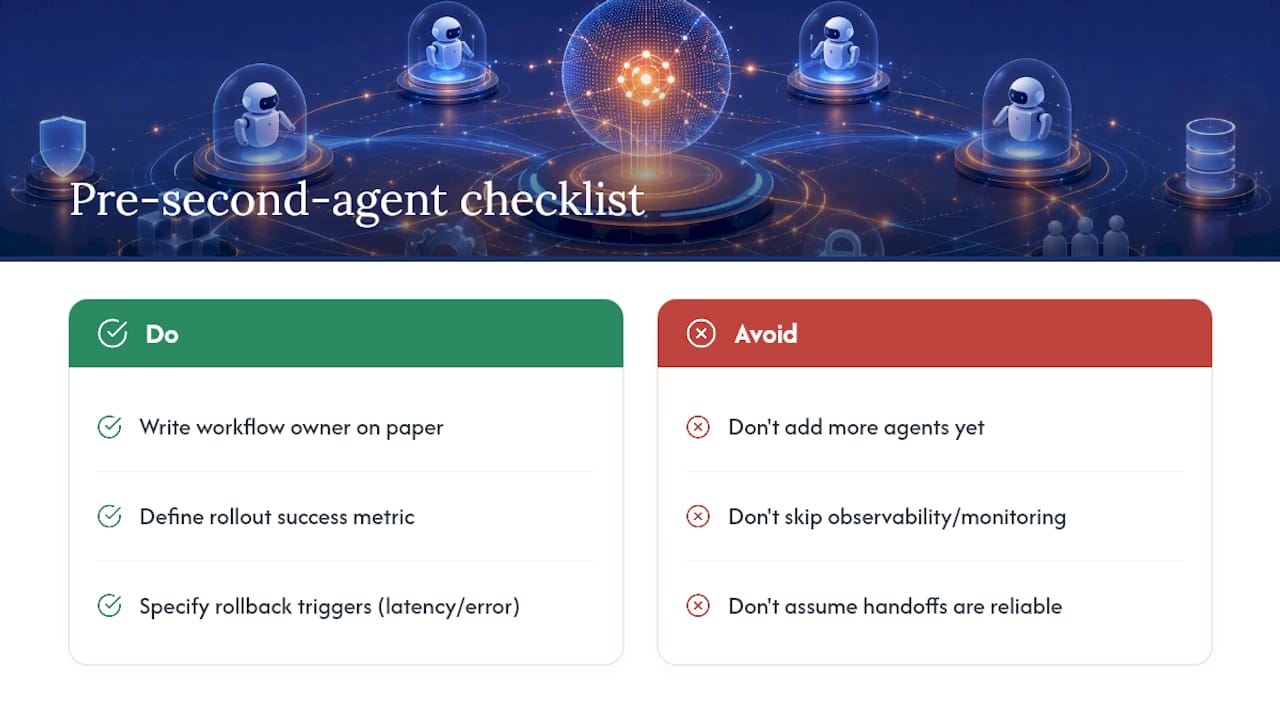
Here’s the one checklist item that prevents most of this: before you build a second agent, write down who owns the workflow, what the rollout success metric is, and what latency or error rate triggers a rollback. If you can’t answer those three questions on paper, you’re not ready to add a second agent, no matter how clean the first one looks.
— Chad
Get Your Multi-Agent Workflow Production Ready
If you’re staring at an agent system that works in staging and falls apart under real traffic, you’re not alone, and you don’t need to rebuild it from scratch to fix it. Bowtie audits existing agent workflows, finds where routing breaks and state gets dropped, and builds the orchestration layer that turns a fragile prototype into something you can actually run in production.

Our AI workflow automation service covers exactly this: mapping your existing processes to the right orchestration pattern, wiring in observability, and handing off a system your team can maintain without calling us every week. If you already have agents running and just aren’t sure they’re safe to scale, start with a professional code audit to find the gaps before your customers do.
Sources
The Azure Architecture Center’s agent design guidance catalogs orchestration patterns with cloud-native tradeoff analysis. Microsoft’s Copilot Studio documentation offers concrete operational rules for multi-agent deployments. The arXiv survey on orchestrated multi-agent systems frames MCP and A2A protocol adoption. Databricks and JetBrains both publish practical architecture breakdowns worth reading before you scope a pilot.
- AI Agent Orchestration: A Guide for Enterprise Systems | Databricks Blog
- AI agent orchestration (JetBrains)
FAQ
What framework is used for AI agent orchestration?
There’s no single standard framework. Enterprises typically build on emerging protocols like MCP for tool access and A2A for peer coordination, layered under a custom or platform-specific orchestration engine.
What is the best AI agent orchestrator?
The best choice depends on your existing stack and the pattern your workflow needs. Rather than chasing a single “best” platform, match your routing logic (rule-based, LLM-driven, or hybrid) to the pattern, sequential, concurrent, handoff, or hierarchical, that fits your actual task.
What are the main types of AI agents in an orchestration system?
Common roles include planner agents, router or supervisor agents, specialist execution agents, reviewer or validator agents, aggregator agents that synthesize parallel outputs, and escalation agents that hand off to humans.
What are the core parts of an AI agent?
Most production agents combine a defined role or scope, access to tools through a protocol like MCP, memory or state tracking, a decision or reasoning process, and logging for auditability.
Does adding orchestration always improve reliability?
No. Orchestration improves reliability when the workflow genuinely needs multiple specialized agents; forcing it onto a task one agent can already handle just adds cost, latency, and complexity for no benefit.






